
GhostMap is an unpatched Android flaw, disclosed by Bitdefender on November 5, 2026, that lets a specially built app trap a phone in an endless crash-and-restart loop the moment it is installed. The app never has to be opened and asks for no permissions. Safe Mode does not help, and in Bitdefender’s tests the only reliable way out was a factory reset, which wipes the phone.
That sounds alarming, and the fix is not here yet. But there is no sign anyone has used GhostMap against real people, and a few simple habits put you well out of reach. Below is what the bug does, who is affected, and the exact steps to protect your data today (as of November 8, 2026).
What is the GhostMap Android flaw?
GhostMap is a bug in the way Android reads app packages (APK files) that can crash core system software over and over. A boot loop is when a phone keeps restarting and never reaches a usable home screen. GhostMap causes exactly that.
Bitdefender Labs found it by accident. On August 12, 2026, a banking-malware dropper the team had collected kept crashing its analysis emulators during installation. Digging into why, researchers found a deeper problem in Android itself and named it GhostMap.
The name refers to the root cause: Android “maps” part of a file into memory at a size larger than the file really is. When the system tries to read the missing part, the process doing the reading crashes.
How GhostMap traps a phone in a boot loop
GhostMap works because two parts of Android disagree about how big a file inside an app is. An attacker can build an app with one deliberately malformed entry. Android’s installer accepts it, but when a core component later reads that entry, it crashes.
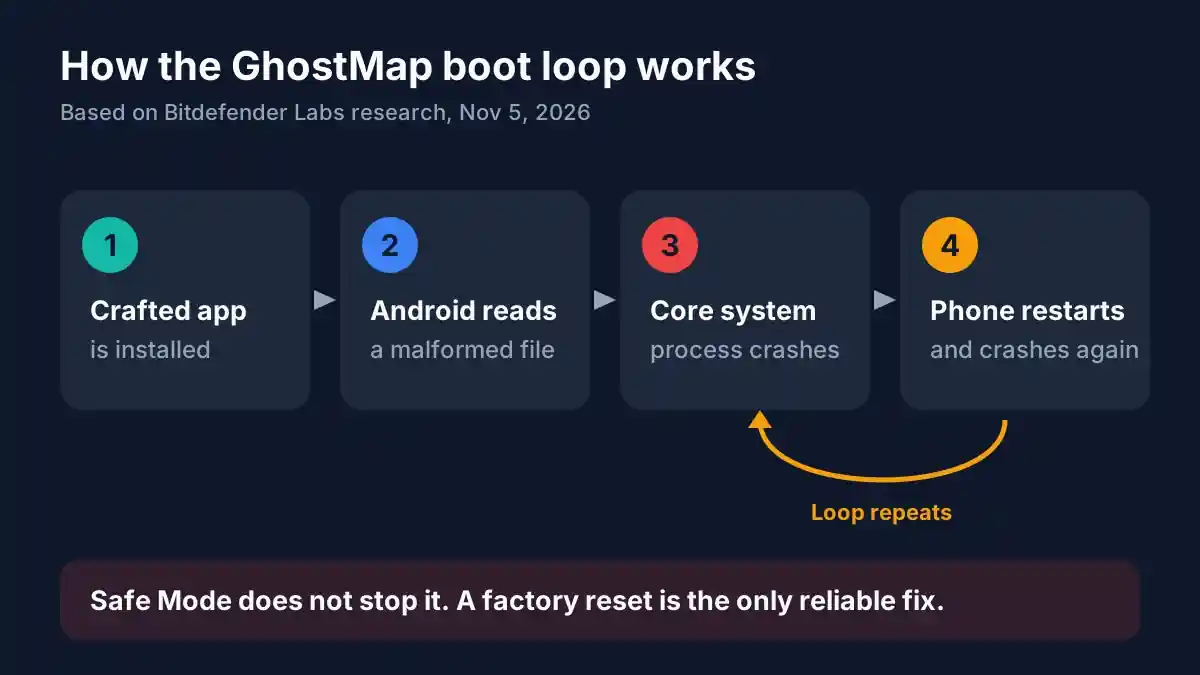
Here is the chain in plain terms:
- A crafted app is installed. It contains no real code and requests no permissions.
- Android reads a malformed file inside it, such as an app resource.
- A core system process (in Bitdefender’s test,
system_server, which runs most of Android’s services) crashes. - The phone restarts, reads the same file again during startup, and crashes again.
In Bitdefender’s test on a Pixel 10, the first crash came about one second after installation. Bitdefender logged 110 crash-and-restart cycles in that normal-boot test.
Why Safe Mode doesn’t help
Safe Mode does not break the GhostMap loop, because the crash happens in Android’s own system code, not in the app’s code. Safe Mode only stops third-party apps from running. GhostMap’s app never runs at all; the system crashes simply by reading its files.
Bitdefender reported the loop continued 72 times in Safe Mode. Removing the app through a computer with ADB (Android Debug Bridge, a developer tool) is possible only if USB debugging was already switched on, and only before the phone’s first full restart, which makes it impractical for most people.
Which Android phones are affected?
According to Bitdefender, every Android version from Android 10 onward is affected. That covers the large majority of Android phones in use today, regardless of brand.
Bitdefender documented its test on a Pixel 10 running Android 17 with the August 5, 2026 security patch. Infosecurity Magazine and Cybernews both repeated the “Android 10 and above” scope. Keep in mind that only Bitdefender has published technical testing so far; no phone maker has confirmed or narrowed the list.
| Question | Answer as of November 8, 2026 |
|---|---|
| Android versions | Android 10 and later (Bitdefender) |
| Must the app be opened? | No, installing it is enough |
| Permissions needed | None |
| Does Safe Mode help? | No |
| Reliable fix | Factory reset (erases the phone) |
| Patch or CVE | None announced |
| Seen in real attacks? | No, per Bitdefender |
Has Google fixed GhostMap?
No. As of November 8, 2026, Google has not released a patch or announced a CVE for GhostMap. A CVE is the public ID number given to a confirmed security vulnerability.
Bitdefender reported the bug to Google’s Android vulnerability reward program on August 20, 2026, and sent an expanded report with a proof of concept on August 25. Per Bitdefender and BleepingComputer, Google first closed the report as “Won’t Fix (Not Reproducible).” After the second report, Google said the issue was outside the scope of a security-update fix and passed it to the relevant team for possible inclusion in a future Android version.
In practice, that means a fix may arrive with a later Android release rather than a monthly security patch. We’ll update this article if Google changes course.
Should you worry? A realistic look at the risk
For most people the real-world risk is low right now, but the damage would be high if it happened. Bitdefender says it has not seen GhostMap used against anyone. The in-the-wild sample it found only crashed the installer, so the malware never landed.
The bigger worry is copycats. Now that the technique is public, scammers could wrap it into fake apps to sabotage phones, or pair it with extortion (“pay us or lose your data”). The most likely delivery route is sideloading, which means installing an APK file from outside Google Play, often via a link in a text, chat or email.
Think of it like a booby-trapped package. You won’t trip it unless you bring it inside. Staying on official app stores and having a fresh backup turns a disaster into an inconvenience.
[ADD PERSONAL EXPERIENCE: If you have ever had an Android phone stuck in a boot loop (from a bad update, ROM or app), describe what it looked like and what you lost or kept. Real detail here builds trust.]
How to protect your Android phone from GhostMap
The best protection against GhostMap is to avoid installing apps from unknown sources and to keep a current backup, so a forced factory reset costs you nothing important. These six steps take about 15 minutes.
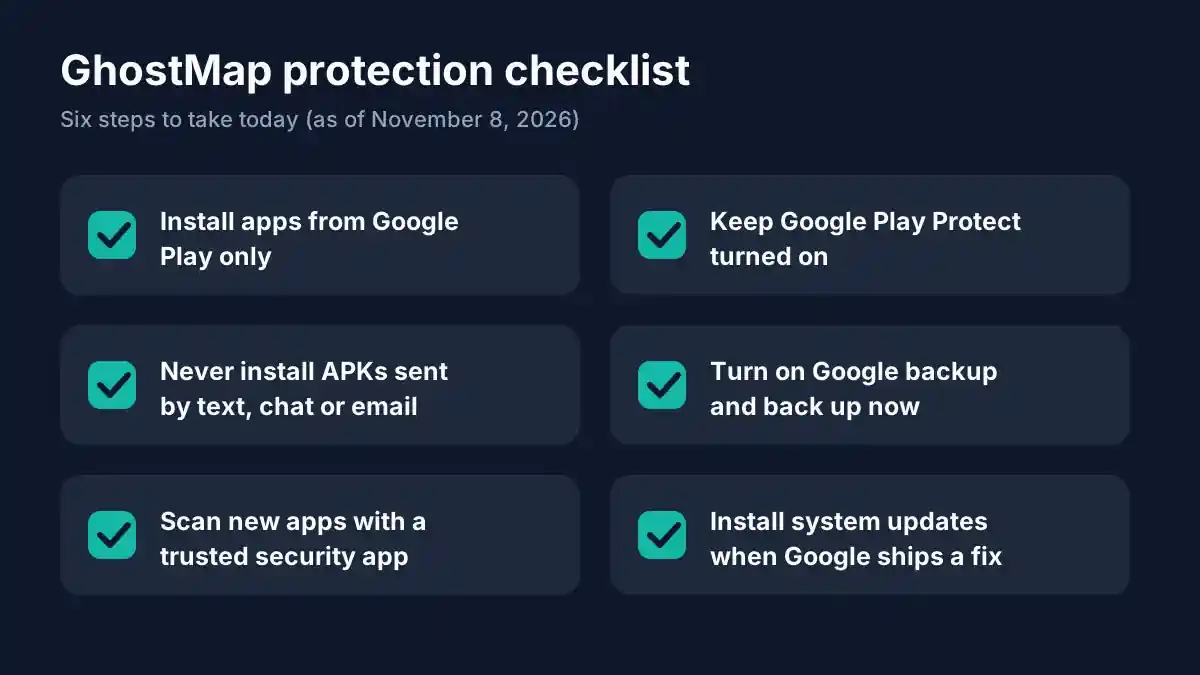
1. Install apps from Google Play (or your phone maker’s store) only
Official stores scan apps before listing them, which adds a layer of review that random download sites lack. It isn’t perfect, but it is far safer than an APK from a link.
2. Keep Google Play Protect turned on
Open the Play Store, tap your profile picture, then Play Protect, and make sure scanning is on. Google has not said whether Play Protect detects GhostMap-style apps, so treat it as one layer, not a guarantee.
3. Never install an APK someone sends you
Delivery drivers, banks and “support” agents do not ask you to install apps from a link. If a message pushes an APK, delete it. Also check Settings > Apps > Special app access > Install unknown apps and turn the permission off for browsers and messaging apps you don’t need it for (labels vary slightly by brand).
4. Back up your phone today
A factory reset only hurts if your data lives on the phone alone. On most phones go to Settings > Google > All services > Backup and tap Back up now. Google backs up apps and app data, call history, contacts, device settings and SMS/MMS messages, and Google Photos can store your pictures separately. Samsung owners can also use Samsung Cloud or Smart Switch.
5. Consider a reputable security app
Bitdefender says its Mobile Security app flags GhostMap-style files as “Android.Riskware.Ghostmap.rA” before installation. Any well-known mobile security app that scans new installs adds another check, especially if you do sideload apps.
6. Install updates when a fix arrives
Watch Settings > System > Software updates (or Settings > Software update on Samsung). When Google ships a fix in a future Android version, install it promptly.
What to do if your phone is already stuck in a boot loop
If your phone restarts endlessly right after you installed an app, a factory reset from recovery mode is the realistic way out. Before you wipe it, try one normal restart and one Safe Mode boot, since many boot loops have other, milder causes.
- Hold the power button for about 30 seconds to force a restart. If the loop stops, uninstall the last app you added straight away.
- Try Safe Mode (method varies by brand; on many phones, press and hold the on-screen power-off option). If the phone stays up in Safe Mode, it’s probably not GhostMap; remove the newest app.
- If the loop continues, enter recovery mode. On most Android phones, power off, then hold Power + Volume Down (Pixel) or Power + Volume Up (many Samsung models) until the recovery screen appears. Check your maker’s support page for the exact combo.
- Choose “Wipe data/factory reset” with the volume keys and confirm with the power button.
- Sign in with the same Google Account after the reset. Factory Reset Protection asks for the account that was on the phone, so have that password ready.
- Restore your backup during setup. Google says a full restore can take up to 24 hours, and you can’t restore a backup from a newer Android version onto an older one.
If the phone is under warranty or carrier protection and you can’t reach recovery mode, contact the manufacturer or your carrier store rather than paying a third-party repair shop.
FAQ
What is GhostMap on Android?
GhostMap is an Android vulnerability disclosed by Bitdefender Labs on November 5, 2026. A specially crafted app can make a core system process crash repeatedly as soon as the app is installed, trapping the phone in a boot loop. The app needs no permissions and never has to be opened. Factory reset is the only reliable fix.
Is my phone affected by GhostMap?
Probably, if it runs Android 10 or later. Bitdefender says all versions from Android 10 onward are affected and tested the bug on a Pixel 10 with Android 17. Being affected doesn’t mean you’re at risk: you would still have to install a malicious app, and no real-world attacks have been seen as of November 8, 2026.
Has Google patched GhostMap?
Not as of November 8, 2026. Google told Bitdefender the issue was outside the scope of a security-update fix and passed it on for possible inclusion in a future Android version. No CVE has been assigned. Keep installing system updates, since a fix may arrive with a later Android release rather than a monthly patch.
Can Safe Mode fix a GhostMap boot loop?
No. Safe Mode blocks third-party apps from running, but GhostMap crashes Android’s own system code just by reading a file inside the app. Bitdefender found the loop continued in Safe Mode. Safe Mode is still worth trying for ordinary boot loops, which often come from a buggy app rather than GhostMap.
Will a factory reset delete everything on my phone?
Yes. A factory reset erases apps, settings, messages and files stored on the phone. Anything already backed up to your Google Account, Google Photos, Samsung Cloud or a computer can be restored afterward. That’s why turning on backup now is the single most useful step against GhostMap and similar problems.
Does Google Play Protect block GhostMap?
Google hasn’t said. None of the published reports confirm whether Play Protect detects GhostMap-style apps, so don’t rely on it alone. Keep Play Protect on, avoid sideloaded APKs, and consider a security app that scans new installs. Bitdefender says its own app detects the technique as Android.Riskware.Ghostmap.rA.
The bottom line
The GhostMap Android flaw is serious because one install can force a factory reset, and Google hasn’t fixed it yet. It is also avoidable: no attacks have been seen, and it needs you to install a booby-trapped app. Stick to official app stores, ignore APK links, and turn on Google backup today so a worst-case reset costs you an afternoon, not your photos and messages.
Information current as of November 8, 2026. We’ll update this page when Google responds or releases a fix.
