
The most common iOS 27.2 problems right now are battery drain and heat in the first days after updating, apps that lose their Wi-Fi or 5G connection, Wi-Fi Calling failures, a slow keyboard in Messages, and a few apps that crash. Most of these have a simple fix you can try in under five minutes, and Apple hasn’t confirmed any widespread bug that should stop you from updating. This guide is current as of November 7, 2026.
Apple released iOS 27.2 on October 26, 2026, and it is the first big update for most iPhones since iOS 27 itself (iOS 27.1 shipped only for iPhone Duo). That makes it a large download with a lot of changes, which is exactly when small glitches show up. Below you’ll find what people are reporting, which issues are confirmed, and what to try first.
What’s in iOS 27.2 (and why it can feel buggy)
iOS 27.2 is Apple’s second point update to iOS 27, with new Siri AI languages, app changes and more than 160 security fixes. Apple’s security notes list fixes across WebKit, the kernel, Bluetooth and other parts of the system, and none of them is marked as actively exploited (Apple). A release-notes analysis counted 162 2026 CVEs plus one older entry (Blake Crosley).
Key facts at a glance:
| Detail | iOS 27.2 |
|---|---|
| Release date | October 26, 2026 |
| Build | 24B119 (iPhone) |
| Supported iPhones | iPhone 11 and later, plus iPhone SE (2nd gen and later) |
| Security fixes | 160+ (none listed as actively exploited) |
| Next update | iOS 27.3 in beta since Nov 3, 2026 (reported); no iOS 27.2.1 as of Nov 7 |
New features include Siri AI in more languages, an “Excluded Apps” control for Siri and Search, returning Messages suggestions, and new FaceTime and Home options (TechNerdiness). Download sizes reported by users range widely, from roughly 13 GB to over 20 GB depending on your model and starting version (Forbes, Chasms).
After a big update, your iPhone re-indexes photos, messages and on-device AI models in the background. That background work is the main reason an iPhone can feel warm, slow or battery-hungry for a few days.
Known iOS 27.2 problems right now
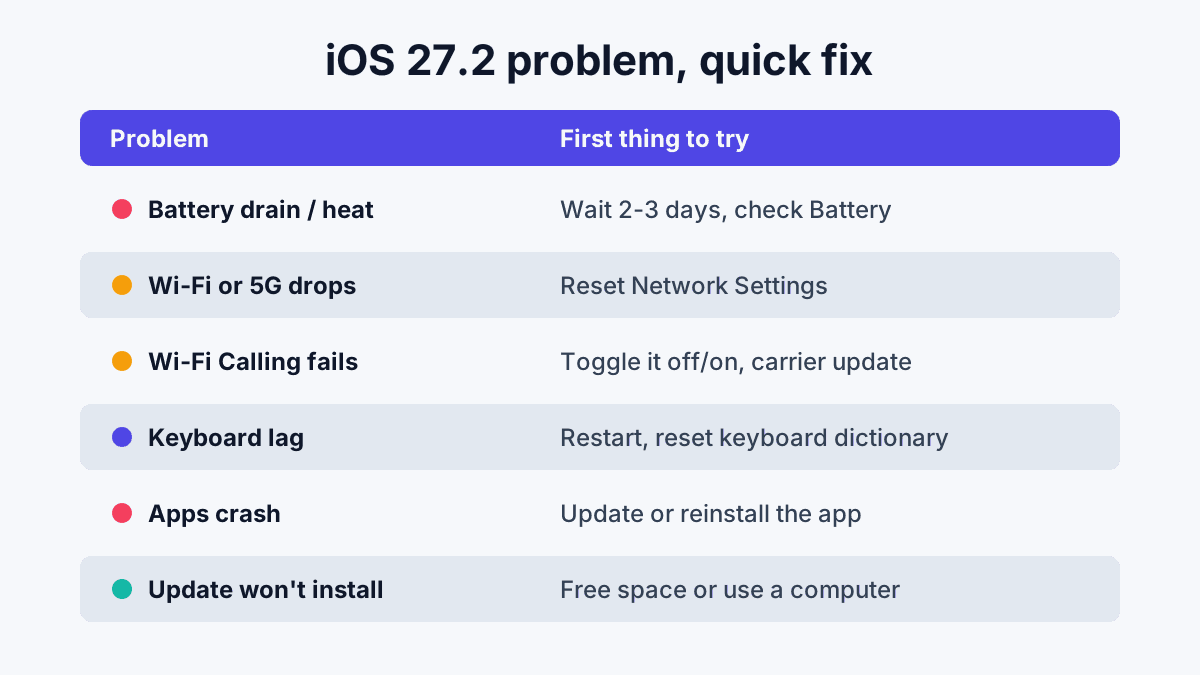
No iOS 27.2 bug has been confirmed by Apple as widespread, but several issues have repeated user reports. We’ve sorted them by how often they come up, based on Apple Support Community threads, Reddit and the TechBetweenTheLines tracker (updated November 5, 2026). Treat “user-reported” as unconfirmed.
Battery drain and heat after updating
Battery drain right after iOS 27.2 is usually temporary. Your iPhone does heavy background setup after any major update, and Apple’s guidance is that this settles down once it finishes (TechBetweenTheLines). One Reddit user quoted by Forbes saw overnight idle drain fall from about 8–10% to 3% after 27.2, so some people actually see better battery life.
What to do:
- Give it 48–72 hours with the phone on Wi-Fi and charging overnight.
- Check Settings > Battery to see which app is using the most power.
- If one app dominates, update it or turn off its Background App Refresh (Settings > General > Background App Refresh).
- Still bad after a week? Check Settings > Battery > Battery Health. An older battery shows the strain of an update more.
[ADD PERSONAL EXPERIENCE: Note your own battery percentage on day 1 vs. day 4 after installing iOS 27.2, and which iPhone model you used.]
Apps can’t connect over Wi-Fi or 5G
Some users report apps that won’t load data even though Wi-Fi or 5G shows as connected. About two dozen reports since late October cover both iOS 27.0.1 and 27.2. This is unconfirmed by Apple.
Before you troubleshoot, know that iOS 27 replaced Wi-Fi Assist with Connectivity Assist, which can switch to cellular when Wi-Fi is weak. That’s a feature, not a bug.
Fixes to try in order: toggle Airplane Mode on and off; forget and rejoin the Wi-Fi network; restart the router; then reset network settings at Settings > General > Transfer or Reset iPhone > Reset > Reset Network Settings. That last step erases saved Wi-Fi passwords, so have them ready.
Wi-Fi Calling stops working
A small number of iPhone 15, 16 and 17 owners say Wi-Fi Calling fails after 27.2 (first reported November 2). Go to Settings > Cellular > Wi-Fi Calling (on some models and carriers it’s under Settings > Phone), turn it off, restart, and turn it back on. Then check Settings > General > About: if a carrier settings update is waiting, a prompt appears within a few seconds. If calls still fail, your carrier can re-provision Wi-Fi Calling on its side.
Keyboard lag in Messages
A slow-to-appear or freezing keyboard has been reported since iOS 27.0 and continues on 27.2. A restart fixes it for many people. If not, try turning off keyboard clicks (Settings > Sounds & Haptics > Keyboard Feedback) and, as a last resort, Reset Keyboard Dictionary in Settings > General > Transfer or Reset iPhone > Reset. That deletes the words your keyboard has learned, so results are mixed and it’s not worth doing first.
Apps crashing or quitting
A handful of apps, including Apple’s Books and Journal, have crash reports since late October. Update all apps from the App Store first, because developers often push fixes within days of a big iOS release. If one app keeps crashing, delete and reinstall it (check that its data is backed up to iCloud first).
Other issues people mention
- Alarms flash but make no sound: an Apple Support Community thread had 121 “me too” replies as of November 5. Check the alarm’s sound isn’t set to “None” and that Attention Aware Features aren’t lowering the volume.
- Siri slow in CarPlay: some drivers say switching from the Siri AI beta back to classic Siri helps.
- Photos won’t send in Messages and no ringtone reports: unconfirmed; a restart and checking Focus modes fix most cases.
- Siri not responding after “thank you” and some videos that won’t play in Photos: anecdotal, mentioned by Forbes readers.
How to fix iOS 27.2 problems, step by step
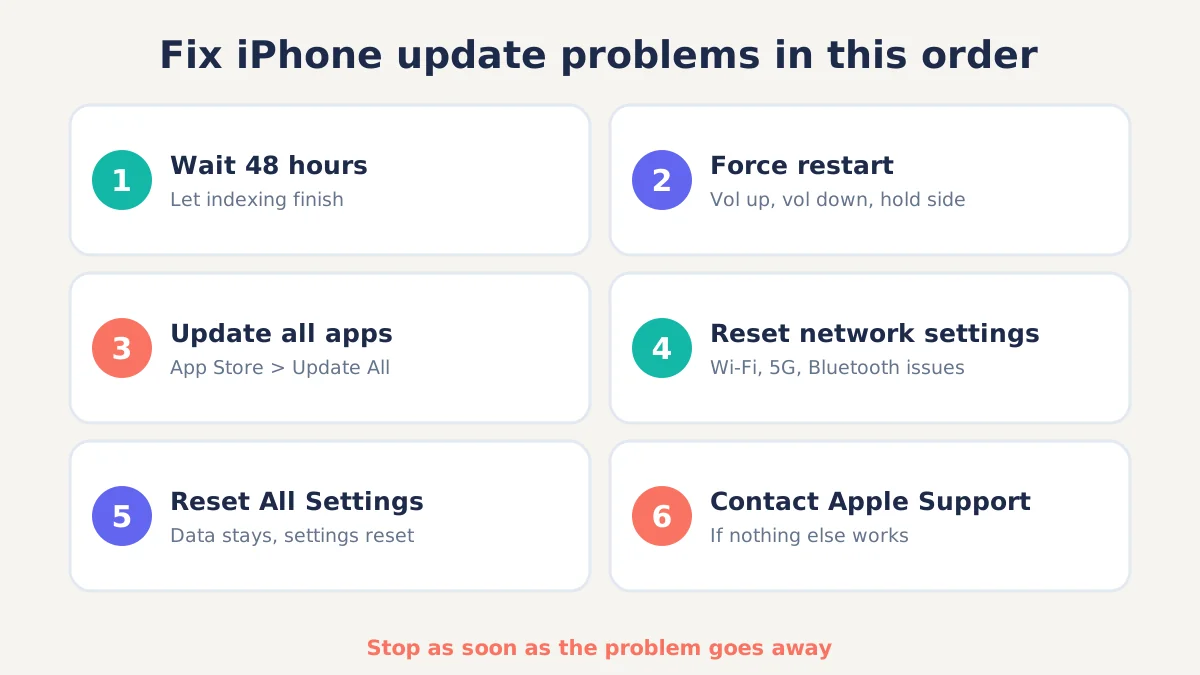
Work through these fixes in order, and stop as soon as the problem goes away. Each step is a bit more disruptive than the last.
- Wait 48 hours. Let background indexing finish, especially for battery and heat complaints.
- Restart your iPhone. Press and quickly release volume up, then volume down, then hold the side button until the Apple logo appears (force restart).
- Update your apps. Open the App Store, tap your profile picture and choose Update All.
- Reset network settings for Wi-Fi, 5G, Bluetooth or Wi-Fi Calling problems.
- Reset All Settings (Settings > General > Transfer or Reset iPhone > Reset > Reset All Settings). Your data stays, but settings return to default.
- Contact Apple Support or book a Genius Bar visit if nothing works, particularly for hardware-like symptoms.
iOS 27.2 won’t install? Try this
If iOS 27.2 won’t download or install, the usual causes are low storage, a weak network or a VPN. Apple notes a VPN or proxy can block update servers. Free space with Settings > General > iPhone Storage > Offload Unused Apps, switch networks, then delete the downloaded update from the same storage list and try again. If it still fails, update with a Mac (Finder) or a Windows PC (Apple Devices app) and choose Update, never Restore, unless you’ve backed up (Chasms).
Should you update to iOS 27.2 or wait?
For most people, installing iOS 27.2 is the right call because of its 160+ security fixes. None of the reported bugs are widespread enough to outweigh those patches, and Forbes’ verdict was to update. If you rely on Wi-Fi Calling at work or home with weak cell coverage, you could wait a few days for iOS 27.2.1 or more reports.
Can you downgrade from iOS 27.2?
Usually not for long. You can only install an older iOS version while Apple is still “signing” it, and Apple normally stops signing older builds within a few weeks of a new release. Downgrading also requires a computer and can erase data if you don’t have a compatible backup. For most problems, the fixes above are faster and safer.
FAQ
Is iOS 27.2 safe to install?
Yes, for most iPhones. iOS 27.2 patches more than 160 security flaws listed on Apple’s security page, and Apple hasn’t confirmed any widespread bug. The reported issues, such as battery drain, Wi-Fi Calling failures and keyboard lag, affect a minority of users and usually have simple fixes. Back up first, as with any update.
Why is my iPhone battery draining after iOS 27.2?
After a big update your iPhone re-indexes photos, messages and on-device AI models in the background, which uses extra power and can make it warm. This normally settles within two to three days. If drain continues after a week, check Settings > Battery for a misbehaving app and look at Battery Health.
How do I fix Wi-Fi problems after iOS 27.2?
Toggle Airplane Mode, forget and rejoin the network, and restart your router. If that fails, go to Settings > General > Transfer or Reset iPhone > Reset > Reset Network Settings. Also remember iOS 27’s Connectivity Assist can switch to cellular on weak Wi-Fi, which can look like a Wi-Fi problem but isn’t.
When is iOS 27.2.1 coming out?
Apple hasn’t announced iOS 27.2.1, and none had shipped as of November 7, 2026. Apple usually releases small bug-fix updates a few weeks after a point release when real problems surface. iOS 27.3 has reportedly been in beta since November 3, so a public 27.3 is likely weeks away.
Can I go back to iOS 27.0 or 27.1?
Only while Apple is still signing the older version, which usually ends a few weeks after a new release. iOS 27.1 only shipped for iPhone Duo, so most iPhones would go back to iOS 27.0.x. Downgrading needs a computer and a compatible backup, so try the standard fixes first.
Bottom line
Most iOS 27.2 problems are short-lived or fixed with a restart, an app update or a network reset. Install the update for its security fixes, give your iPhone a couple of days to settle, and work through the step-by-step fixes above if something still feels off. We’ll update this page when Apple releases iOS 27.2.1 or iOS 27.3.
