
Clicked a phishing link? Don’t panic, and close the page. If you didn’t type anything or download anything, your risk is low. If you entered a password, change it now on the real site and turn on two-factor authentication. If you entered card details, call your bank. If you downloaded a file, disconnect from the internet and run a security scan.
Below are eight easy steps to stay safe after clicking a phishing link, plus how to report it and how to spot the next one.
[ADD PERSONAL EXPERIENCE: one line about a phishing message you or a family member received.]
Table of Contents
What Is a Phishing Link?
A phishing link is a link in an email, text, social media message or ad that leads to a fake website. The fake site looks like your bank, a delivery company, Netflix, Microsoft or another trusted brand. Its goal is to trick you into typing your password, card details or personal information, or into downloading malware.
How Risky Was Your Click?
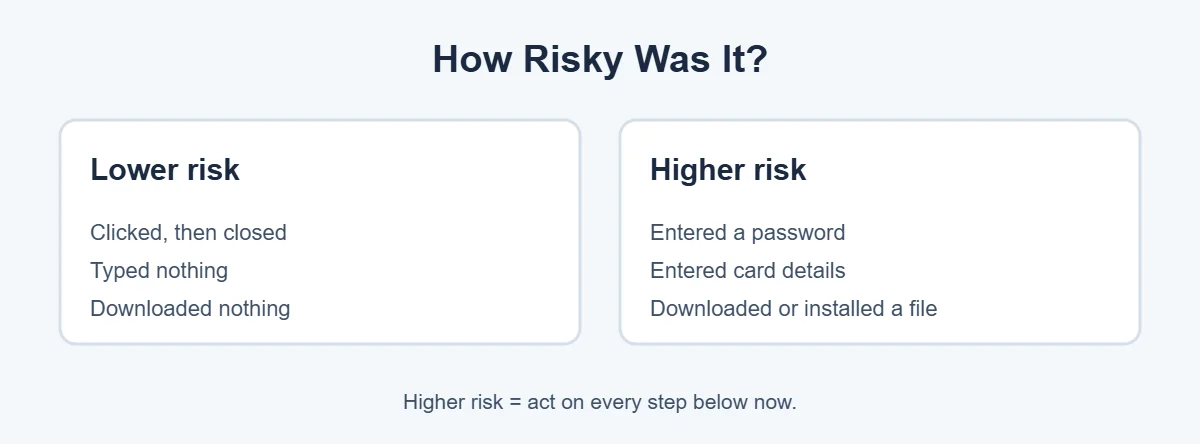
What you did after clicking matters more than the click itself:
- You clicked and closed the page: low risk. Do a quick scan and stay alert.
- You typed a password: high risk to that account and any account using the same password.
- You typed card or bank details: high risk of fraud. Call your bank.
- You downloaded or opened a file: possible malware. Disconnect and scan.
- You gave a code or approved a login: someone may already be in your account. Act now.
8 Easy Steps After Clicking a Phishing Link
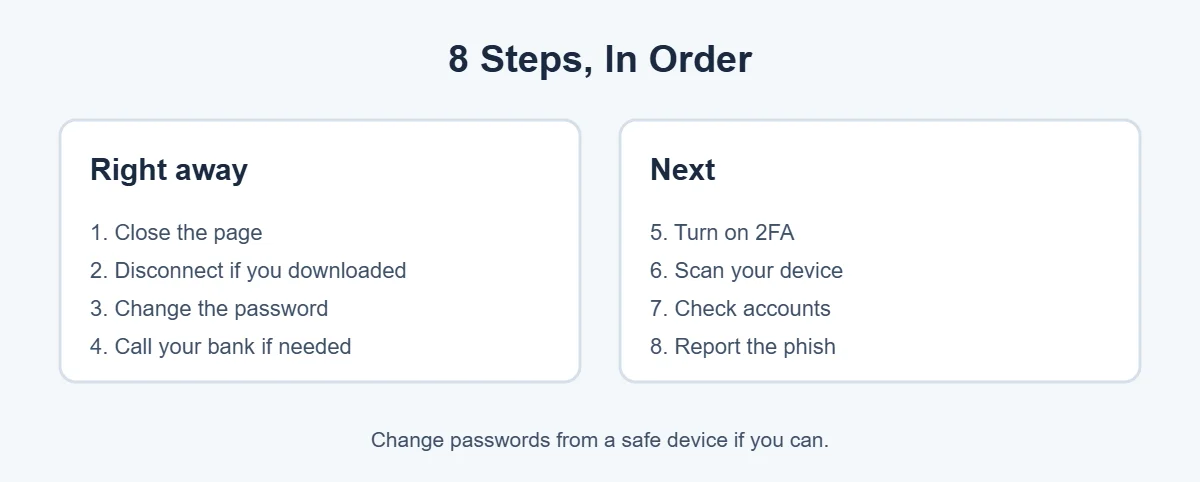
1. Close the page
Close the tab or app. Don’t type anything else, and don’t click any more buttons on the page, even ones that say “cancel.”
2. Disconnect if you downloaded something
If a file downloaded or you installed something, turn off Wi-Fi and mobile data. This can stop malware sending your data or downloading more.
3. Change your password
If you entered a password, go to the real website or app yourself and change it. Change it anywhere else you used the same password too. Use a different, safe device if you can.
4. Call your bank if you entered financial details
Use the number on the back of your card or the bank’s official app. Ask them to block the card, watch for fraud and send a replacement.
5. Turn on two-factor authentication
Add a second step, like an authenticator app or passkey, to your email, bank and social media. This stops criminals even if they have your password.
6. Scan your device
On Windows, open Windows Security and run a full scan. On Android, run Google Play Protect from the Play Store. On iPhone, update iOS and delete any app or profile the page asked you to install (Settings, General, VPN & Device Management).
7. Check your accounts for changes
In the account’s security settings, look for new devices, changed recovery emails or phone numbers, and email forwarding rules you didn’t set. Sign out of all other sessions.
8. Report the phishing
- US: forward emails to reportphishing@apwg.org and report at ReportFraud.ftc.gov.
- UK: forward emails to report@phishing.gov.uk; report fraud to Action Fraud.
- US and UK texts: forward to 7726.
- Canada: report to the Canadian Anti-Fraud Centre.
- Australia: report to Scamwatch or ReportCyber.
Also use the Report phishing or Report junk button in Gmail, Outlook or your messaging app.
How to Spot a Phishing Link Next Time
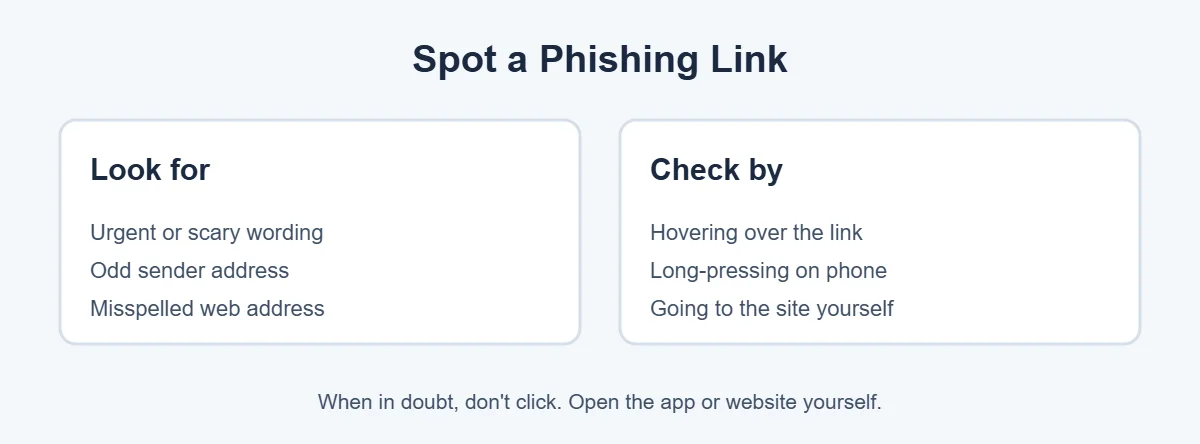
- Urgent or scary wording: “Your account will be closed,” “Payment failed,” “Package on hold.”
- Odd sender: a free email address or random numbers instead of the company’s real domain.
- Misspelled web address: like paypa1.com or amazon-security-check.net.
- Check before you click: hover on a computer, or long-press on a phone, to preview the real address.
- Go direct: open the company’s app or type its website address yourself.
For more simple guides, visit TrickieTech.
Common Types of Phishing Links
Phishing comes in many forms. Knowing the common ones makes a phishing link easier to spot:
| Type | How it arrives | Typical message |
|---|---|---|
| Email phishing | “Your account is locked, sign in to restore it” | |
| Smishing | Text message | “Your package couldn’t be delivered, pay a small fee” |
| Social media phishing | DM or comment | “Is this you in this video?” or fake giveaways |
| QR code phishing | Posters, parking meters, emails | “Scan to pay” or “Scan to verify” |
| Search ad phishing | Fake ads at the top of search results | Looks like your bank or a software download |
| Business email compromise | Work email | “Urgent invoice” or “change of bank details” |
Clicked a Phishing Link on Your Phone?
Phones are where most people click a phishing link, because texts are short and links are hard to check. Here’s what to do on a phone:
- iPhone: close the Safari tab. Go to Settings, Apps, Safari and tap Clear History and Website Data if you want a clean start. Check Settings, General, VPN & Device Management for any profile you didn’t add, and delete it.
- Android: close the browser tab. Check your recent downloads and delete any APK files. Open the Play Store, tap your profile, then Play Protect, and run a scan. Check Settings for “Install unknown apps” and turn it off for your browser.
- Both: don’t reply to the text, block the sender, and forward it to 7726 in the US or UK before deleting it.
Clicked a Phishing Link at Work?
If you clicked a phishing link at work, tell your IT or security team straight away, even if you think nothing happened. Workplaces see phishing every day, and a quick report helps them protect everyone. Don’t try to hide it or fix it alone. Many companies have a “Report phishing” button in Outlook for exactly this reason. If you entered your work password, your IT team may need to reset it and check your account for suspicious activity.
Signs Your Account Was Taken Over
Even if you acted fast after the phishing link, watch for these signs over the next few weeks:
- Password reset emails you didn’t ask for.
- Login alerts from new devices or places.
- Friends receiving strange messages from you.
- Emails missing from your inbox, or new forwarding rules.
- Changed recovery phone number or email.
- Charges or orders you didn’t make.
If you see any of these, use the account’s “hacked account” or “recover account” option on its official website, and change your password again from a safe device.
Real-Life Examples
“A delivery text asked for a $1.99 redelivery fee”
The phishing link led to a fake payment page, and the person entered card details. Calling the bank within an hour meant the card was blocked before any large charges went through.
“A fake Microsoft login page asked for my email password”
They typed the password but then got suspicious. Changing the password and turning on two-factor authentication within minutes kept the account safe.
“I clicked a link but closed it straight away”
The phishing link was closed quickly. Nothing was entered or downloaded. A Windows Security quick scan came back clean, and no further action was needed.
[ADD PERSONAL EXPERIENCE: add a short real example if you have one.]
How to Protect Yourself in the Future
- Use a password manager. It won’t fill your password on a fake site behind a phishing link, which is a helpful warning sign.
- Use passkeys where you can. They can’t be typed into a fake website.
- Turn on two-factor authentication everywhere.
- Keep your browser updated, and leave its safe browsing protection on.
- Be wary of QR codes in public places and emails.
- Slow down. Scammers rely on urgency. Take a minute before you click.
Simple Words You’ll See
- Phishing: fake messages that trick you into giving information.
- Smishing: phishing by text message.
- Malware: harmful software.
- Two-factor authentication: a second step when you sign in.
- Passkey: a password replacement that works with your face, fingerprint or PIN.
Quick Checklist
- Close the page.
- Disconnect if you downloaded something.
- Change any password you entered.
- Call your bank if you entered card details.
- Turn on two-factor authentication.
- Scan your device.
- Check accounts for changes.
- Report the phishing link.
Why Phishing Works on Smart People
Falling for a phishing link isn’t a sign that you’re careless. Modern phishing is designed by professionals, and it works because it uses normal human reactions:
- Urgency: “Act within 24 hours” makes you rush instead of check.
- Fear: “Suspicious login detected” or “Your account will be suspended” makes you want to fix it fast.
- Authority: messages that look like they’re from your bank, the tax office or your boss feel safe to obey.
- Good timing: a fake delivery text arrives when you’re actually waiting for a parcel.
- Perfect copies: fake sites copy real logos, fonts and layouts. AI tools now help scammers write messages without spelling mistakes.
The best defense is a simple habit: when a message asks you to sign in, pay or confirm details, don’t use its link. Open the app or type the website address yourself.
What Criminals Do With Stolen Details
Understanding the goal helps you see why fast action matters. With details stolen through a phishing link, criminals may:
- Log in to your email and reset passwords for your other accounts.
- Use your card for online purchases or sell it on criminal forums.
- Send phishing messages to your contacts from your real account, which people trust more.
- Use your social media to promote crypto scams or fake giveaways.
- Collect personal details to open accounts or apply for credit in your name.
That’s why your email account matters most. Secure it first, and the rest of your accounts are much harder to take over.
If You Lost Money
If money left your account because of a phishing link, report it to your bank immediately and ask whether the payment can be stopped or recalled. Banks in the UK may reimburse victims of authorized push payment scams under rules introduced in 2024, and US card payments have fraud protections when you report quickly. Keep screenshots of the message, the website address and any receipts, and file a report with your country’s fraud reporting service.
Help Family Members Who Clicked
If a parent, child or friend tells you they clicked a phishing link, stay calm and kind. People who feel embarrassed often hide it, which gives criminals more time. Sit with them and go through the steps together: close the page, change the password on the real site, call the bank if needed, and turn on two-factor authentication. Then set up a password manager on their device and show them how to check a link by long-pressing it. A few minutes of help can stop a small mistake from turning into real losses.
Tools That Block Phishing Links
You don’t have to rely only on your eyes. These free tools catch many phishing links before you see them:
- Browser protection: Google Safe Browsing in Chrome and Microsoft Defender SmartScreen in Edge warn you before you open known phishing sites. In Chrome, you can choose Enhanced protection in Settings, Privacy and security, Security.
- Email filters: Gmail and Outlook move most phishing to spam. Reporting messages makes their filters smarter.
- Phone scam filters: iPhone can filter unknown senders in Messages, and Android’s Messages app has spam protection.
- Security apps: some trusted security apps check links in texts and warn about scam sites.
None of these are perfect, so keep the habit of going to websites yourself.
Frequently Asked Questions
What happens if I click a phishing link but don’t enter anything?
In most cases, very little. Simply opening a phishing page on an up-to-date phone or computer rarely infects it. Close the page, don’t download anything, and run a quick security scan to be safe. Then watch your accounts for a few days.
Can clicking a link hack my phone?
It’s rare on an updated phone. The bigger risk is entering your password or card details on a fake page, or installing an app or profile the page asks for. Keep your phone updated, close the page, and remove anything you installed from it.
What should I do if I entered my password on a phishing site?
Change that password immediately on the real website, and anywhere you used the same password. Turn on two-factor authentication. Sign out of other sessions in the account’s security settings, and check for changes like a new recovery email or forwarding rules.
What if I entered my card details?
Call your bank or card company straight away using the number on the back of your card. Ask them to block the card and send a new one. Check recent transactions and report any you don’t recognize. Most banks offer fraud protection if you report quickly.
How do I report a phishing email or text?
In the US, forward phishing emails to reportphishing@apwg.org and report scams at ReportFraud.ftc.gov. In the UK, forward emails to report@phishing.gov.uk. In the US and UK, forward scam texts to 7726. You can also use the Report phishing button in Gmail or Outlook.
How can I tell if a link is a phishing link?
Hover over the link on a computer, or long-press on a phone, to see the real address. Watch for misspellings, extra words, or odd endings in the web address. Be suspicious of urgent messages asking you to log in, pay, or confirm details. When unsure, go to the website yourself.
The Bottom Line
If you clicked a phishing link, close the page and think about what you did next. If you typed nothing and downloaded nothing, a quick scan is usually enough.
If you entered a password, change it and turn on two-factor authentication. If you entered card details, call your bank. Then report the phish so others are protected too.
{“@context”:”https://schema.org”,”@type”:”FAQPage”,”mainEntity”:[{“@type”:”Question”,”name”:”What happens if I click a phishing link but don’t enter anything?”,”acceptedAnswer”:{“@type”:”Answer”,”text”:”In most cases, very little. Simply opening a phishing page on an up-to-date phone or computer rarely infects it. Close the page, don’t download anything, and run a quick security scan to be safe. Then watch your accounts for a few days.”}},{“@type”:”Question”,”name”:”Can clicking a link hack my phone?”,”acceptedAnswer”:{“@type”:”Answer”,”text”:”It’s rare on an updated phone. The bigger risk is entering your password or card details on a fake page, or installing an app or profile the page asks for. Keep your phone updated, close the page, and remove anything you installed from it.”}},{“@type”:”Question”,”name”:”What should I do if I entered my password on a phishing site?”,”acceptedAnswer”:{“@type”:”Answer”,”text”:”Change that password immediately on the real website, and anywhere you used the same password. Turn on two-factor authentication. Sign out of other sessions in the account’s security settings, and check for changes like a new recovery email or forwarding rules.”}},{“@type”:”Question”,”name”:”What if I entered my card details?”,”acceptedAnswer”:{“@type”:”Answer”,”text”:”Call your bank or card company straight away using the number on the back of your card. Ask them to block the card and send a new one. Check recent transactions and report any you don’t recognize. Most banks offer fraud protection if you report quickly.”}},{“@type”:”Question”,”name”:”How do I report a phishing email or text?”,”acceptedAnswer”:{“@type”:”Answer”,”text”:”In the US, forward phishing emails to reportphishing@apwg.org and report scams at ReportFraud.ftc.gov. In the UK, forward emails to report@phishing.gov.uk. In the US and UK, forward scam texts to 7726. You can also use the Report phishing button in Gmail or Outlook.”}},{“@type”:”Question”,”name”:”How can I tell if a link is a phishing link?”,”acceptedAnswer”:{“@type”:”Answer”,”text”:”Hover over the link on a computer, or long-press on a phone, to see the real address. Watch for misspellings, extra words, or odd endings in the web address. Be suspicious of urgent messages asking you to log in, pay, or confirm details. When unsure, go to the website yourself.”}}]}