
To check if your email was in a data breach, go to haveibeenpwned.com and type your email address. It’s free and shows which known breaches included your email and what data leaked. You can also check the password checkup in Google Password Manager, Apple Passwords or Microsoft Edge. If you were in a breach, change the leaked password and turn on two-factor authentication.
Below are five free, easy ways to check, and seven steps to protect yourself afterward.
[ADD PERSONAL EXPERIENCE: one line about the first time you found your email in a data breach.]
Table of Contents
What Is a Data Breach?
A data breach happens when criminals break into a company’s systems and steal customer information. That can include email addresses, passwords, names, phone numbers, addresses, card details or ID numbers.
Breaches are very common. Many people have had their email address leaked in several breaches without knowing it. The important part is what leaked and what you do next.
5 Free Ways to Check If Your Email Was in a Data Breach
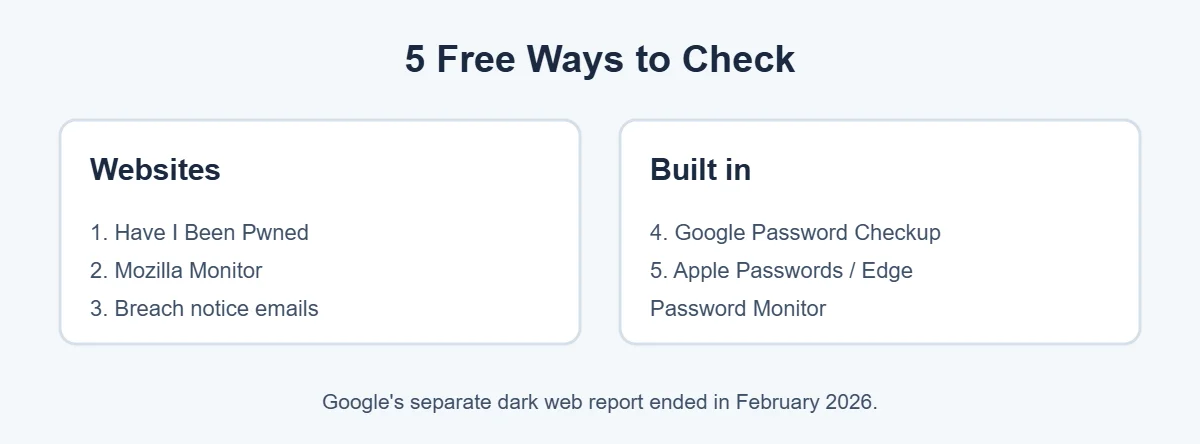
1. Have I Been Pwned
Go to haveibeenpwned.com, type your email address and press Check. You’ll see a list of known breaches that included your email, with the date and the types of data exposed. You only enter your email, never a password. You can also sign up for free alerts about future breaches.
2. Mozilla Monitor
Mozilla, the maker of Firefox, runs Mozilla Monitor (monitor.mozilla.org). It uses breach data to show where your email appeared and can send alerts. It’s free to check.
3. Google Password Checkup
If you save passwords in Chrome or Android, go to passwords.google.com and choose Password Checkup. It tells you which saved passwords were found in breaches, which are reused, and which are weak. Note that Google’s separate “dark web report” feature ended in February 2026, but Password Checkup is still available.
4. Apple Passwords
On iPhone, iPad or Mac, open the Passwords app (iOS 18 and macOS Sequoia or later) and check Security. It flags passwords that appeared in data leaks. On older versions, look in Settings, Passwords, Security Recommendations.
5. Microsoft Edge Password Monitor
In Edge, go to Settings, Passwords and turn on Password Monitor. Edge checks your saved passwords against known leaks and alerts you.
What Leaked Decides What You Do
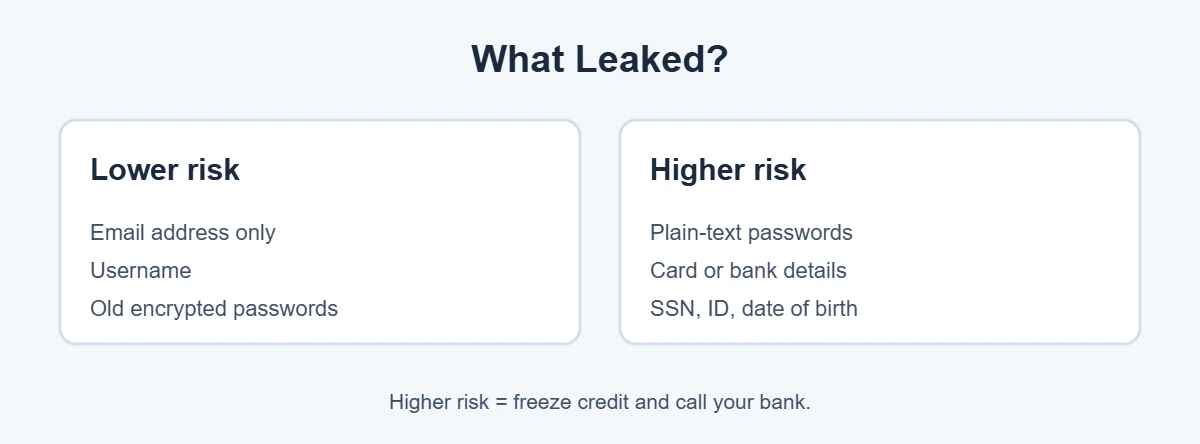
Look at the details of each data breach result. The type of data that leaked tells you how serious it is:
- Email only: expect more spam and phishing. Stay alert.
- Passwords: change that password now, and anywhere you reused it.
- Phone number: expect scam texts and calls; consider a carrier PIN against SIM swaps.
- Card or bank details: call your bank and watch your statements.
- ID numbers or date of birth: consider a credit freeze and identity monitoring.
7 Steps to Take After a Data Breach
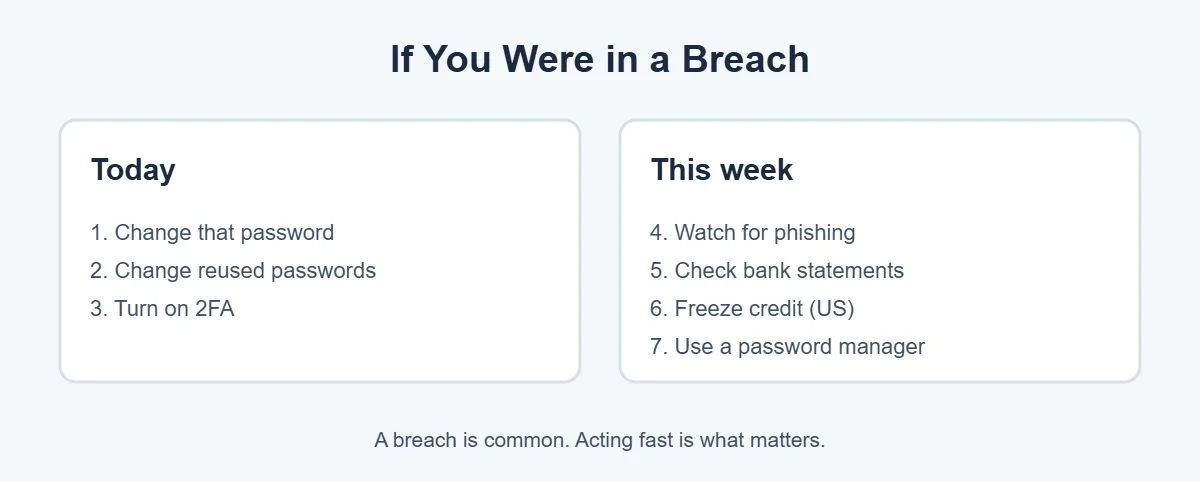
- Change the password for the breached account.
- Change it everywhere you reused it. Criminals try leaked passwords on other sites.
- Turn on two-factor authentication, starting with your email account.
- Watch for phishing. Scammers send fake emails mentioning the breach. Go to the company’s website yourself; don’t click links.
- Check bank and card statements for charges you don’t recognize.
- Freeze your credit if ID or financial data leaked. In the US, it’s free with Equifax, Experian and TransUnion.
- Use a password manager so every account has a different, strong password.
The US Federal Trade Commission has more guidance at IdentityTheft.gov, including steps if your information is misused.
For more simple guides, visit TrickieTech.
How Do Data Breaches Happen?
Knowing how a data breach happens helps you understand why it’s usually not your fault, and why some habits protect you anyway.
- Hacked companies: criminals find a weakness in a company’s website, servers or cloud storage and copy customer records.
- Stolen staff logins: an employee falls for a phishing email, and attackers use their account to get in.
- Misconfigured databases: sometimes data is left online without a password by mistake, and anyone who finds it can download it.
- Third-party suppliers: a company you trust uses a supplier that gets hacked, exposing your data even though the main company wasn’t attacked directly.
- Malware on your own device: “info-stealer” malware can grab saved passwords from your browser. This is the one kind of leak you can directly prevent with antivirus and safe downloads.
Understanding Your Have I Been Pwned Results
When you check your email, you’ll see one of two results:
- “Good news, no pwnage found!” Your email isn’t in the breaches the site knows about. That’s good, but it doesn’t guarantee you were never in a data breach, since not every breach becomes public.
- “Oh no, pwned!” Your email appears in one or more breaches. Scroll down to see each one.
For each breach, look at three things: the company name, the breach date, and the compromised data list. A breach from 2014 with only email addresses is much less urgent than a recent one that includes passwords and phone numbers.
You may also see “paste” results. These are data dumps posted publicly online. Treat them like a breach and change any password that might be included.
Check Your Passwords Without Exposing Them
Have I Been Pwned also has a Pwned Passwords checker. It uses a privacy method so your full password is never sent to the site. Even so, the easiest and safest way for most people is to use the password checkup built into Google Password Manager, Apple Passwords or Edge, because they check all your saved passwords at once.
Never type your password into a random “check your password” website you found through an ad or an email. That’s a common phishing trick.
How to Freeze Your Credit
If your Social Security number, date of birth or financial details leaked in a data breach, a credit freeze is one of the best protections in the US. It stops lenders from opening new accounts in your name.
- Contact each of the three credit bureaus: Equifax, Experian and TransUnion. Each has an online freeze page.
- Create an account with each and request a freeze.
- Save any PIN or login details somewhere safe.
- When you need to apply for credit, temporarily lift the freeze online, then turn it back on.
Freezes are free in the US and don’t affect your credit score. In the UK, you can check your credit report with agencies like Experian, Equifax and TransUnion and consider protective registration with Cifas. In Canada and Australia, contact the credit bureaus for fraud alerts or bans.
Watch Out for Breach Scams
After a big data breach hits the news, scammers send emails and texts pretending to be the company, offering “refunds,” “free protection” or warning that your account will be closed. Signs of a scam:
- Urgent language like “act within 24 hours.”
- A link to “verify your account” or “claim compensation.”
- A sender address that doesn’t match the company’s real website.
- Requests for your password, card number or verification codes.
Real companies will tell you about a breach, but you should always go to their website or app yourself instead of clicking links.
How Often Should You Check?
Instead of checking every week, sign up for free alerts from Have I Been Pwned or Mozilla Monitor, and turn on password leak warnings in your password manager. Then you’ll be told automatically when your email shows up in a new data breach. A quick manual check every few months is plenty on top of that.
Real-Life Examples
“My email showed up in five breaches”
Most were old and only included email addresses. One included a password that had been reused on a shopping site. Changing that password and turning on two-factor authentication closed the gap.
“I got an email saying my account would be closed after a breach”
It was phishing. The real company’s website had a breach notice, but no account was being closed.
[ADD PERSONAL EXPERIENCE: add a short example of what you found when you checked.]
Simple Words You’ll See
- Data breach: when stolen customer data leaks from a company.
- Pwned: internet slang for “owned” or compromised.
- Credential stuffing: criminals trying leaked passwords on many other sites.
- Credit freeze: a lock that stops new credit being opened in your name.
- Two-factor authentication: a second step, like a code or passkey, when you sign in.
Should You Pay for Identity Monitoring?
Many companies sell identity theft protection that watches for your data in breaches and on criminal forums. Some also offer insurance and help restoring your identity. Here’s an honest view:
- Free tools cover the basics. Have I Been Pwned alerts, password manager leak warnings and a credit freeze handle most of what paid services do for email and password leaks.
- Paid services can help if your Social Security number or full identity was exposed, if you want someone to handle paperwork after identity theft, or if you’d like monitoring for the whole family in one place.
- Check what’s included. Look for credit monitoring from all three bureaus, identity restoration help, and clear pricing after the first year.
- You may already have it free. After a big data breach, the company involved often offers free credit monitoring for a year or two. Banks and some insurance policies include it too.
Protect Older Relatives and Kids
Parents and grandparents are frequent targets of scams that follow a data breach, and children’s identities can be misused for years before anyone notices.
- Help older relatives check their email on Have I Been Pwned and set up a password manager.
- Teach them that real companies never ask for passwords or codes by phone or text.
- In the US, you can request a credit freeze for a child under 16 with each credit bureau. It’s free and stops anyone opening accounts in their name.
- Use a separate email address for kids’ games and apps, so a data breach there doesn’t touch important accounts.
Use Email Aliases to Limit Future Breaches
An email alias is a different address that forwards to your real inbox. If a shop or app suffers a data breach, only the alias leaks, and you can turn it off. Options include Hide My Email with iCloud+, aliases in Firefox Relay, and plus addressing in Gmail and Outlook (for example yourname+shop@gmail.com), which helps you spot who leaked or sold your address.
Using aliases for newsletters and online shopping keeps your main email address cleaner and makes phishing easier to spot.
Data Breach Notice Letters: What to Do
Sometimes you’ll get a letter or email from a company saying your information was involved in a data breach. Before you act, make sure it’s real. Look up the company’s official website yourself and check for a breach notice there, or call their customer service number from a statement or the back of your card.
If it’s genuine, the notice usually explains what leaked and may include a code for free credit monitoring. Sign up through the company’s official site only. Keep the letter, because you may need it later if your identity is misused or if there’s a settlement that offers compensation to affected customers.
Quick Checklist
- Check your email at Have I Been Pwned.
- Run your password manager’s checkup.
- Change leaked and reused passwords.
- Turn on two-factor authentication.
- Watch for phishing that mentions the breach.
- Check bank and card statements.
- Freeze your credit if ID or financial data leaked.
- Sign up for free breach alerts.
Frequently Asked Questions
How do I know if my email was in a data breach?
Enter your email address at haveibeenpwned.com, a free and widely trusted service. It lists known breaches that included your email and what data leaked. Your password manager, like Google Password Manager or Apple Passwords, can also warn you about leaked passwords.
Is Have I Been Pwned safe to use?
Yes. Have I Been Pwned was created by security researcher Troy Hunt and is widely used and recommended by security experts and organizations. You only enter your email address, never your password. You can also sign up to get an email if your address appears in a future breach.
What should I do if my email was in a data breach?
Change the password for the breached site, and anywhere you reused it. Turn on two-factor authentication, especially for your email. Watch for phishing emails that mention the breach, and check bank statements. If financial or ID data leaked, consider a credit freeze.
Does a data breach mean my email is hacked?
Not necessarily. A breach means a company that had your data was attacked, and your details may have leaked. Your email account is only at risk if your email password leaked or you reused that password. Change it and turn on two-factor authentication to be safe.
Can I remove my email from the dark web?
No. Once data has leaked, it can’t be pulled back from criminal forums. What you can do is make it useless: change leaked passwords, use unique passwords for every site, turn on two-factor authentication, and freeze your credit if sensitive data was exposed.
Is a credit freeze free?
In the US, yes. By law, freezing and unfreezing your credit with Equifax, Experian and TransUnion is free. You need to contact each bureau. A freeze stops new credit being opened in your name and doesn’t affect your credit score. Other countries have different options.
The Bottom Line
Checking if your email was in a data breach takes two minutes with Have I Been Pwned or your password manager’s checkup. Being in a breach is common and not your fault.
What matters is acting fast: change leaked and reused passwords, turn on two-factor authentication, watch for phishing, and freeze your credit if sensitive data was exposed.
{“@context”:”https://schema.org”,”@type”:”FAQPage”,”mainEntity”:[{“@type”:”Question”,”name”:”How do I know if my email was in a data breach?”,”acceptedAnswer”:{“@type”:”Answer”,”text”:”Enter your email address at haveibeenpwned.com, a free and widely trusted service. It lists known breaches that included your email and what data leaked. Your password manager, like Google Password Manager or Apple Passwords, can also warn you about leaked passwords.”}},{“@type”:”Question”,”name”:”Is Have I Been Pwned safe to use?”,”acceptedAnswer”:{“@type”:”Answer”,”text”:”Yes. Have I Been Pwned was created by security researcher Troy Hunt and is widely used and recommended by security experts and organizations. You only enter your email address, never your password. You can also sign up to get an email if your address appears in a future breach.”}},{“@type”:”Question”,”name”:”What should I do if my email was in a data breach?”,”acceptedAnswer”:{“@type”:”Answer”,”text”:”Change the password for the breached site, and anywhere you reused it. Turn on two-factor authentication, especially for your email. Watch for phishing emails that mention the breach, and check bank statements. If financial or ID data leaked, consider a credit freeze.”}},{“@type”:”Question”,”name”:”Does a data breach mean my email is hacked?”,”acceptedAnswer”:{“@type”:”Answer”,”text”:”Not necessarily. A breach means a company that had your data was attacked, and your details may have leaked. Your email account is only at risk if your email password leaked or you reused that password. Change it and turn on two-factor authentication to be safe.”}},{“@type”:”Question”,”name”:”Can I remove my email from the dark web?”,”acceptedAnswer”:{“@type”:”Answer”,”text”:”No. Once data has leaked, it can’t be pulled back from criminal forums. What you can do is make it useless: change leaked passwords, use unique passwords for every site, turn on two-factor authentication, and freeze your credit if sensitive data was exposed.”}},{“@type”:”Question”,”name”:”Is a credit freeze free?”,”acceptedAnswer”:{“@type”:”Answer”,”text”:”In the US, yes. By law, freezing and unfreezing your credit with Equifax, Experian and TransUnion is free. You need to contact each bureau. A freeze stops new credit being opened in your name and doesn’t affect your credit score. Other countries have different options.”}}]}