
SIM swap protection means locking your mobile account so nobody, including a scammer pretending to be you, can move your phone number to a new SIM card or another carrier without your approval. In the US, T-Mobile, Verizon and AT\&T all offer a free or built-in lock you can turn on in their apps in about two minutes. Pair it with an account PIN and app-based two-factor codes, and a SIM swap scam becomes very hard to pull off.
Why bother? Your phone number is the master key to your bank, email and social accounts. If someone takes it over, every “we texted you a code” message goes to them instead of you. This guide shows exactly how SIM swaps work, how to lock your number at each major carrier, the warning signs to watch for, and what to do in the first hour if it happens to you.
What is a SIM swap scam?
A SIM swap scam is a type of account takeover in which a criminal convinces your carrier to move your phone number onto a SIM card or eSIM they control. Once the number is theirs, they receive your calls and texts, including one-time login codes.
There are two closely related versions:
- SIM swap (SIM change): The scammer gets your number activated on a new SIM or eSIM with your current carrier.
- Port-out fraud: The scammer transfers your number to a different carrier entirely.
The FCC describes both as ways to hijack a number so the criminal can reset passwords on financial and social media accounts. The end goal is almost always money: draining bank or crypto accounts, or taking over email to reach everything else.
How SIM swap attacks work, step by step
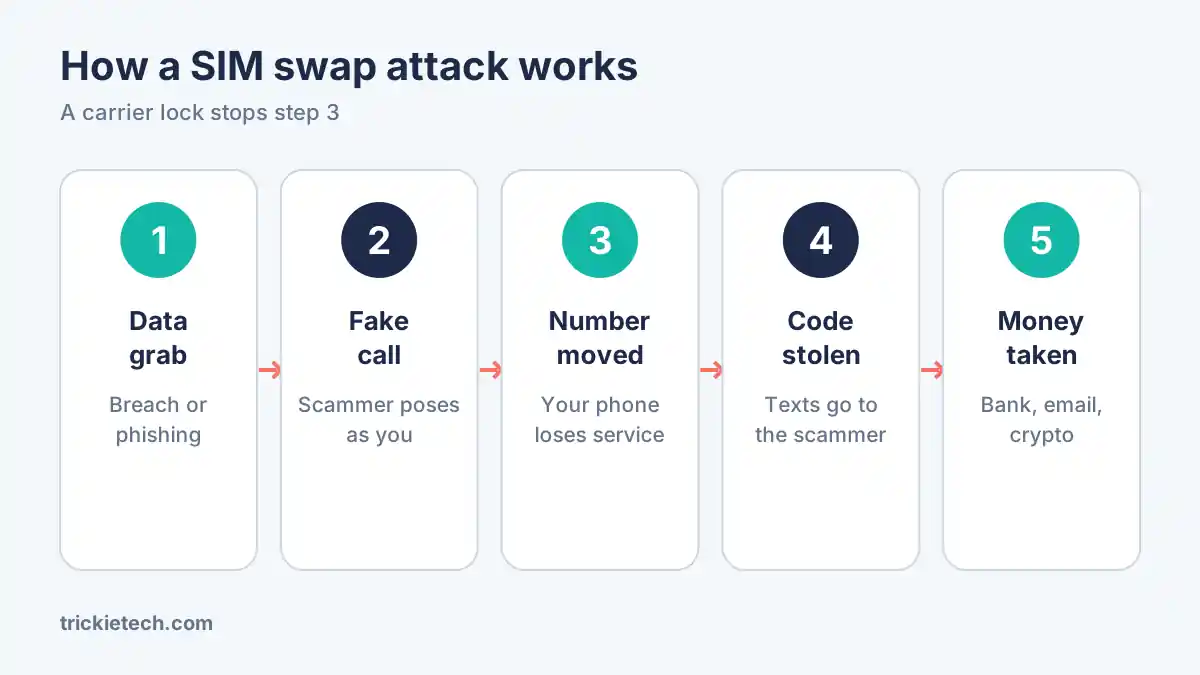
A SIM swap attack usually starts with your personal data, not your phone. Scammers gather your name, address, date of birth and sometimes your account PIN from data breaches, phishing or social media. Then they call or visit your carrier pretending to be you, or bribe or trick an employee.
A typical attack looks like this:
- Research: The scammer collects your details from breached data or a phishing text.
- Impersonation: They contact your carrier, claim your phone was lost and ask for a new SIM or eSIM.
- Activation: The carrier moves your number. Your phone suddenly loses service.
- Takeover: They request password resets for your email, bank and crypto apps. The text codes go to their device.
- Cash-out: They move money, sell your accounts or lock you out before you notice.
The whole process can take less than an hour. That’s why prevention matters far more than cleanup.
How common are SIM swap scams in 2026?
SIM swap scams are less common than phishing, but each case tends to be expensive. According to the FBI’s Internet Crime Complaint Center (IC3) 2025 annual report, Americans reported:
| Year | SIM swap complaints to the FBI | Reported losses |
|---|---|---|
| 2023 | 1,075 | \$48.8 million |
| 2024 | 982 | \$26.0 million |
| 2025 | 971 | \$17.4 million |
Those numbers only count people who filed a report, so the real total is higher. For context, the FBI’s 2022 SIM swapping alert counted 1,611 complaints and more than \$68 million in losses in 2021 alone, up from about \$12 million across 2018 to 2020.
Losses have dropped since then, partly because carriers added locks and stricter identity checks. But the average loss per reported case in 2025 was still close to \$18,000.
Why SIM swap protection matters more than ever
SIM swap protection matters because so many accounts still use your phone number as the backup login method. If your bank, email or crypto wallet sends a text code to reset a password, your phone number is effectively your password.
It also matters because personal data is easy to buy. Large breaches have exposed names, addresses, birth dates and phone numbers for millions of Americans. A scammer doesn’t need to hack your phone. They only need enough details to sound like you on a customer service call.
[ADD PERSONAL EXPERIENCE: Describe a time you or someone you know got a suspicious "your SIM was changed" text, a carrier verification call, or lost service unexpectedly, and what you did about it.]
The FCC’s SIM swap rules: what carriers must do
The FCC adopted rules against SIM swap and port-out fraud on November 15, 2023, and published them in the Federal Register on December 8, 2023. They apply to all US wireless carriers.
Under the rules, carriers must:
- Use secure methods to confirm your identity before a SIM change or number port.
- Notify you immediately when someone requests a SIM change or port-out on your account.
- Offer you the option to lock your account so SIM changes and ports are blocked.
- Train staff to spot fraud and respond reasonably to failed identity checks.
The rules set a baseline, but they don’t turn locks on for you. Most protections are opt-in, so you still need to switch them on yourself.
How to turn on SIM swap protection at each major carrier
Every major US carrier now offers SIM swap protection in the form of a lock that blocks SIM changes. The steps below were checked against each carrier’s own pages on November 8, 2026. Menus change often, so if a step looks different, search the carrier’s app for “SIM protection” or “account lock.”
| Carrier | Feature name | What it blocks | Cost |
|---|---|---|---|
| T-Mobile | SIM Protection + Port Out Protection | SIM/eSIM changes; number transfers | Free for postpaid |
| Verizon | SIM Protection (plus Number Lock) | SIM swaps, upgrades, BYOD changes | No cost |
| AT\&T | Wireless Account Lock | SIM/eSIM changes, number transfers, upgrades, new lines, billing and user changes | Built into myAT\&T |
T-Mobile: SIM Protection and Port Out Protection
T-Mobile’s account fraud help page says SIM Protection is free for all postpaid customers. It stops anyone from moving your number to another device. Port Out Protection is a separate free add-on that blocks transfers to other carriers.
To turn on SIM Protection in the T-Life app (postpaid):
- Open T-Life and tap the Manage tab.
- Tap the gear icon, then Security, then SIM Protection.
- Toggle it on for the whole account or for individual lines.
- Tap Save Changes, then Continue.
On the web, go to your profile menu > Profile > Security > SIM Protection. Prepaid customers log in at T-Mobile.com and choose My T-Mobile > My Profile > SIM Protection.
For Port Out Protection, go to T-Life > Manage > See Plans > Manage add-ons and check Port Out Protection for each line. Only the Primary Account Holder can remove it later.
Verizon: SIM Protection
Verizon’s SIM swapping page says SIM Protection is available at no cost. It blocks SIM swaps, device upgrades and bring-your-own-device changes on a locked line.
To turn it on in the My Verizon app:
- Tap the Account tab.
- Tap Edit Profile and Settings under your name.
- Open the Security menu and choose SIM Protection.
- Toggle it on for each number you want to protect.
Two details make it strong. Only the Account Owner or an Account Manager can change it, and store and customer service reps can’t turn it off for you. When you turn it off yourself, Verizon adds a 15-minute delay before any SIM change can go through.
Verizon also offers a separate Number Lock feature aimed at port-outs. Look for it in the same Security area of My Verizon, or ask Verizon support to confirm it’s on.
AT\&T: Wireless Account Lock
AT\&T launched Wireless Account Lock on July 1, 2025, as reported by MacRumors. It’s the broadest lock of the big three. It blocks SIM and eSIM changes, number transfers, device upgrades, new lines, billing changes, authorized user changes and phone number changes.
To turn it on in the myAT\&T app (postpaid):
- Tap the Services tab at the bottom.
- Choose Mobile Security, then Wireless Account Lock.
- Tap Continue and pick the account.
- Swipe to lock.
AT\&T emails the primary account holder and texts every active number whenever the lock changes, so a scammer can’t quietly flip it off. Prepaid and business accounts have separate lock options.
Smaller carriers and prepaid brands
SIM swap protection isn’t limited to the big three. Most smaller carriers and prepaid brands (including those that run on the big three networks) offer at least a port-out PIN. Log in to your account and search for “number lock,” “port-out PIN,” “transfer PIN” or “account PIN.” If you can’t find one, call support and ask what they offer under the FCC’s SIM swap rules.
Other ways to protect your phone number
A carrier lock is the most important part of SIM swap protection, but it works best as one layer of several.
Set a strong account PIN or passcode
An account PIN is a number your carrier asks for before making changes. Pick one that isn’t your birthday, address or the last digits of your SSN or phone number. Never share it with anyone who calls you, even if they claim to be from your carrier.
T-Mobile notes that PIN changes must be made from your own line on its network with Wi-Fi turned off, which helps block remote changes.
Move logins off text-message codes
Text-message (SMS) codes are the weak point a SIM swap exploits. Switch your most important accounts to stronger options:
- Passkeys: A passkey lets you sign in with your phone’s fingerprint, face or screen lock instead of a password and code. Google, Apple, Microsoft, Amazon and many banks support them.
- Authenticator apps: Apps such as Google Authenticator or Microsoft Authenticator generate codes on your device, not over your phone number.
- Security keys: A physical USB or NFC key is the strongest option for email and crypto accounts.
Start with your email account. Whoever controls your email can reset almost everything else. Then do your bank, crypto exchange, password manager and main social accounts. Remove your phone number as a recovery option where you have a safer backup.
Limit what scammers can learn about you
The less data a scammer has, the harder it is to impersonate you. Keep your birth date, address and phone number off public social profiles. Be wary of quizzes and “security question” style posts. Use a unique email for financial accounts if you can.
Freeze your credit
A credit freeze stops anyone from opening new credit in your name, which limits what a scammer can do even if they get in. It’s free at Equifax, Experian and TransUnion, and you can lift it temporarily when you need to apply for credit.
Consider eSIM, but don’t rely on it
An eSIM is a digital SIM built into your phone instead of a removable card. The FCC says eSIM “may decrease SIM swap risk” because there’s no card to steal. But port-out fraud and carrier impersonation still work against eSIM lines, so you still need the lock and PIN.
Warning signs of a SIM swap
The clearest sign of a SIM swap is your phone suddenly losing cell service for no reason while people around you still have signal. Your phone may show “No Service” or “SOS only,” and calls and texts stop working on cellular, even though Wi-Fi still works.
Watch for these other red flags:
- A text or email from your carrier about a SIM change, eSIM activation or port request you didn’t make
- Password reset emails or login alerts you didn’t trigger
- Being suddenly logged out of email, banking or social apps
- Friends saying they got strange messages “from you”
- Calls from someone claiming to be your carrier who asks for your PIN or a code you just received
Real carrier staff won’t ask you to read back a one-time code. If someone does, hang up and call the number on your bill or in the carrier’s app.
What to do if you’ve been SIM swapped
If you think your number was hijacked, act within minutes. The goal is to get your number back and lock your email and money before the scammer can use them.
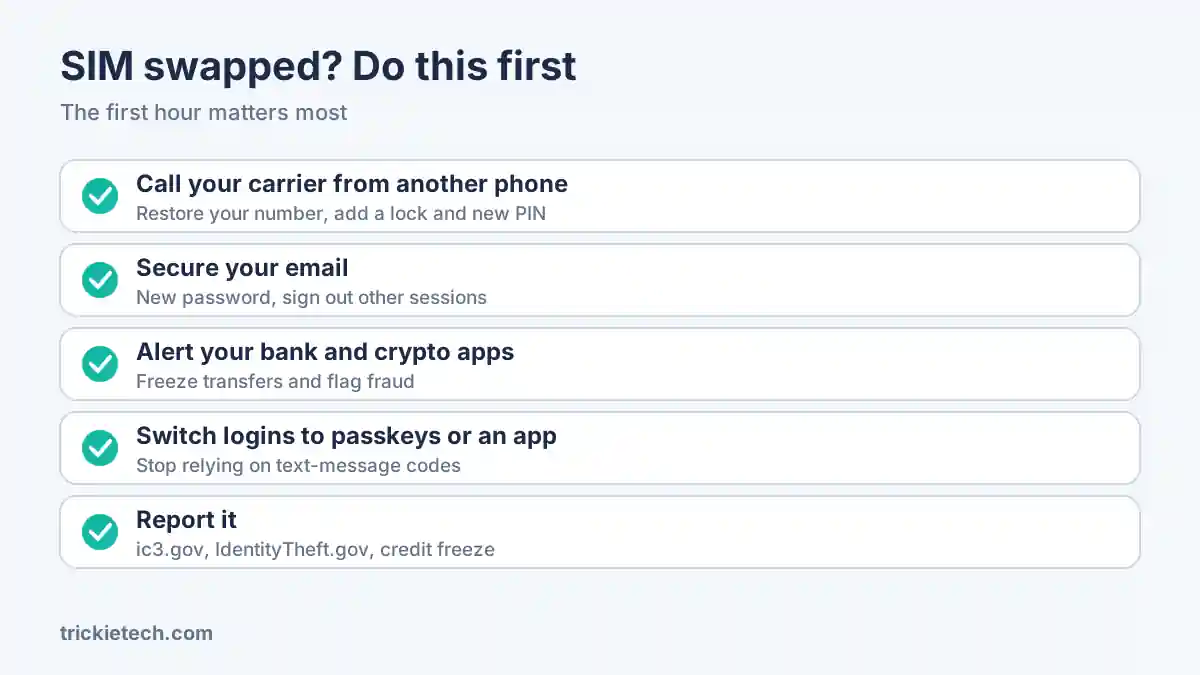
- Call your carrier from another phone or Wi-Fi calling. Say your number was taken over without permission. Ask them to restore it to your SIM and add a lock and new PIN.
- Secure your email first. Change the password and sign out all other sessions. Check that the recovery email and phone haven’t been changed.
- Contact your bank and any crypto exchange. Ask them to freeze transfers and flag the account for fraud.
- Change passwords for financial and social accounts. Turn on passkeys or authenticator apps as you go.
- Report it. File a report with the FBI at ic3.gov and an identity theft report with the FTC at IdentityTheft.gov. The FCC also suggests a police report.
- Place a fraud alert or credit freeze with Equifax, Experian and TransUnion.
- Keep records. Save texts, emails, call times and reference numbers. Banks and carriers may ask for them.
You can check your credit reports for free at AnnualCreditReport.com to spot accounts you didn’t open.
Frequently asked questions
Can someone SIM swap you with just your phone number?
Usually not with the number alone. Scammers typically also need your name, address, birth date or account PIN, which they get from breaches or phishing. That’s why a carrier lock matters: even with your details, they can’t move a locked number without changing the lock, and only the account owner can do that.
Is SIM swap protection free?
Yes, at the major US carriers. T-Mobile’s SIM Protection and Port Out Protection are free for postpaid customers, and Verizon offers SIM Protection at no cost. AT\&T’s Wireless Account Lock is built into the myAT\&T app. FCC rules adopted in 2023 require carriers to offer customers a way to lock their accounts.
Does eSIM prevent SIM swapping?
Not completely. An eSIM can’t be physically stolen, and the FCC says it may lower SIM swap risk. But a scammer can still convince your carrier to move your number to their eSIM or port it to another carrier. You still need an account lock, a strong PIN and app-based login codes.
How do I know if my SIM was swapped?
The biggest sign is losing cell service suddenly while others nearby still have signal. Other clues include alerts about a SIM change you didn’t make, unexpected password reset emails and being logged out of accounts. If you notice these, call your carrier from another phone right away.
Will a carrier lock stop me from upgrading my own phone?
Yes, temporarily. A lock blocks SIM changes and upgrades for everyone, including you. When you get a new phone, turn the lock off in your carrier’s app first, finish the switch, then turn it back on. Verizon adds a 15-minute delay after you turn it off, so plan a few extra minutes.
Should I remove my phone number from my accounts?
For your most important accounts, yes, where you have a safer backup. Replace SMS codes with passkeys, an authenticator app or a security key, and set a backup email. Keep a number on accounts only when the service offers no alternative, and protect that number with a carrier lock.
Conclusion: turn on SIM swap protection today
SIM swap protection takes about five minutes and closes one of the easiest paths into your bank and email. Turn on your carrier’s lock (SIM Protection at T-Mobile and Verizon, Wireless Account Lock at AT\&T), set a strong account PIN, and move your key accounts from text codes to passkeys or an authenticator app. If your phone ever loses service for no reason, treat it as an emergency and call your carrier from another device.
Last updated: November 8, 2026. Carrier menus and features change; check your carrier’s app or support page for the latest steps.
