
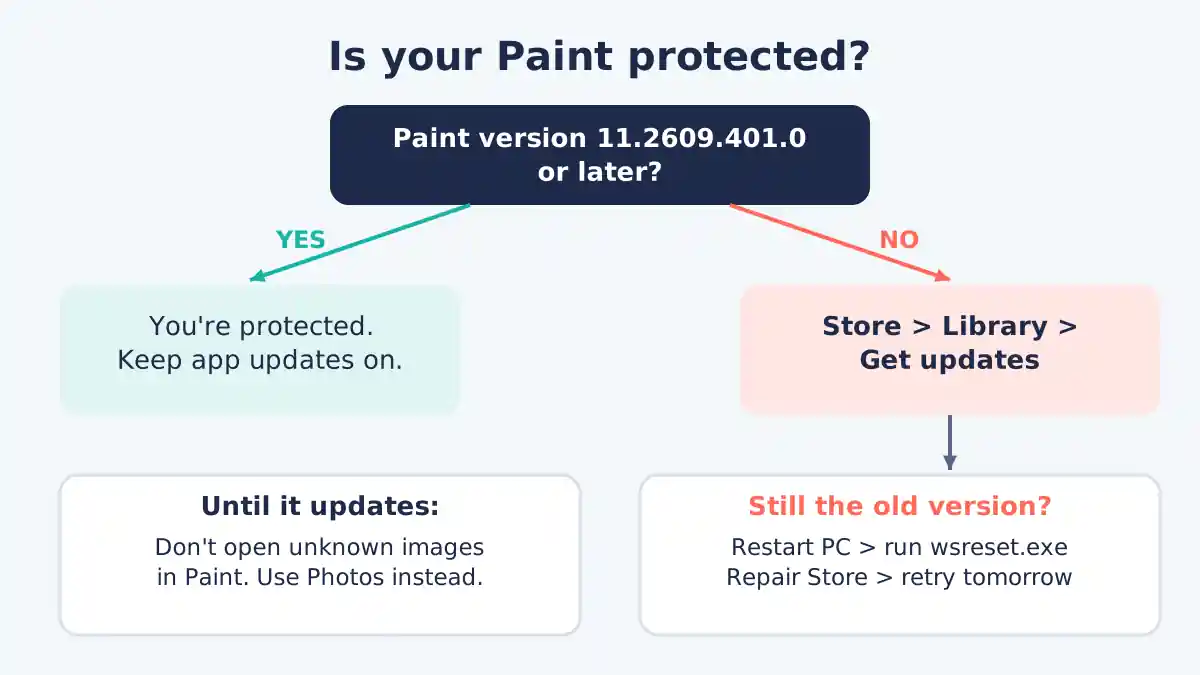
Short answer: Microsoft has fixed a remote code execution flaw in Paint (CVE-2026-83844), but the fix arrives as a Microsoft Paint update from the Microsoft Store, not through Windows Update. Open Paint, check the version under Settings, and if it’s lower than 11.2609.401.0, go to Microsoft Store > Library > Get updates.
That detail caught many people out. Plenty of Windows 11 PCs that are “fully up to date” in Windows Update are still running an unpatched copy of Paint, according to reports from Windows Latest and The Hacker News this week. The good news: checking takes about 30 seconds, and there is no sign anyone is attacking the flaw yet.
Information as of November 8, 2026. Microsoft has revised its advisory more than once, so details may change.
What is the Microsoft Paint vulnerability (CVE-2026-83844)?
CVE-2026-83844 is a remote code execution (RCE) vulnerability in Microsoft Paint, the drawing app built into Windows 11. Microsoft published it on October 13, 2026, rated it “Important”, and gave it a CVSS 3.1 score of 8.1 out of 10, according to The Hacker News and Brandefense.
A remote code execution flaw is a bug that could let an attacker run their own code on your PC. In this case the root cause is an out-of-bounds read (CWE-125), which means Paint can be tricked into reading memory it shouldn’t.
Key facts, as reported by several security outlets:
| Detail | What’s known (Nov 8, 2026) |
|---|---|
| CVE | CVE-2026-83844 |
| Published | October 13, 2026 |
| Severity | Important, CVSS 8.1 |
| Bug type | Out-of-bounds read leading to code execution |
| Exploited in the wild? | No reports; Microsoft lists “Exploitation Less Likely” |
| In CISA’s exploited-bugs list? | No, as of Nov 6 |
| Safe Paint version | 11.2609.401.0 or later |
| How it’s delivered | Microsoft Store app update |
Attack complexity is rated high, so this isn’t a bug a casual scammer can use easily. Still, the score is high enough that you should update rather than wait.
Why didn’t Windows Update fix Paint?
Windows Update didn’t fix Paint because Paint is now a Microsoft Store app. Store apps get their updates from the Store, on their own schedule, separately from the monthly Windows patches.
So a PC that installed every October and November Windows update can still have a vulnerable Paint. SOCRadar puts it plainly: a fully patched operating system does not prove the Paint package is patched.
There was a second problem. Testers told The Hacker News and TokenPost that the Store kept offering an older build (11.2605.81.0) in some countries for several days. By November 6, The Hacker News found the fixed 11.2609.401.0 build available in all ten countries it checked.
[ADD PERSONAL EXPERIENCE: Check Paint's version on your own Windows 11 PC before updating. Note the version number you found, whether Store auto-updates were on, and how long the update took.]
How to check your Paint version
You can check your Paint version from inside the app in under a minute. Anything lower than 11.2609.401.0 needs updating.
Check inside Paint
- Open Paint from the Start menu.
- Click the Settings (gear) icon in the top-right corner.
- Look under About Paint for the version number.
Version numbers compare left to right. 11.2609.401.0 is newer than 11.2605.91.0 because 2609 is higher than 2605.
Check with PowerShell (for every user on the PC)
If several people use the computer, each account can have its own copy of Paint. The Hacker News recommends checking all of them from an administrator PowerShell window:
Get-AppxPackage -AllUsers -Name Microsoft.Paint | Select-Object Name, Version
Every line should show 11.2609.401.0 or later.
How to install the Microsoft Paint update
The fastest way to install the Microsoft Paint update is to ask the Store to check for app updates right now instead of waiting for automatic updates.
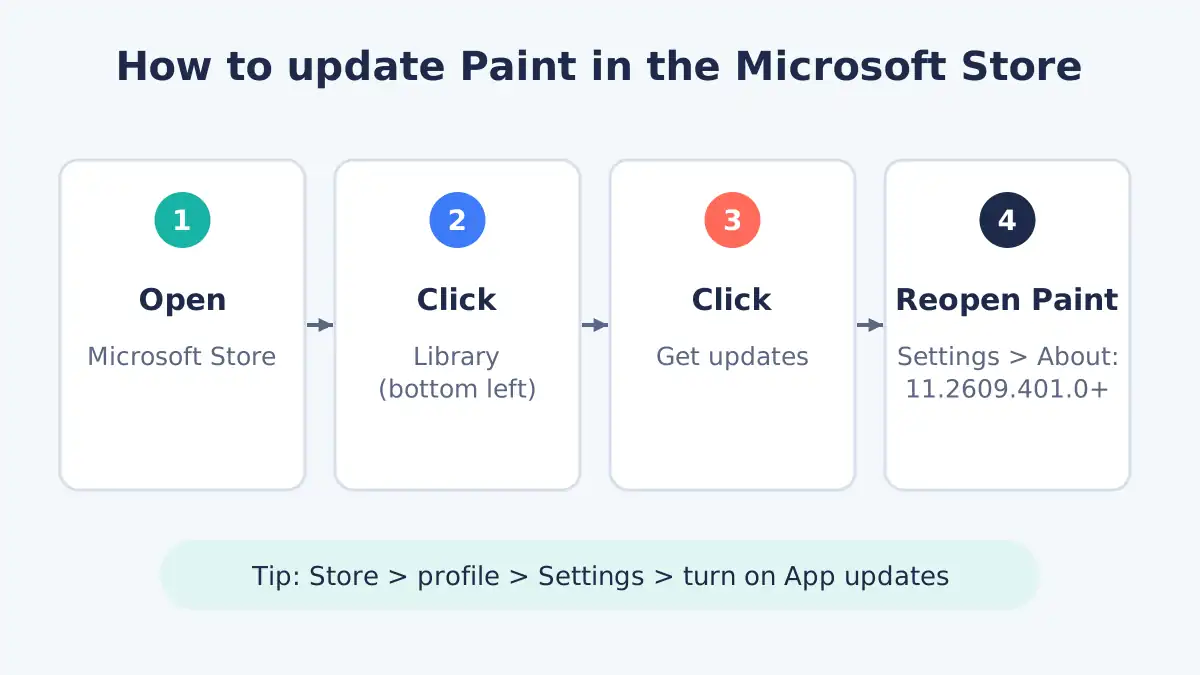
Method 1: Microsoft Store Library
- Open the Microsoft Store.
- Click Library in the bottom-left corner.
- Click Get updates.
- If Paint appears in the list, let it update (or click Update all).
- Close Paint if it was open, then reopen it and check the version again.
Method 2: Paint’s own Store page
- In the Microsoft Store, search for Paint.
- Open the listing published by Microsoft Corporation.
- If you see an Update button, click it.
Turn on automatic app updates
To get future fixes without thinking about it, open the Microsoft Store, click your profile icon > Settings, and make sure App updates is switched on. Microsoft says the fix arrives by installing the new version or making sure it updated automatically.
Microsoft Paint update not installing? Fixes to try
If Paint still shows an old version after you click Get updates, the Store is usually stuck or hasn’t been offered the new build yet. Try these in order:
- Restart the PC, then run Get updates again. Brandefense notes a restart may be needed.
- Sign in to the Microsoft Store with your Microsoft account if it shows you as signed out.
- Clear the Store cache: press Windows + R, type
wsreset.exe, and press Enter. A blank window opens, then the Store relaunches. Some administrators told TokenPost this didn’t help them, but it’s quick and harmless. - Check the date and time: wrong clock settings can break Store downloads. Go to Settings > Time & language > Date & time and turn on “Set time automatically”.
- Repair the Store app: Settings > Apps > Installed apps > Microsoft Store > three dots > Advanced options > Repair.
- Wait a day and retry. Store rollouts can be staggered by region, as testers saw last week.
If none of that works, avoid opening image files from people or sites you don’t know in Paint until the update arrives. Use the Photos app or your browser to view them instead.
Should you stop using or uninstall Paint?
Most people don’t need to uninstall Paint; updating it is enough. There are no reports of real-world attacks, and Microsoft rates exploitation as less likely.
Uninstalling makes sense in one case: a PC where nobody uses Paint, such as a work or shared family computer. You can remove it from Settings > Apps > Installed apps > Paint > Uninstall and reinstall it free from the Store later. Managed business PCs should follow their IT team’s guidance.
What’s still unclear about this flaw
A few details were still inconsistent across sources as of November 8, 2026. Being upfront about them is safer than guessing:
- How the attack is triggered. Microsoft’s advisory, as quoted by The Hacker News, describes a crafted packet sent over the network. Other reports say a user would have to open a booby-trapped file. SOCRadar notes Microsoft hasn’t confirmed that opening an image alone is enough.
- Which version is “fixed”. Earlier listings pointed to 11.2605.91.0; current reporting says 11.2609.401.0. Updating to 11.2609.401.0 or later covers both.
- Windows 10. Coverage focuses on Windows 11. If your Windows 10 PC gets Paint through the Store, run the same check.
FAQ
Is Microsoft Paint safe to use right now?
Yes, once it’s updated. Paint version 11.2609.401.0 or later includes the fix for CVE-2026-83844. As of November 8, 2026, there were no reports of the flaw being exploited, and Microsoft rated exploitation as less likely. Until you update, avoid opening image files from unknown senders in Paint, and use Photos or your browser to view them instead.
Why didn’t Windows Update fix Paint?
Paint is a Microsoft Store app, so its security fixes come through Store app updates instead of the monthly Windows Update patches. That means a PC can have every Windows update installed and still run an old Paint. Open Microsoft Store, select Library, then Get updates to install the patched version straight away.
How do I check which version of Paint I have?
Open Paint, click the gear (Settings) icon in the top-right corner, and look under About Paint. The version should read 11.2609.401.0 or higher. On shared PCs, an administrator can run Get-AppxPackage -AllUsers -Name Microsoft.Paint in PowerShell to see the version installed for every user account on the computer.
Has the Paint vulnerability been used in attacks?
No attacks had been reported as of November 8, 2026. Microsoft’s advisory lists the flaw as not publicly disclosed and not exploited, with exploitation less likely. CISA had not added it to its Known Exploited Vulnerabilities catalog as of November 6. That can change, so it’s still worth updating Paint now rather than later.
Do I need to uninstall Paint?
No. Updating Paint to version 11.2609.401.0 or later is enough for most people. Removing Paint only makes sense on PCs where nobody uses it, such as some shared or work computers. You can uninstall it from Settings > Apps > Installed apps and reinstall it free from the Microsoft Store whenever you need it again.
Bottom line
The Microsoft Paint update that fixes CVE-2026-83844 won’t arrive through Windows Update, so don’t assume you’re covered. Take 30 seconds now: open Paint, check the version under Settings, and if it’s below 11.2609.401.0, run Microsoft Store > Library > Get updates. Then switch on automatic app updates so the next Store-delivered fix installs itself.
