
The GTA 6 preload opens on November 10, 2026, and Rockstar says it needs up to 212 GB of free space, depending on your console. PS5 owners can start the pre-download at midnight local time on November 10, while Xbox Series X|S downloads are reported to open at 7 p.m. ET on November 9. The game itself unlocks on November 19.
The date is the easy part of the GTA 6 preload. The hard part, for millions of players, is finding 212 GB on a console that is already full. This guide covers the exact timing, the real file size on each console, and a step-by-step plan to make room without deleting things you will regret.
Facts in this article are current as of November 8, 2026. Rockstar, Sony and Microsoft can change sizes and times before launch, so check your console’s store page for the final number.
When does the GTA 6 preload start?
The GTA 6 preload starts on November 10, 2026, for players who pre-ordered. Rockstar confirmed the date in a Newswire post on November 3, 2026, and the game launches on PlayStation 5 and Xbox Series X|S on November 19. There is no PC version at launch.
A preload (Sony calls it a “pre-download”) is an early download of the game files. The files stay locked until release day, so preloading does not give you early access. It only means you can play the moment the game unlocks instead of waiting on a 200+ GB download.
GTA 6 preload time on PS5
The PlayStation Blog says pre-download opens at midnight local time on November 10 for anyone who pre-ordered. In practice, that means 12:00 a.m. in your own time zone, whether you live in New York or Los Angeles.
GTA 6 preload time on Xbox Series X|S
Microsoft has not posted a separate announcement, but several outlets, including Notebookcheck and Fenix Bazaar, report a single global start of 12:00 a.m. GMT on November 10. In the US, that works out to:
| Time zone | Xbox GTA 6 preload opens |
|---|---|
| Eastern (ET) | 7:00 p.m., Monday, Nov 9 |
| Central (CT) | 6:00 p.m., Monday, Nov 9 |
| Mountain (MT) | 5:00 p.m., Monday, Nov 9 |
| Pacific (PT) | 4:00 p.m., Monday, Nov 9 |
Boxed copies
Retail boxes of GTA 6 contain a download code, not a game disc, according to Fenix Bazaar and DLCompare. Those boxes are expected in stores from November 12. So even “physical” buyers get the GTA 6 preload as a full download, and you can start as soon as you redeem the code.
How big is GTA 6 on PS5 and Xbox?
GTA 6 needs up to 212 GB of free space, according to Rockstar. Sony’s blog tells PS5 owners to clear “a minimum of 212GB.” On Xbox, the Microsoft Store catalog lists the package at 225.34 GB, which looks bigger but is roughly the same file measured differently.
| Platform | Reported size | Source and status |
|---|---|---|
| PS5 / PS5 Pro | Clear at least 212 GB | PlayStation Blog (official) |
| Xbox Series X | S | 225.34 GB (209.86 GiB) |
| All consoles | “Up to 212 GB depending on your device” | Rockstar FAQ (official) |
Why does Xbox show 225 GB instead of 212 GB?
The difference is mostly units, not a bigger game. Storage makers count a gigabyte (GB) as 1,000,000,000 bytes, while consoles often count in gibibytes (GiB), where 1 GiB is 1,073,741,824 bytes. So 209.86 GiB and 225.34 GB describe the same download, as Notebookcheck explains.
Rockstar has not announced a day-one patch size as of November 8. Patches usually need a little extra working space while they install, so plan for more than the bare minimum.
Will GTA 6 fit on your console?
GTA 6 will fit on every current PS5 and Xbox Series model, but on an Xbox Series S or a launch PS5 it will take up a large share of the drive. The number on the box is not what you can actually use, because the system software reserves part of the drive.
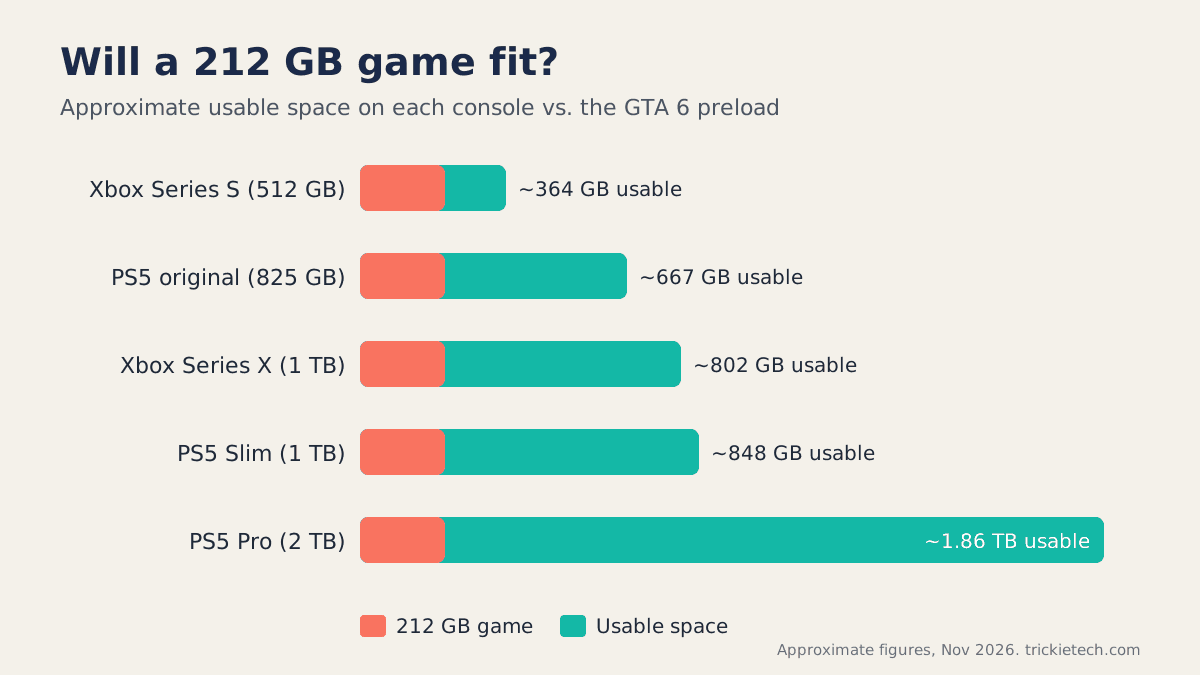
| Console | Advertised storage | Approx. usable space | GTA 6 share |
|---|---|---|---|
| Xbox Series S (512 GB) | 512 GB | ~364 GB | Over half |
| PS5 (original, 825 GB) | 825 GB | ~667 GB | About a third |
| Xbox Series X (1 TB) | 1 TB | ~802 GB | Over a quarter |
| PS5 Slim (1 TB) | 1 TB | ~848 GB | About a quarter |
| PS5 Pro (2 TB) | 2 TB | ~1.86 TB | About 11% |
Usable figures are approximate and come from launch-era measurements reported by GameSpot and other outlets; your exact number varies with system updates.
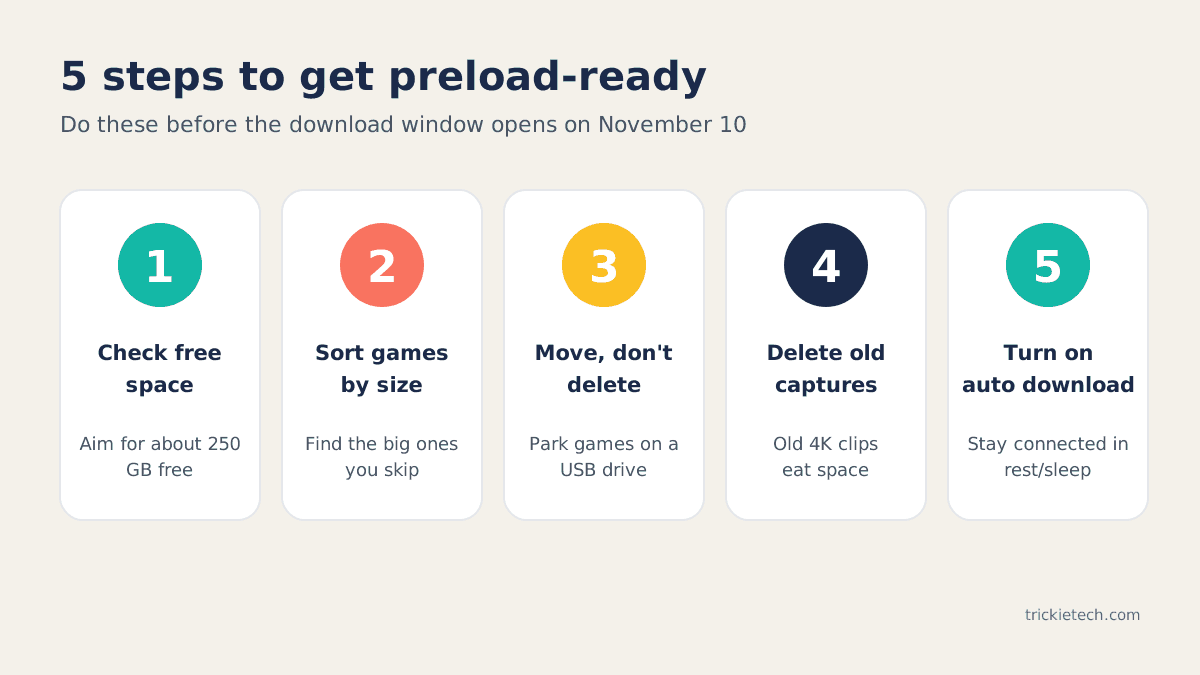
A good rule of thumb is to aim for about 250 GB free before the GTA 6 preload opens on November 10. That covers the 212 GB download, a day-one patch and the temporary space patches use while installing.
[ADD PERSONAL EXPERIENCE: How much free space did your own PS5 or Xbox have before clearing room, which games did you remove or move first, and how long did the move or download take on your connection?]
How to free up space for the GTA 6 preload
The fastest way to make room is to sort your games by size, then move (not delete) the big ones you are not playing. Moving keeps your installs, so you do not have to download them again after the GTA 6 preload finishes. Delete only what you can easily reinstall.
On PS5
- Go to Settings > Storage > Console Storage > Games and Apps to see what is using space.
- Sort the list by size and note the largest games you have not played lately.
- If you have a USB drive set up as extended storage, move PS5 games there instead of deleting them. You will need to copy them back to play, but it saves a re-download.
- Delete old Media Gallery captures. A few hours of 4K gameplay video can easily take tens of gigabytes.
- Check Saved Data for games you no longer own. These are small, but they add up.
On Xbox Series X|S
- Press the Xbox button, then go to My games & apps > See all > Manage and open the storage view.
- Sort installed games by size.
- Move large games to an external USB drive if you have one; you can move them back later without a full download.
- Uninstall games you can reinstall quickly, especially Game Pass titles you have finished.
- Clear old captures from the Capture & share menu.
Can you play GTA 6 from an external drive?
No, not from a regular USB drive. GTA 6 is a current-generation game, and both PS5 and Xbox Series X|S require these games to run from fast internal-class storage. A USB drive can only store them.
- PS5: Sony’s support page says PS5 games “can’t be played directly from USB extended storage” (PlayStation Support). To play from extra storage, you need an internal M.2 SSD: a PCIe Gen4 NVMe drive between 250 GB and 8 TB, with 5,500 MB/s or faster recommended (PlayStation Support).
- Xbox Series X|S: games optimized for Series X|S must run from the internal SSD or an official Storage Expansion Card, which plugs into the back of the console. Standard USB drives can store these games and play older Xbox One titles, but not run Series X|S games (TechSpot, Tom’s Hardware).
A smart combination: keep GTA 6 on the internal drive, and use a cheap USB drive as a “parking lot” for the games you move out of the way.
How to make sure the GTA 6 preload actually downloads
Turn on automatic downloads and keep your console connected in rest or sleep mode. If you skip this, the GTA 6 preload simply waits until you start it by hand.
- PS5: In the Game Library, select GTA 6 and choose the content to download automatically. Then go to Settings > System > Power Saving > Features Available in Rest Mode and turn on Stay Connected to the Internet. If auto-download is off, start it from Game Library > Your Collection > GTA 6 > Download once the window opens.
- Xbox: Keep automatic updates on and the console in Sleep mode. The game should appear in your queue under My games & apps. If it does not, go to Full library > All owned games, select GTA 6 and choose Install all.
- Code-in-box buyers: Redeem the code on the store as soon as you have the box; the GTA 6 preload is tied to the account that owns the game.
A wired Ethernet connection is worth it for a download this size. On a 100 Mbps connection, 212 GB takes roughly 4 to 5 hours in ideal conditions, and longer on launch night when servers are busy.
What time does GTA 6 unlock on November 19?
Rockstar says GTA 6 releases at midnight local time in each region on November 19, 2026, as reported by VICE. However, Fenix Bazaar reports that regional PlayStation Store listings point to a single US unlock at 12:00 a.m. ET, which would be 9:00 p.m. PT on November 18. Rockstar has not published an official hour, so watch the countdown on your console’s store page.
FAQ
When does the GTA 6 preload start?
On PS5, the pre-download opens at midnight local time on November 10, 2026, for players who pre-ordered. On Xbox Series X|S, reports point to 12:00 a.m. GMT on November 10, which is 7:00 p.m. ET or 4:00 p.m. PT on November 9. The game unlocks on November 19.
How many GB is GTA 6?
Rockstar says the pre-load needs up to 212 GB of free space, depending on your console. Sony tells PS5 owners to clear at least 212 GB. The Xbox store catalog shows 225.34 GB, which equals about 209.86 GiB, so it is roughly the same size measured in different units.
Can I play GTA 6 from an external hard drive?
Not from a standard USB drive. PS5 games must run from internal storage or an M.2 SSD installed inside the console. Xbox Series X|S games must run from the internal SSD or an official Storage Expansion Card. A USB drive is still useful for storing other games to free up internal space.
Will GTA 6 fit on an Xbox Series S?
Yes, but it leaves little room for anything else. The Series S has about 364 GB of usable space, and GTA 6 needs up to 212 GB, so it will take more than half the drive. Plan to move other games to a USB drive, or add a Storage Expansion Card if you want to keep several big games installed.
Can I preload GTA 6 with a physical copy?
Yes. GTA 6 boxed copies contain a download code instead of a disc, and retailers are expected to stock them from November 12. Redeem the code on the PlayStation Store or Microsoft Store as soon as you get it, and the download will begin if the preload window is already open.
Does preloading GTA 6 let me play early?
No. Preloading only downloads the game files ahead of time. They stay locked until your region’s unlock time on November 19, 2026. The benefit is that you can start playing right away instead of waiting hours for a 200+ GB download on launch night.
Bottom line
The GTA 6 preload opens on November 10 (or the evening of November 9 for US Xbox players) and needs up to 212 GB. Check your free space today, aim for about 250 GB to allow for a day-one patch, and move large games to a USB drive instead of deleting them. If you are on an Xbox Series S or an original PS5 and plan to keep other big games installed, an approved M.2 SSD or Storage Expansion Card is the only way to add space that can actually run the game.
