
/** * Astra Addon Updates * * Functions for updating data, used by the background updater. * * @package Astra Addon * @version 2.1.3 */ defined( 'ABSPATH' ) || exit; /** * Do not apply new default colors to the Elementor & Gutenberg Buttons for existing users. * * @since 2.1.4 * * @return void */ function astra_addon_page_builder_button_color_compatibility() { $theme_options = get_option( 'astra-settings', array() ); // Set flag to not load button specific CSS. if ( ! isset( $theme_options['pb-button-color-compatibility-addon'] ) ) { $theme_options['pb-button-color-compatibility-addon'] = false; error_log( 'Astra Addon: Page Builder button compatibility: false' ); // phpcs:ignore WordPress.PHP.DevelopmentFunctions.error_log_error_log update_option( 'astra-settings', $theme_options ); } } /** * Apply Desktop + Mobile to parallax device. * * @since 2.3.0 * * @return bool */ function astra_addon_page_header_parallax_device() { $posts = get_posts( array( 'post_type' => 'astra_adv_header', 'numberposts' => -1, ) ); foreach ( $posts as $post ) { $ids = $post->ID; if ( false == $ids ) { return false; } $settings = get_post_meta( $ids, 'ast-advanced-headers-design', true ); if ( isset( $settings['parallax'] ) && $settings['parallax'] ) { $settings['parallax-device'] = 'both'; } else { $settings['parallax-device'] = 'none'; } update_post_meta( $ids, 'ast-advanced-headers-design', $settings ); } } /** * Migrate option data from Content background option to its desktop counterpart. * * @since 2.4.0 * * @return void */ function astra_responsive_content_background_option() { // phpcs:ignore WordPress.NamingConventions.PrefixAllGlobals.NonPrefixedFunctionFound $theme_options = get_option( 'astra-settings', array() ); if ( false === get_option( 'content-bg-obj-responsive', false ) && isset( $theme_options['content-bg-obj'] ) ) { $theme_options['content-bg-obj-responsive']['desktop'] = $theme_options['content-bg-obj']; $theme_options['content-bg-obj-responsive']['tablet'] = array( 'background-color' => '', 'background-image' => '', 'background-repeat' => 'repeat', 'background-position' => 'center center', 'background-size' => 'auto', 'background-attachment' => 'scroll', ); $theme_options['content-bg-obj-responsive']['mobile'] = array( 'background-color' => '', 'background-image' => '', 'background-repeat' => 'repeat', 'background-position' => 'center center', 'background-size' => 'auto', 'background-attachment' => 'scroll', ); } update_option( 'astra-settings', $theme_options ); } /** * Migrate multisite css file generation option to sites indiviually. * * @since 2.3.3 * * @return void */ function astra_addon_css_gen_multi_site_fix() { if ( is_multisite() ) { $is_css_gen_enabled = get_site_option( '_astra_file_generation', 'disable' ); if ( 'enable' === $is_css_gen_enabled ) { update_option( '_astra_file_generation', $is_css_gen_enabled ); error_log( 'Astra Addon: CSS file generation: enable' ); // phpcs:ignore WordPress.PHP.DevelopmentFunctions.error_log_error_log } } } /** * Check if we need to change the default value for tablet breakpoint. * * @since 2.4.0 * @return void */ function astra_addon_update_theme_tablet_breakpoint() { $theme_options = get_option( 'astra-settings' ); if ( ! isset( $theme_options['can-update-addon-tablet-breakpoint'] ) ) { // Set a flag to check if we need to change the addon tablet breakpoint value. $theme_options['can-update-addon-tablet-breakpoint'] = false; } update_option( 'astra-settings', $theme_options ); } /** * Apply missing editor_type post meta to having code enabled custom layout posts. * * @since 2.5.0 * * @return bool */ function custom_layout_compatibility_having_code_posts() { // phpcs:ignore WordPress.NamingConventions.PrefixAllGlobals.NonPrefixedFunctionFound $posts = get_posts( array( 'post_type' => 'astra-advanced-hook', 'numberposts' => -1, ) ); foreach ( $posts as $post ) { $post_id = $post->ID; if ( ! $post_id ) { return; } $post_with_code_editor = get_post_meta( $post_id, 'ast-advanced-hook-with-php', true ); if ( isset( $post_with_code_editor ) && 'enabled' === $post_with_code_editor ) { update_post_meta( $post_id, 'editor_type', 'code_editor' ); } else { update_post_meta( $post_id, 'editor_type', 'wordpress_editor' ); } } } /** * Added new submenu color options for Page Headers. * * @since 2.5.0 * * @return bool */ function astra_addon_page_header_submenu_color_options() { $posts = get_posts( array( 'post_type' => 'astra_adv_header', 'numberposts' => -1, ) ); foreach ( $posts as $post ) { $id = $post->ID; if ( false == $id ) { return false; } $settings = get_post_meta( $id, 'ast-advanced-headers-design', true ); if ( ( isset( $settings['primary-menu-h-color'] ) && $settings['primary-menu-h-color'] ) && ! isset( $settings['primary-menu-a-color'] ) ) { $settings['primary-menu-a-color'] = $settings['primary-menu-h-color']; } if ( ( isset( $settings['above-header-h-color'] ) && $settings['above-header-h-color'] ) && ! isset( $settings['above-header-a-color'] ) ) { $settings['above-header-a-color'] = $settings['above-header-h-color']; } if ( ( isset( $settings['below-header-h-color'] ) && $settings['below-header-h-color'] ) && ! isset( $settings['below-header-a-color'] ) ) { $settings['below-header-a-color'] = $settings['below-header-h-color']; } update_post_meta( $id, 'ast-advanced-headers-design', $settings ); } } /** * Manage flags & run backward compatibility process for following cases. * * 1. Sticky header inheriting colors in normal headers as well. * * @since 2.6.0 * @return void */ function astra_addon_header_css_optimizations() { $theme_options = get_option( 'astra-settings' ); if ( ! isset( $theme_options['can-inherit-sticky-colors-in-header'] ) && ( ( isset( $theme_options['header-above-stick'] ) && $theme_options['header-above-stick'] ) || ( isset( $theme_options['header-main-stick'] ) && $theme_options['header-main-stick'] ) || ( isset( $theme_options['header-below-stick'] ) && $theme_options['header-below-stick'] ) ) && ( ( ( isset( $theme_options['sticky-above-header-megamenu-heading-color'] ) && '' !== $theme_options['sticky-above-header-megamenu-heading-color'] ) || ( isset( $theme_options['sticky-above-header-megamenu-heading-h-color'] ) && '' !== $theme_options['sticky-above-header-megamenu-heading-h-color'] ) ) || ( ( isset( $theme_options['sticky-primary-header-megamenu-heading-color'] ) && '' !== $theme_options['sticky-primary-header-megamenu-heading-color'] ) || ( isset( $theme_options['sticky-primary-header-megamenu-heading-h-color'] ) && '' !== $theme_options['sticky-primary-header-megamenu-heading-h-color'] ) ) || ( ( isset( $theme_options['sticky-below-header-megamenu-heading-color'] ) && '' !== $theme_options['sticky-below-header-megamenu-heading-color'] ) || ( isset( $theme_options['sticky-below-header-megamenu-heading-h-color'] ) && '' !== $theme_options['sticky-below-header-megamenu-heading-h-color'] ) ) ) ) { // Set a flag to inherit sticky colors in the normal header as well. $theme_options['can-inherit-sticky-colors-in-header'] = true; } update_option( 'astra-settings', $theme_options ); } /** * Page Header's color options compatibility with new Header builder layout. * * @since 3.5.0 * @return void */ function astra_addon_page_headers_support_to_builder_layout() { $theme_options = get_option( 'astra-settings' ); if ( ! isset( $theme_options['can-update-page-header-compatibility-to-header-builder'] ) ) { // Set a flag to avoid direct changes on frontend. $theme_options['can-update-page-header-compatibility-to-header-builder'] = true; } update_option( 'astra-settings', $theme_options ); } /** * Do not apply new font-weight heading support CSS in editor/frontend directly. * * 1. Adding Font-weight support to widget titles. * 2. Customizer font CSS not supporting in editor. * * @since 3.5.1 * * @return void */ function astra_addon_headings_font_support() { $theme_options = get_option( 'astra-settings', array() ); if ( ! isset( $theme_options['can-support-widget-and-editor-fonts'] ) ) { $theme_options['can-support-widget-and-editor-fonts'] = false; update_option( 'astra-settings', $theme_options ); } } /** * Cart color not working in old header > cart widget. As this change can reflect on frontend directly, adding this backward compatibility. * * @since 3.5.1 * @return void */ function astra_addon_cart_color_not_working_in_old_header() { $theme_options = get_option( 'astra-settings' ); if ( ! isset( $theme_options['can-reflect-cart-color-in-old-header'] ) ) { // Set a flag to avoid direct changes on frontend. $theme_options['can-reflect-cart-color-in-old-header'] = false; } update_option( 'astra-settings', $theme_options ); } /** * Till now "Header Sections" addon has dependency conflict with new header builder, unless & until this addon activate dynamic CSS does load for new header layouts. * As we deprecate "Header Sections" for new header builder layout, conflict appears here. * * Adding backward compatibility as changes can directly reflect on frontend. * * @since 3.5.7 * @return void */ function astra_addon_remove_header_sections_deps_new_builder() { $theme_options = get_option( 'astra-settings' ); if ( ! isset( $theme_options['remove-header-sections-deps-in-new-header'] ) ) { // Set a flag to avoid direct changes on frontend. $theme_options['remove-header-sections-deps-in-new-header'] = false; } update_option( 'astra-settings', $theme_options ); } /** * In old header for Cart widget we have background: #ffffff; for outline cart, whereas this CSS missed in new HFB > Cart element. Adding it now as per support requests. This case is only for new header builder > WooCommerce cart. * * @since 3.5.7 * @return void */ function astra_addon_outline_cart_bg_color_support() { $theme_options = get_option( 'astra-settings', array() ); if ( ! isset( $theme_options['add-outline-cart-bg-new-header'] ) ) { $theme_options['add-outline-cart-bg-new-header'] = false; update_option( 'astra-settings', $theme_options ); } } /** * Swap section on Mobile Device not working in old header. As this change can reflect on frontend directly, adding this backward compatibility. * * @since 3.5.7 * @return void */ function astra_addon_swap_section_not_working_in_old_header() { $theme_options = get_option( 'astra-settings', array() ); if ( ! isset( $theme_options['support-swap-mobile-header-sections'] ) ) { $theme_options['support-swap-mobile-header-sections'] = false; update_option( 'astra-settings', $theme_options ); } } /** * Do not apply default header site title and tag line color to sticky header for existing users. * * @since 3.5.8 * * @return void */ function astra_sticky_header_site_title_tagline_css() { // phpcs:ignore WordPress.NamingConventions.PrefixAllGlobals.NonPrefixedFunctionFound $theme_options = get_option( 'astra-settings', array() ); if ( ! isset( $theme_options['sticky-header-default-site-title-tagline-css'] ) ) { $theme_options['sticky-header-default-site-title-tagline-css'] = false; update_option( 'astra-settings', $theme_options ); } } /** * Migrating Builder > Account > resonsive menu color options to single color options. * Because we do not show menu on resonsive devices, whereas we trigger login link on responsive devices instead of showing menu. * * @since 3.5.9 * * @return void */ function astra_addon_remove_responsive_account_menu_colors_support() { $theme_options = get_option( 'astra-settings', array() ); $account_menu_colors = array( 'header-account-menu-color', // Menu color. 'header-account-menu-h-color', // Menu hover color. 'header-account-menu-a-color', // Menu active color. 'header-account-menu-bg-obj', // Menu background color. 'header-account-menu-h-bg-color', // Menu background hover color. 'header-account-menu-a-bg-color', // Menu background active color. 'sticky-header-account-menu-color', // Sticky menu color. 'sticky-header-account-menu-h-color', // Sticky menu hover color. 'sticky-header-account-menu-a-color', // Sticky menu active color. 'sticky-header-account-menu-bg-obj', // Sticky menu background color. 'sticky-header-account-menu-h-bg-color', // Sticky menu background hover color. 'sticky-header-account-menu-a-bg-color', // Sticky menu background active color. ); foreach ( $account_menu_colors as $color_option ) { if ( ! isset( $theme_options[ $color_option ] ) && isset( $theme_options[ $color_option . '-responsive' ]['desktop'] ) ) { $theme_options[ $color_option ] = $theme_options[ $color_option . '-responsive' ]['desktop']; } } update_option( 'astra-settings', $theme_options ); } /** * Check if old user and keep the existing product gallery layouts. * * @since 3.9.0 * @return void */ function astra_addon_update_product_gallery_layout() { $theme_options = get_option( 'astra-settings' ); if ( ! isset( $theme_options['astra-product-gallery-layout-flag'] ) ) { $theme_options['astra-product-gallery-layout-flag'] = false; } update_option( 'astra-settings', $theme_options ); } /** * Migrate old user data to new responsive format for shop's cart button padding. * * @since 3.9.0 * @return void */ function astra_addon_responsive_shop_button_padding() { $theme_options = get_option( 'astra-settings', array() ); $vertical_button_padding = isset( $theme_options['shop-button-v-padding'] ) ? $theme_options['shop-button-v-padding'] : ''; $horizontal_button_padding = isset( $theme_options['shop-button-h-padding'] ) ? $theme_options['shop-button-h-padding'] : ''; if ( ! isset( $theme_options['shop-button-padding'] ) ) { $theme_options['shop-button-padding'] = array( 'desktop' => array( 'top' => $vertical_button_padding, 'right' => $horizontal_button_padding, 'bottom' => $vertical_button_padding, 'left' => $horizontal_button_padding, ), 'tablet' => array( 'top' => '', 'right' => '', 'bottom' => '', 'left' => '', ), 'mobile' => array( 'top' => '', 'right' => '', 'bottom' => '', 'left' => '', ), 'desktop-unit' => 'px', 'tablet-unit' => 'px', 'mobile-unit' => 'px', ); update_option( 'astra-settings', $theme_options ); } } /** * Migrate old box shadow user data to new simplyfy box-shadow controls shop items shadow. * * @since 3.9.0 * @return void */ function astra_addon_shop_box_shadow_migration() { // For shop products box-shadow. $theme_options = get_option( 'astra-settings', array() ); if ( ! isset( $theme_options['shop-item-box-shadow-control'] ) && isset( $theme_options['shop-product-shadow'] ) ) { $normal_shadow_x = ''; $normal_shadow_y = ''; $normal_shadow_blur = ''; $normal_shadow_spread = ''; $normal_shadow_color = 'rgba(0,0,0,.1)'; switch ( $theme_options['shop-product-shadow'] ) { case 1: $normal_shadow_x = '0'; $normal_shadow_y = '1'; $normal_shadow_blur = '3'; $normal_shadow_spread = '-2'; break; case 2: $normal_shadow_x = '0'; $normal_shadow_y = '3'; $normal_shadow_blur = '6'; $normal_shadow_spread = '-5'; break; case 3: $normal_shadow_x = '0'; $normal_shadow_y = '10'; $normal_shadow_blur = '20'; $normal_shadow_spread = ''; break; case 4: $normal_shadow_x = '0'; $normal_shadow_y = '14'; $normal_shadow_blur = '28'; $normal_shadow_spread = ''; break; case 5: $normal_shadow_x = '0'; $normal_shadow_y = '20'; $normal_shadow_blur = '30'; $normal_shadow_spread = '0'; break; default: break; } $theme_options['shop-item-box-shadow-control'] = array( 'x' => $normal_shadow_x, 'y' => $normal_shadow_y, 'blur' => $normal_shadow_blur, 'spread' => $normal_shadow_spread, ); $theme_options['shop-item-box-shadow-position'] = 'outline'; $theme_options['shop-item-box-shadow-color'] = $normal_shadow_color; update_option( 'astra-settings', $theme_options ); } // For shop products hover box-shadow. $theme_options = get_option( 'astra-settings', array() ); if ( ! isset( $theme_options['shop-item-hover-box-shadow-control'] ) && isset( $theme_options['shop-product-shadow-hover'] ) ) { $normal_shadow_x = ''; $normal_shadow_y = ''; $normal_shadow_blur = ''; $normal_shadow_spread = ''; $normal_shadow_color = 'rgba(0,0,0,.1)'; switch ( $theme_options['shop-product-shadow-hover'] ) { case 1: $normal_shadow_x = '0'; $normal_shadow_y = '1'; $normal_shadow_blur = '3'; $normal_shadow_spread = '-2'; break; case 2: $normal_shadow_x = '0'; $normal_shadow_y = '3'; $normal_shadow_blur = '6'; $normal_shadow_spread = '-5'; break; case 3: $normal_shadow_x = '0'; $normal_shadow_y = '10'; $normal_shadow_blur = '20'; $normal_shadow_spread = ''; break; case 4: $normal_shadow_x = '0'; $normal_shadow_y = '14'; $normal_shadow_blur = '28'; $normal_shadow_spread = ''; break; case 5: $normal_shadow_x = '0'; $normal_shadow_y = '20'; $normal_shadow_blur = '30'; $normal_shadow_spread = '0'; break; default: break; } $theme_options['shop-item-hover-box-shadow-control'] = array( 'x' => $normal_shadow_x, 'y' => $normal_shadow_y, 'blur' => $normal_shadow_blur, 'spread' => $normal_shadow_spread, ); $theme_options['shop-item-hover-box-shadow-position'] = 'outline'; $theme_options['shop-item-hover-box-shadow-color'] = $normal_shadow_color; update_option( 'astra-settings', $theme_options ); } } /** * If old user then it keeps then default cart icon. * * @since 3.9.0 * @return void */ function astra_addon_update_woocommerce_cart_icons() { $theme_options = get_option( 'astra-settings' ); if ( ! isset( $theme_options['astra-woocommerce-cart-icons-flag'] ) ) { $theme_options['astra-woocommerce-cart-icons-flag'] = false; update_option( 'astra-settings', $theme_options ); } } /** * If old user then it keeps then default cart icon. * * @since 3.9.0 * @return void */ function astra_addon_update_toolbar_seperations() { $theme_options = get_option( 'astra-settings' ); $shop_toolbar_display = isset( $theme_options['shop-toolbar-display'] ) ? $theme_options['shop-toolbar-display'] : true; if ( ! isset( $theme_options['shop-toolbar-structure'] ) ) { if ( true === $shop_toolbar_display ) { if ( isset( $theme_options['shop-off-canvas-trigger-type'] ) && 'disable' !== $theme_options['shop-off-canvas-trigger-type'] && 'custom-class' !== $theme_options['shop-off-canvas-trigger-type'] ) { $theme_options['shop-toolbar-structure'] = array( 'filters', 'results', 'sorting', ); $theme_options['shop-toolbar-structure-with-hiddenset'] = array( 'filters' => true, 'results' => true, 'sorting' => true, 'easy_view' => false, ); } else { $theme_options['shop-toolbar-structure'] = array( 'results', 'sorting', ); $theme_options['shop-toolbar-structure-with-hiddenset'] = array( 'results' => true, 'filters' => false, 'sorting' => true, 'easy_view' => false, ); } } else { if ( isset( $theme_options['shop-off-canvas-trigger-type'] ) && 'disable' !== $theme_options['shop-off-canvas-trigger-type'] && 'custom-class' !== $theme_options['shop-off-canvas-trigger-type'] ) { $theme_options['shop-toolbar-structure'] = array( 'filters', ); $theme_options['shop-toolbar-structure-with-hiddenset'] = array( 'filters' => true, 'results' => false, 'sorting' => false, 'easy_view' => false, ); } else { $theme_options['shop-toolbar-structure'] = array(); $theme_options['shop-toolbar-structure-with-hiddenset'] = array( 'results' => false, 'filters' => false, 'sorting' => false, 'easy_view' => false, ); } } update_option( 'astra-settings', $theme_options ); } } /** * Restrict direct changes on users end so make it filterable. * * @since 3.9.0 * @return void */ function astra_addon_apply_modern_ecommerce_setup() { $theme_options = get_option( 'astra-settings', array() ); if ( ! isset( $theme_options['modern-ecommerce-setup'] ) ) { $theme_options['modern-ecommerce-setup'] = false; update_option( 'astra-settings', $theme_options ); } } /** * Improve active/selected variant for WooCommerce single product. * * @since 3.9.3 * @return void */ function astra_addon_update_variant_active_state() { $theme_options = get_option( 'astra-settings', array() ); if ( ! isset( $theme_options['can-update-variant-active-style'] ) ) { $theme_options['can-update-variant-active-style'] = false; update_option( 'astra-settings', $theme_options ); } } /** * Version 4.0.0 backward handle. * * 1. Migrating Post Structure & Meta options in title area meta parts. * 2. Migrate existing setting & do required onboarding for new admin dashboard v4.0.0 app. * * @since 4.0.0 * @return void */ function astra_addon_background_updater_4_0_0() { // Dynamic customizer migration setup starts here. $theme_options = get_option( 'astra-settings', array() ); if ( ! isset( $theme_options['addon-dynamic-customizer-support'] ) ) { $theme_options['addon-dynamic-customizer-support'] = true; update_option( 'astra-settings', $theme_options ); } // Admin dashboard migration starts here. $admin_dashboard_settings = get_option( 'astra_admin_settings', array() ); if ( ! isset( $admin_dashboard_settings['addon-setup-admin-migrated'] ) ) { // Insert fallback whitelabel icon for agency users to maintain their branding. if ( is_multisite() ) { $branding = get_site_option( '_astra_ext_white_label' ); } else { $branding = get_option( '_astra_ext_white_label' ); } if ( ( isset( $branding['astra-agency']['hide_branding'] ) && true === (bool) $branding['astra-agency']['hide_branding'] ) && ! isset( $branding['astra']['icon'] ) ) { $branding['astra']['icon'] = ASTRA_EXT_URI . 'admin/core/assets/images/whitelabel-branding.svg'; if ( is_multisite() ) { update_site_option( '_astra_ext_white_label', $branding ); } else { update_option( '_astra_ext_white_label', $branding ); } } // Consider admin part from addon side migrated. $admin_dashboard_settings['addon-setup-admin-migrated'] = true; update_option( 'astra_admin_settings', $admin_dashboard_settings ); } } namespace Google\Site_Kit_Dependencies\GuzzleHttp\Psr7; use Google\Site_Kit_Dependencies\Psr\Http\Message\MessageInterface; use Google\Site_Kit_Dependencies\Psr\Http\Message\RequestInterface; use Google\Site_Kit_Dependencies\Psr\Http\Message\StreamInterface; use Google\Site_Kit_Dependencies\Psr\Http\Message\UriInterface; /** * Returns the string representation of an HTTP message. * * @param MessageInterface $message Message to convert to a string. * * @return string * * @deprecated str will be removed in guzzlehttp/psr7:2.0. Use Message::toString instead. */ function str(\Google\Site_Kit_Dependencies\Psr\Http\Message\MessageInterface $message) { return \Google\Site_Kit_Dependencies\GuzzleHttp\Psr7\Message::toString($message); } /** * Returns a UriInterface for the given value. * * This function accepts a string or UriInterface and returns a * UriInterface for the given value. If the value is already a * UriInterface, it is returned as-is. * * @param string|UriInterface $uri * * @return UriInterface * * @throws \InvalidArgumentException * * @deprecated uri_for will be removed in guzzlehttp/psr7:2.0. Use Utils::uriFor instead. */ function uri_for($uri) { return \Google\Site_Kit_Dependencies\GuzzleHttp\Psr7\Utils::uriFor($uri); } /** * Create a new stream based on the input type. * * Options is an associative array that can contain the following keys: * - metadata: Array of custom metadata. * - size: Size of the stream. * * This method accepts the following `$resource` types: * - `Psr\Http\Message\StreamInterface`: Returns the value as-is. * - `string`: Creates a stream object that uses the given string as the contents. * - `resource`: Creates a stream object that wraps the given PHP stream resource. * - `Iterator`: If the provided value implements `Iterator`, then a read-only * stream object will be created that wraps the given iterable. Each time the * stream is read from, data from the iterator will fill a buffer and will be * continuously called until the buffer is equal to the requested read size. * Subsequent read calls will first read from the buffer and then call `next` * on the underlying iterator until it is exhausted. * - `object` with `__toString()`: If the object has the `__toString()` method, * the object will be cast to a string and then a stream will be returned that * uses the string value. * - `NULL`: When `null` is passed, an empty stream object is returned. * - `callable` When a callable is passed, a read-only stream object will be * created that invokes the given callable. The callable is invoked with the * number of suggested bytes to read. The callable can return any number of * bytes, but MUST return `false` when there is no more data to return. The * stream object that wraps the callable will invoke the callable until the * number of requested bytes are available. Any additional bytes will be * buffered and used in subsequent reads. * * @param resource|string|int|float|bool|StreamInterface|callable|\Iterator|null $resource Entity body data * @param array $options Additional options * * @return StreamInterface * * @throws \InvalidArgumentException if the $resource arg is not valid. * * @deprecated stream_for will be removed in guzzlehttp/psr7:2.0. Use Utils::streamFor instead. */ function stream_for($resource = '', array $options = []) { return \Google\Site_Kit_Dependencies\GuzzleHttp\Psr7\Utils::streamFor($resource, $options); } /** * Parse an array of header values containing ";" separated data into an * array of associative arrays representing the header key value pair data * of the header. When a parameter does not contain a value, but just * contains a key, this function will inject a key with a '' string value. * * @param string|array $header Header to parse into components. * * @return array Returns the parsed header values. * * @deprecated parse_header will be removed in guzzlehttp/psr7:2.0. Use Header::parse instead. */ function parse_header($header) { return \Google\Site_Kit_Dependencies\GuzzleHttp\Psr7\Header::parse($header); } /** * Converts an array of header values that may contain comma separated * headers into an array of headers with no comma separated values. * * @param string|array $header Header to normalize. * * @return array Returns the normalized header field values. * * @deprecated normalize_header will be removed in guzzlehttp/psr7:2.0. Use Header::normalize instead. */ function normalize_header($header) { return \Google\Site_Kit_Dependencies\GuzzleHttp\Psr7\Header::normalize($header); } /** * Clone and modify a request with the given changes. * * This method is useful for reducing the number of clones needed to mutate a * message. * * The changes can be one of: * - method: (string) Changes the HTTP method. * - set_headers: (array) Sets the given headers. * - remove_headers: (array) Remove the given headers. * - body: (mixed) Sets the given body. * - uri: (UriInterface) Set the URI. * - query: (string) Set the query string value of the URI. * - version: (string) Set the protocol version. * * @param RequestInterface $request Request to clone and modify. * @param array $changes Changes to apply. * * @return RequestInterface * * @deprecated modify_request will be removed in guzzlehttp/psr7:2.0. Use Utils::modifyRequest instead. */ function modify_request(\Google\Site_Kit_Dependencies\Psr\Http\Message\RequestInterface $request, array $changes) { return \Google\Site_Kit_Dependencies\GuzzleHttp\Psr7\Utils::modifyRequest($request, $changes); } /** * Attempts to rewind a message body and throws an exception on failure. * * The body of the message will only be rewound if a call to `tell()` returns a * value other than `0`. * * @param MessageInterface $message Message to rewind * * @throws \RuntimeException * * @deprecated rewind_body will be removed in guzzlehttp/psr7:2.0. Use Message::rewindBody instead. */ function rewind_body(\Google\Site_Kit_Dependencies\Psr\Http\Message\MessageInterface $message) { \Google\Site_Kit_Dependencies\GuzzleHttp\Psr7\Message::rewindBody($message); } /** * Safely opens a PHP stream resource using a filename. * * When fopen fails, PHP normally raises a warning. This function adds an * error handler that checks for errors and throws an exception instead. * * @param string $filename File to open * @param string $mode Mode used to open the file * * @return resource * * @throws \RuntimeException if the file cannot be opened * * @deprecated try_fopen will be removed in guzzlehttp/psr7:2.0. Use Utils::tryFopen instead. */ function try_fopen($filename, $mode) { return \Google\Site_Kit_Dependencies\GuzzleHttp\Psr7\Utils::tryFopen($filename, $mode); } /** * Copy the contents of a stream into a string until the given number of * bytes have been read. * * @param StreamInterface $stream Stream to read * @param int $maxLen Maximum number of bytes to read. Pass -1 * to read the entire stream. * * @return string * * @throws \RuntimeException on error. * * @deprecated copy_to_string will be removed in guzzlehttp/psr7:2.0. Use Utils::copyToString instead. */ function copy_to_string(\Google\Site_Kit_Dependencies\Psr\Http\Message\StreamInterface $stream, $maxLen = -1) { return \Google\Site_Kit_Dependencies\GuzzleHttp\Psr7\Utils::copyToString($stream, $maxLen); } /** * Copy the contents of a stream into another stream until the given number * of bytes have been read. * * @param StreamInterface $source Stream to read from * @param StreamInterface $dest Stream to write to * @param int $maxLen Maximum number of bytes to read. Pass -1 * to read the entire stream. * * @throws \RuntimeException on error. * * @deprecated copy_to_stream will be removed in guzzlehttp/psr7:2.0. Use Utils::copyToStream instead. */ function copy_to_stream(\Google\Site_Kit_Dependencies\Psr\Http\Message\StreamInterface $source, \Google\Site_Kit_Dependencies\Psr\Http\Message\StreamInterface $dest, $maxLen = -1) { return \Google\Site_Kit_Dependencies\GuzzleHttp\Psr7\Utils::copyToStream($source, $dest, $maxLen); } /** * Calculate a hash of a stream. * * This method reads the entire stream to calculate a rolling hash, based on * PHP's `hash_init` functions. * * @param StreamInterface $stream Stream to calculate the hash for * @param string $algo Hash algorithm (e.g. md5, crc32, etc) * @param bool $rawOutput Whether or not to use raw output * * @return string Returns the hash of the stream * * @throws \RuntimeException on error. * * @deprecated hash will be removed in guzzlehttp/psr7:2.0. Use Utils::hash instead. */ function hash(\Google\Site_Kit_Dependencies\Psr\Http\Message\StreamInterface $stream, $algo, $rawOutput = \false) { return \Google\Site_Kit_Dependencies\GuzzleHttp\Psr7\Utils::hash($stream, $algo, $rawOutput); } /** * Read a line from the stream up to the maximum allowed buffer length. * * @param StreamInterface $stream Stream to read from * @param int|null $maxLength Maximum buffer length * * @return string * * @deprecated readline will be removed in guzzlehttp/psr7:2.0. Use Utils::readLine instead. */ function readline(\Google\Site_Kit_Dependencies\Psr\Http\Message\StreamInterface $stream, $maxLength = null) { return \Google\Site_Kit_Dependencies\GuzzleHttp\Psr7\Utils::readLine($stream, $maxLength); } /** * Parses a request message string into a request object. * * @param string $message Request message string. * * @return Request * * @deprecated parse_request will be removed in guzzlehttp/psr7:2.0. Use Message::parseRequest instead. */ function parse_request($message) { return \Google\Site_Kit_Dependencies\GuzzleHttp\Psr7\Message::parseRequest($message); } /** * Parses a response message string into a response object. * * @param string $message Response message string. * * @return Response * * @deprecated parse_response will be removed in guzzlehttp/psr7:2.0. Use Message::parseResponse instead. */ function parse_response($message) { return \Google\Site_Kit_Dependencies\GuzzleHttp\Psr7\Message::parseResponse($message); } /** * Parse a query string into an associative array. * * If multiple values are found for the same key, the value of that key value * pair will become an array. This function does not parse nested PHP style * arrays into an associative array (e.g., `foo[a]=1&foo[b]=2` will be parsed * into `['foo[a]' => '1', 'foo[b]' => '2'])`. * * @param string $str Query string to parse * @param int|bool $urlEncoding How the query string is encoded * * @return array * * @deprecated parse_query will be removed in guzzlehttp/psr7:2.0. Use Query::parse instead. */ function parse_query($str, $urlEncoding = \true) { return \Google\Site_Kit_Dependencies\GuzzleHttp\Psr7\Query::parse($str, $urlEncoding); } /** * Build a query string from an array of key value pairs. * * This function can use the return value of `parse_query()` to build a query * string. This function does not modify the provided keys when an array is * encountered (like `http_build_query()` would). * * @param array $params Query string parameters. * @param int|false $encoding Set to false to not encode, PHP_QUERY_RFC3986 * to encode using RFC3986, or PHP_QUERY_RFC1738 * to encode using RFC1738. * * @return string * * @deprecated build_query will be removed in guzzlehttp/psr7:2.0. Use Query::build instead. */ function build_query(array $params, $encoding = \PHP_QUERY_RFC3986) { return \Google\Site_Kit_Dependencies\GuzzleHttp\Psr7\Query::build($params, $encoding); } /** * Determines the mimetype of a file by looking at its extension. * * @param string $filename * * @return string|null * * @deprecated mimetype_from_filename will be removed in guzzlehttp/psr7:2.0. Use MimeType::fromFilename instead. */ function mimetype_from_filename($filename) { return \Google\Site_Kit_Dependencies\GuzzleHttp\Psr7\MimeType::fromFilename($filename); } /** * Maps a file extensions to a mimetype. * * @param $extension string The file extension. * * @return string|null * * @link http://svn.apache.org/repos/asf/httpd/httpd/branches/1.3.x/conf/mime.types * @deprecated mimetype_from_extension will be removed in guzzlehttp/psr7:2.0. Use MimeType::fromExtension instead. */ function mimetype_from_extension($extension) { return \Google\Site_Kit_Dependencies\GuzzleHttp\Psr7\MimeType::fromExtension($extension); } /** * Parses an HTTP message into an associative array. * * The array contains the "start-line" key containing the start line of * the message, "headers" key containing an associative array of header * array values, and a "body" key containing the body of the message. * * @param string $message HTTP request or response to parse. * * @return array * * @internal * * @deprecated _parse_message will be removed in guzzlehttp/psr7:2.0. Use Message::parseMessage instead. */ function _parse_message($message) { return \Google\Site_Kit_Dependencies\GuzzleHttp\Psr7\Message::parseMessage($message); } /** * Constructs a URI for an HTTP request message. * * @param string $path Path from the start-line * @param array $headers Array of headers (each value an array). * * @return string * * @internal * * @deprecated _parse_request_uri will be removed in guzzlehttp/psr7:2.0. Use Message::parseRequestUri instead. */ function _parse_request_uri($path, array $headers) { return \Google\Site_Kit_Dependencies\GuzzleHttp\Psr7\Message::parseRequestUri($path, $headers); } /** * Get a short summary of the message body. * * Will return `null` if the response is not printable. * * @param MessageInterface $message The message to get the body summary * @param int $truncateAt The maximum allowed size of the summary * * @return string|null * * @deprecated get_message_body_summary will be removed in guzzlehttp/psr7:2.0. Use Message::bodySummary instead. */ function get_message_body_summary(\Google\Site_Kit_Dependencies\Psr\Http\Message\MessageInterface $message, $truncateAt = 120) { return \Google\Site_Kit_Dependencies\GuzzleHttp\Psr7\Message::bodySummary($message, $truncateAt); } /** * Remove the items given by the keys, case insensitively from the data. * * @param iterable $keys * * @return array * * @internal * * @deprecated _caseless_remove will be removed in guzzlehttp/psr7:2.0. Use Utils::caselessRemove instead. */ function _caseless_remove($keys, array $data) { return \Google\Site_Kit_Dependencies\GuzzleHttp\Psr7\Utils::caselessRemove($keys, $data); } /*! Select2 4.0.5 | https://github.com/select2/select2/blob/master/LICENSE.md */ (function(){if(jQuery&&jQuery.fn&&jQuery.fn.select2&&jQuery.fn.select2.amd)var e=jQuery.fn.select2.amd;return e.define("select2/i18n/fr",[],function(){return{errorLoading:function(){return"Les résultats ne peuvent pas être chargés."},inputTooLong:function(e){var t=e.input.length-e.maximum;return"Supprimez "+t+" caractère"+(t>1)?"s":""},inputTooShort:function(e){var t=e.minimum-e.input.length;return"Saisissez au moins "+t+" caractère"+(t>1)?"s":""},loadingMore:function(){return"Chargement de résultats supplémentaires…"},maximumSelected:function(e){return"Vous pouvez seulement sélectionner "+e.maximum+" élément"+(e.maximum>1)?"s":""},noResults:function(){return"Aucun résultat trouvé"},searching:function(){return"Recherche en cours…"}}}),{define:e.define,require:e.require}})(); Adobe Premiere Pro Tips for Beginners (9 essential tips) - Trickie Tech
Search
Close this search box.
Search
Close this search box.

Adobe Premiere Pro Tips for Beginners (9 essential tips)

Are you new to Adobe Premiere Pro? If so, this post is perfect for you! Here you’ll find 9 essential tips to help you get started with Adobe Premiere Pro. Whether you’re a beginner or a pro, these tips will help you become an expert in no time. With these tips, you’ll be able to quickly and easily edit your videos in Adobe Premiere Pro. So let’s get started and explore these Adobe Premiere Pro Tips for Beginners.
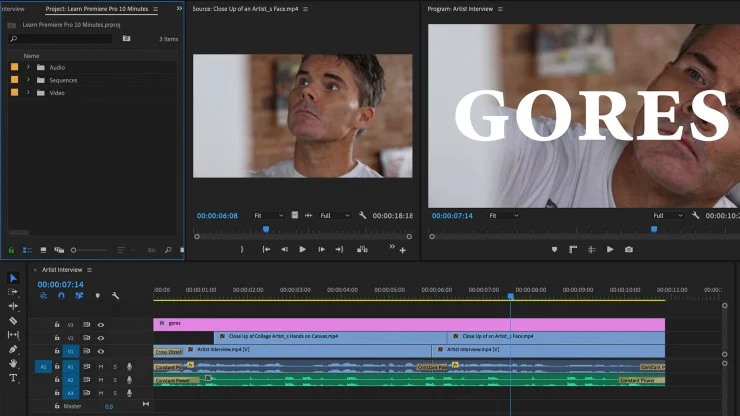
Adobe Premiere Pro Tips for Beginners

9 Essential Adobe Premiere Pro Tips for Beginners

Follow are the 9 Essential Adobe Premiere Pro Tips for Beginners:

1) Get to Know the Interface

One of the most important Adobe Premiere Pro Tips for Beginners is to get to know the interface. The interface is where you will be creating, editing and producing your videos. It’s where you access all of the features that Premiere Pro has to offer. It’s a good idea to take some time to familiarize yourself with the different tabs, windows and panels that make up the interface. Learn what each tab does and how you can use it to create your video. Understanding the interface will help you quickly and efficiently edit your project.

2) Use the Keyboard Shortcuts

One of the best Adobe Premiere Pro Tips for Beginners is to make sure you are taking advantage of the keyboard shortcuts. Not only do they save time, but they can also make complex editing tasks a breeze. Once you get used to using them, you will find yourself working much faster. Here are some of the most commonly used shortcuts:

• Control + A = Select All

• Control + D = Deselect

• Command + K = Split Clip

• Command + T = Insert/Overwrite Edit

• Option + Left Arrow/Right Arrow = Move Selected Clip(s) Backward/Forward

• Option + Up Arrow/Down Arrow = Nudge Selected Clip(s) Backward/Forward

• Command + Shift + D = Select All Clips to the Right

• Command + Shift + H = Select All Clips on the Same Track

• Control + I = Ripple Trim

• Command + M = Toggle Mute/Unmute Audio Track

• Shift + M = Toggle Solo/Unsolo Audio Track

Using these keyboard shortcuts can help you work quickly and efficiently in Adobe Premiere Pro, making it easier for you to produce great content. So remember to take the time to practice these Adobe Premiere Pro tips for beginners and make them a part of your regular workflow.

3) Learn the Basic Editing Tools

For Adobe Premiere Pro beginners, it is essential to become familiar with the basic editing tools. The main tools available in Adobe Premiere Pro are: Cut, Slip, and Slide. The Cut tool is used to delete portions of a clip, while the Slip and Slide tools are used to adjust the timing of a clip. Additionally, you can use the Ripple Edit tool to move clips around without affecting the overall timeline. Using these tools, you can easily add new clips or rearrange existing ones to create your desired effect. By becoming familiar with these basic Adobe Premiere Pro Tips for Beginners, you will be able to quickly and easily edit your video project.
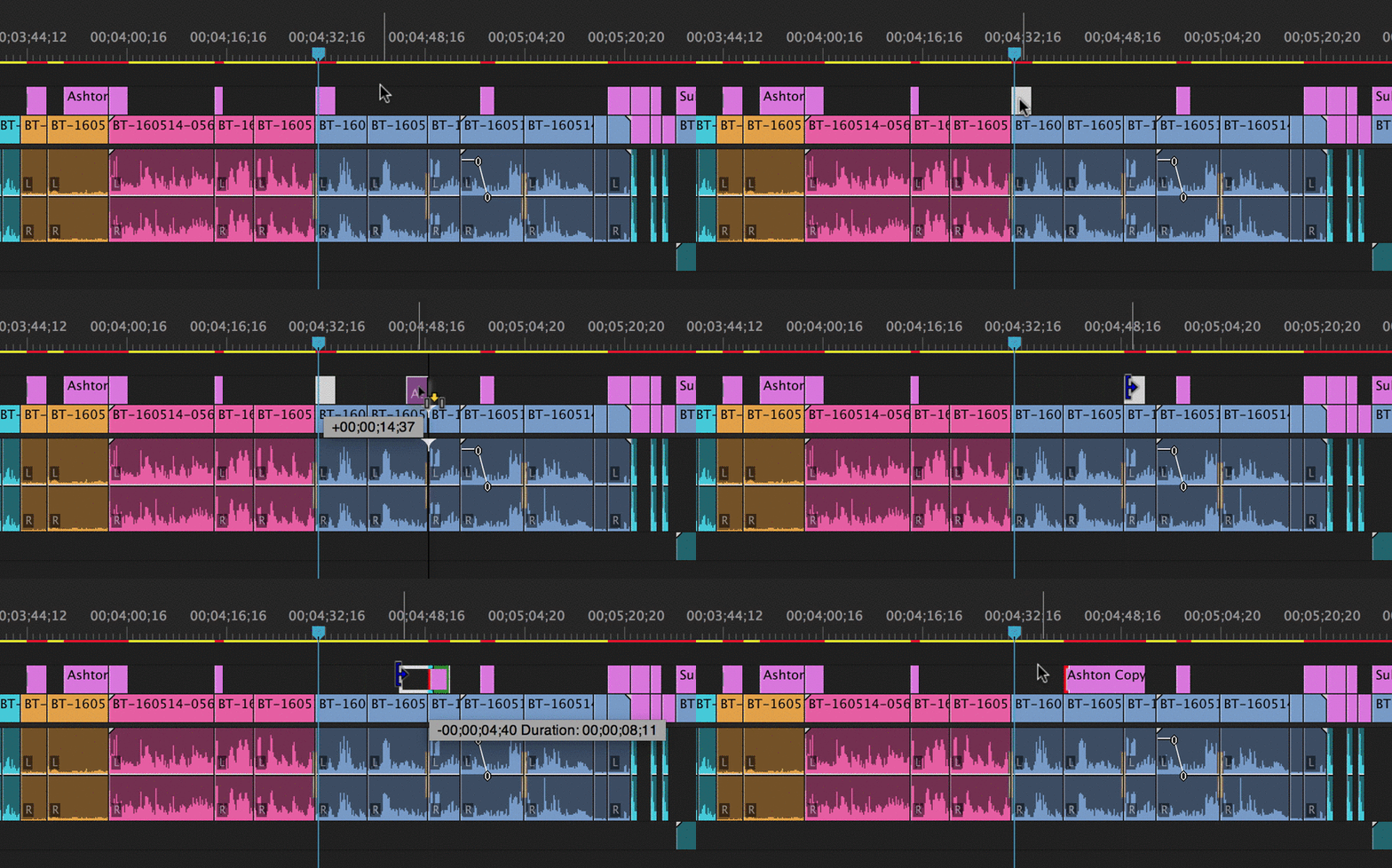
4) Understand Video and Audio Formats

When it comes to Adobe Premiere Pro Tips for Beginners, understanding video and audio formats is key. Knowing the various types of video and audio formats can make all the difference when editing with Adobe Premiere Pro. When importing media into your project, pay attention to the format type. Different formats have different characteristics, so it’s important to understand them in order to pick the right one for your project.

Common Video Formats are: AVI, MOV, MP4, and MPEG.

Common Audio Formats are: WAV, AIFF, MP3, and AAC.

It’s also important to consider the file size of the video and audio formats you are using. Bigger files will require more storage space on your hard drive and also lead to longer rendering times. Adobe Premiere Pro makes it easy to preview your videos in different formats so you can get an idea of how they will look when rendered.

In summary, understanding video and audio formats is a critical part of Adobe Premiere Pro Tips for Beginners. Familiarizing yourself with common video and audio formats and knowing the characteristics of each can save you time and help you create better projects with Adobe Premiere Pro.

5) Trim and Split Clips

Being able to trim and split clips is an important skill for any video editor, and Adobe Premiere Pro Tips for Beginners are no different. To trim a clip, simply select it in the timeline and drag one of the edges to shorten or lengthen the clip. Splitting a clip is similarly easy; just select it in the timeline and press “S” on your keyboard. This will split the clip into two separate clips. You can then move, delete, or adjust each clip individually. If you want to get more precise with your splits, you can zoom in and drag the edges of the clip to exactly where you want them.

6) Adjust Clip Speed

One of the Adobe Premiere Pro tips for beginners is learning how to adjust clip speed. Clip speed is the rate at which a video plays back, and can be adjusted to help create a certain mood or effect. For example, if you want to make a scene look slow-motion, you can speed it up to half the original speed.

To adjust the speed of a clip in Adobe Premiere Pro, right-click on it and select “Speed/Duration” from the drop-down menu. Then, drag the clip out to the desired length, and use the “Speed” setting to adjust the playback speed. You can also use the “Ripple Edit” tool to extend or shorten clips to match the length of other clips in your timeline. This tool will automatically adjust the speed of all following clips so that they are in sync with the rest of your project.

By using these simple Adobe Premiere Pro tips for beginners, you can easily adjust the speed of any clip in your project and make sure everything is perfectly in sync.

7) Add Transitions

Adding transitions to your Adobe Premiere Pro project is an essential part of creating a professional-looking video. Transitions can help to smooth the transition between two clips, adding energy and excitement to your editing process. Adobe Premiere Pro has a wide selection of transition effects to choose from. To add a transition, select the transition you want to use and drag it between two clips in the timeline. You can adjust the duration of the transition in the effect controls panel. By experimenting with different transitions, you can create a unique look for your video. These Adobe Premiere Pro tips for beginners will help you get the hang of adding transitions quickly and easily.

8) Add Titles and Text

Adding titles and text to your video can help engage your audience and provide the necessary information. With Adobe Premiere Pro, you have a wide range of tools at your disposal to create professional-looking titles and text effects. To add titles and text to your project, select the Titles tab in the Project panel, then drag the title you want to add onto the timeline. Once it is on the timeline, you can adjust the font, color, size, position, and many other settings. You can also create motion graphics by animating the position, scale, rotation, and other properties of your titles. For more Adobe Premiere Pro Tips for Beginners, use the Type tool in the Program monitor to add text directly to your timeline. Select the Type tool, type in your text, adjust the font and other settings, then drag and drop it into the timeline. With Adobe Premiere Pro, you have all the tools you need to create high-quality titles and text effects for your videos.

9) Export Your Video

When your video is ready to be shared with the world, you’ll need to export it. Exporting your video with Adobe Premiere Pro can be a bit daunting at first, but with these Adobe Premiere Pro tips for beginners, you’ll be able to master this skill in no time!

First, click on the “File” menu and then select “Export”. From there, you’ll be presented with a wide range of export options, including the format you want to save your video as. Depending on what type of device you’re exporting to (e.g. a laptop or a smartphone) and what you intend to do with the video (e.g. share it on social media or upload it to YouTube), you should choose the appropriate format for your project.

Once you’ve chosen the format for your video, the next step is to adjust the bitrate settings for your video file. Bitrate is a measure of how much data is used to store a single second of video and is directly related to video quality and file size. Generally speaking, higher bitrates will result in better video quality, but also larger file sizes. You can experiment with different bitrates and decide which one works best for your project.

Finally, click “Export” and Adobe Premiere Pro will create an output file according to your settings. You can then share the video file or upload it to your desired platform.

By following these Adobe Premiere Pro tips for beginners, you’ll be well on your way to becoming a master editor and creating professional-looking videos in no time!

Conclusion

As a beginner, Adobe Premiere Pro can be intimidating, but with the right tips and tricks, you can create amazing videos. The nine tips discussed above are some of the essential Adobe Premiere Pro tips for beginners, allowing them to master the basics of video editing and create stunning projects. With practice and perseverance, anyone can become an experienced Adobe Premiere Pro user. Start by familiarizing yourself with the interface and keyboard shortcuts, then progress to learning more advanced editing tools. Mastering these Adobe Premiere Pro tips for beginners will get you well on your way to becoming an expert in no time.


Leave a Comment

Your email address will not be published. Required fields are marked *