
To block spam calls, turn on your phone’s built-in filter first. On an iPhone with iOS 26, go to Settings, Apps, Phone and set Screen Unknown Callers to Ask Reason for Calling or Silence. On Android, open the Phone app’s settings and turn on Filter spam calls. Then add your carrier’s free blocker and register on your country’s Do Not Call list.
Below are nine easy ways to block spam calls on iPhone and Android, plus how to report scammers.
[ADD PERSONAL EXPERIENCE: one line about how many spam calls you were getting and what helped most.]
Table of Contents
Why Spam Calls Are So Common
Robocall systems can dial millions of numbers a day, and many use fake caller ID that looks local. Your number may also have leaked in a data breach or been shared by apps and websites. The goal is usually to sell something, or to scam you with fake bank, tax, delivery or tech support calls.
9 Easy Ways to Block Spam Calls
1. Turn on Call Screening on iPhone
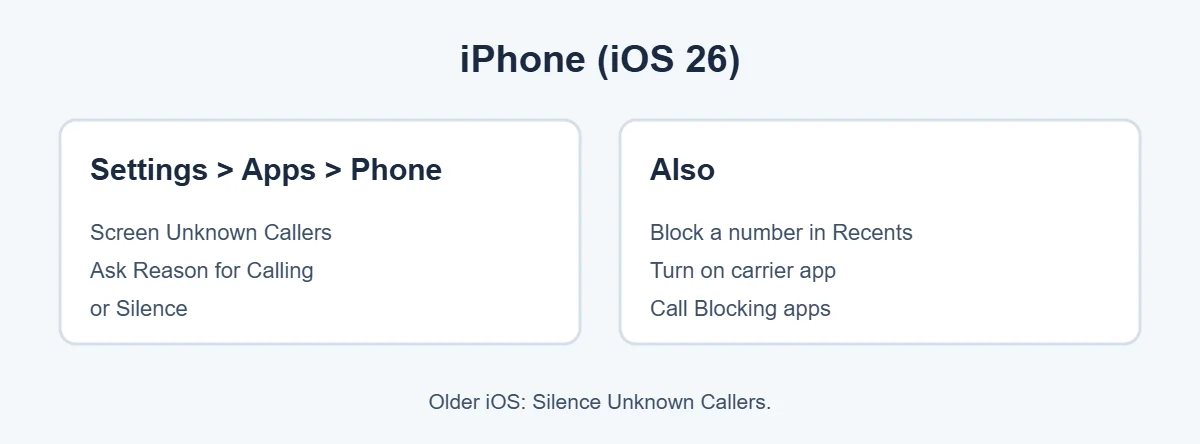
On iOS 26, go to Settings, Apps, Phone. Under Screen Unknown Callers, choose:
- Ask Reason for Calling: your iPhone answers unknown callers and asks who they are and why they’re calling. You see their answer before deciding to pick up. Most robocalls just hang up.
- Silence: unknown callers go straight to voicemail without ringing.
Calls from contacts and numbers you’ve called recently still ring normally. On older iOS versions, use Silence Unknown Callers in the Phone settings.
2. Turn on spam filtering on Android
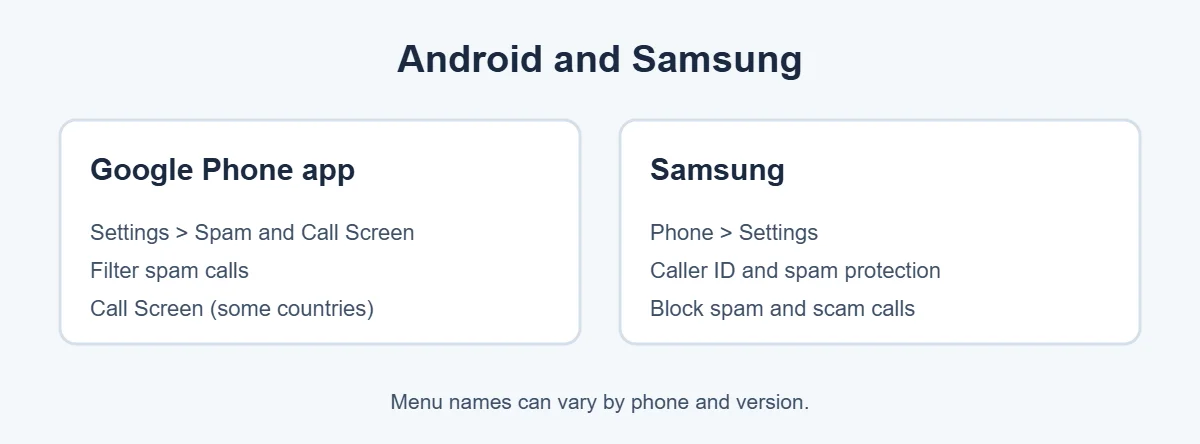
In the Google Phone app, tap the three dots, Settings, Spam and Call Screen (or Caller ID & spam), and turn on See caller and spam ID and Filter spam calls. On Pixel phones in supported countries, Call Screen can answer unknown calls for you.
3. Turn on spam protection on Samsung
Open the Phone app, tap the three dots, Settings, then Caller ID and spam protection. Turn it on and choose to block spam and scam calls.
4. Use your carrier’s free blocker
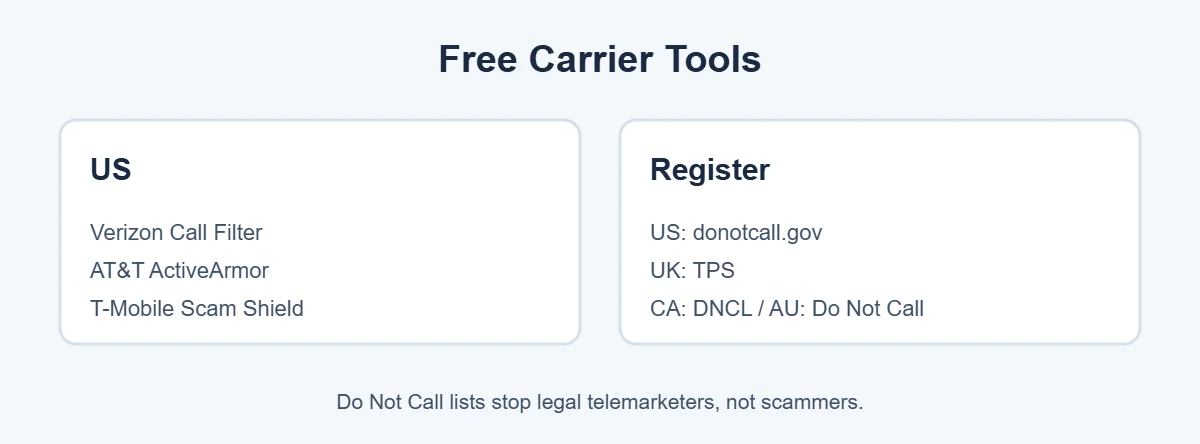
Most big carriers include free spam protection:
- Verizon: Call Filter app.
- AT&T: ActiveArmor.
- T-Mobile: Scam Shield.
In the UK, Canada and Australia, many carriers also block known scam numbers automatically. Check your carrier’s app or website for options.
5. Block individual numbers
- iPhone: open Recents, tap the info button next to the number, then Block Caller.
- Android: open Recents, press and hold the number, then choose Block/report spam.
6. Register on the Do Not Call list
- US: donotcall.gov
- UK: Telephone Preference Service (TPS)
- Canada: National Do Not Call List (DNCL)
- Australia: Do Not Call Register
It’s free. It stops most legal sales calls, though scammers ignore it.
7. Don’t answer unknown numbers
Let unknown calls go to voicemail. Real callers leave a message. Answering or pressing buttons tells robocallers your number works.
8. Use a trusted call-blocking app
Apps like Hiya, Robokiller and Truecaller add bigger spam databases and extra features. Many have free and paid versions. Check the privacy policy, since some apps upload your contacts.
9. Report spam calls
Reporting helps carriers and regulators block numbers for everyone. In the US, report at donotcall.gov or ReportFraud.ftc.gov. In the UK, use Action Fraud. In Canada, the Canadian Anti-Fraud Centre. In Australia, Scamwatch.
For more simple guides, visit TrickieTech.
Common Spam and Scam Calls to Watch For
| Call type | What they say | What to do |
|---|---|---|
| Fake bank | “Suspicious charge on your card, press 1” | Hang up and call the number on your card |
| Tax or government | “You owe taxes, pay now or be arrested” | Hang up; tax agencies don’t threaten by phone |
| Delivery | “Your package is held, confirm details” | Check tracking in the official app |
| Tech support | “Your computer has a virus” | Hang up; never give remote access |
| Car warranty | “Your vehicle warranty is expiring” | Hang up and block |
| Family emergency | “Grandma, I’m in trouble, send money” | Call the family member directly |
| One-ring calls | Calls that ring once from abroad | Don’t call back; it may be premium rate |
Watch Out for AI Voice Scams
Even if you block spam calls, some get through. Scammers can now copy a person’s voice from short clips posted online. A call might sound exactly like your child, parent or boss asking for urgent money. To protect your family:
- Agree on a family safe word that only you know.
- If a loved one calls asking for money, hang up and call them back on their real number.
- Be suspicious of any call that demands gift cards, wire transfers or crypto.
Block Spam Calls on a Landline
Landlines get lots of robocalls, especially for older people. To block spam calls on a landline, options include:
- Ask your phone provider about free call blocking or anonymous call rejection.
- Buy a phone with a built-in call blocker that only lets approved numbers ring through.
- Register the landline on the Do Not Call list too.
Stop Spam Texts Too
Spam texts often come with spam calls, so once you block spam calls, filter texts too. On iPhone, go to Settings, Apps, Messages and turn on Filter Unknown Senders. On Android, open Google Messages, tap your profile, Messages settings, Spam protection and turn it on. Forward scam texts to 7726 in the US and UK, then delete them. Never tap links in unexpected texts.
Keep Your Number More Private
- Don’t post your phone number on social media.
- Use a second number (like Google Voice in the US) for shop sign-ups and online forms.
- Untick boxes that let companies share your details with “partners.”
- Check if your number leaked in a data breach and be extra careful with calls afterward.
What If You Already Answered a Scam Call?
- You only said hello: no harm done. Block and move on.
- You gave personal details: watch your accounts and consider a credit freeze if you gave ID numbers.
- You gave card or bank details: call your bank immediately using the number on your card.
- You gave remote access to your computer: disconnect from the internet, uninstall the remote app, run a full scan and change passwords.
- You sent money: contact your bank or the payment service straight away and report it to the authorities.
Real-Life Examples
“I was getting five spam calls a day”
The easiest way to block spam calls here was turning on iPhone Call Screening with Ask Reason for Calling. It stopped almost all of them, because robocalls hang up when asked who they are.
“My mum kept answering scam calls on her Android”
Turning on Filter spam calls in the Phone app and the carrier’s free blocker cut them down a lot.
[ADD PERSONAL EXPERIENCE: add a short real example if you have one.]
Quick Checklist
- Turn on Call Screening (iPhone) or spam filtering (Android).
- Turn on your carrier’s free spam blocker.
- Block repeat numbers.
- Register on the Do Not Call list.
- Don’t answer or call back unknown numbers.
- Filter spam texts too.
- Report scam calls.
- Agree on a family safe word.
How Call Screening Works, Simply
Call screening is the most powerful way to block spam calls without missing real ones. When an unknown number calls, your phone answers for you with a recorded message asking who’s calling and why.
A real person, like a doctor’s office or delivery driver, says their name and reason. You see their words as text on your screen and can pick up, send a quick reply, or ignore it.
Most robocalls can’t respond, so they hang up. That’s why screening works better than blocking numbers one by one.
Will You Miss Important Calls?
It’s a fair worry. Here’s how to avoid missing calls that matter:
- Save important numbers as contacts: your doctor, school, bank, pharmacy and workplace.
- Use screening rather than silence if you often get calls from new numbers, like job interviews or deliveries.
- Check voicemail and call screening transcripts once a day.
- Recently called numbers usually ring through, so returning a call to a new number works normally.
- Emergency calls: on iPhone, if you call emergency services, unknown-caller filtering is paused for a while so emergency services can call you back.
Spam Calls on Work Phones
If your work phone gets spam calls, check with your IT team before installing apps. Many companies use managed phones with their own call filtering. You can still use built-in phone settings and block repeat numbers, and you should report scam calls pretending to be from your company, your bank or your IT department to your security team.
Simple Words You’ll See
- Robocall: an automated call with a recorded message.
- Spoofing: faking the caller ID number, often to look local.
- Call screening: your phone answers unknown calls and asks why they’re calling.
- Do Not Call list: a free register that tells legal telemarketers not to call you.
- Vishing: voice phishing, scams done by phone call.
Block Spam Calls for Older Parents
Older relatives are top targets for scam callers. To block spam calls on their phone, set it up for them in one visit:
- Turn on Call Screening (iPhone) or Filter spam calls (Android).
- Add family, doctors and other important numbers as contacts, so they always ring.
- Install the carrier’s free spam blocker if it isn’t already on.
- Register their numbers, mobile and landline, on the Do Not Call list.
- Write a short note by the phone: “Never give bank details or codes on a call. Hang up and call back.”
Then check in every few weeks. Ask whether any strange calls got through, and block spam calls from repeat numbers together.
Does Paying for a Spam Blocker Help?
Paid call-blocking apps can block spam calls a little better, thanks to bigger spam databases, automatic voicemail transcription and features like answering robocalls with recorded “bots.” For most people, though, free tools are enough: your phone’s built-in screening plus your carrier’s free blocker. Try free first, and pay only if spam still gets through.
How Long Until Spam Calls Drop?
Built-in screening works from the very next call, so you’ll notice fewer rings straight away. Do Not Call registration can take up to a month to cut legal sales calls in the US. Spam from scammers won’t stop completely, because they keep changing numbers, but with screening and your carrier’s blocker on, most people see a big drop within a week.
Keep reporting the ones that slip through. Each report helps carriers block spam calls from that source for everyone.
Block Spam Calls on Other Devices
Spam calls don’t only ring your phone. If you use other devices for calls, set them up too:
- Apple Watch, iPad and Mac: they follow your iPhone’s settings when Calls on Other Devices is on, so Call Screening and blocked numbers usually apply there too.
- Smartwatches on Android: calls are filtered by your phone’s Phone app before they reach the watch.
- Google Voice (US): open Settings and turn on Filter spam for calls, messages and voicemail.
- WhatsApp: go to Settings, Privacy, Calls and turn on Silence unknown callers to stop spam WhatsApp calls.
- Home phones and VoIP lines: check your provider’s online account for call-blocking features.
Covering every device closes the gaps scammers use and keeps your phone calm.
Check Your Settings Every Few Months
Phone updates sometimes add new spam features or change menu names. After a big iOS or Android update, open your Phone settings and make sure your spam filter and call screening are still on. Also check your blocked list and remove any numbers you blocked by mistake, like a new doctor or school, so their calls get through again.
Frequently Asked Questions
How do I stop spam calls for free?
Turn on your phone’s built-in protection: Screen Unknown Callers on iPhone with iOS 26, or Filter spam calls in the Android Phone app. Add your carrier’s free spam blocker, like Verizon Call Filter, AT&T ActiveArmor or T-Mobile Scam Shield. Register on your country’s Do Not Call list.
Why am I getting so many spam calls?
Your number may have leaked in a data breach, been sold by apps or websites, or simply been dialed at random by robocall systems. Answering or pressing buttons tells callers your number is active, which can lead to more calls. Let unknown numbers go to voicemail.
Does the Do Not Call Registry stop spam calls?
It stops most legal telemarketing calls from companies that follow the rules. Scammers ignore it. So registering helps cut sales calls, but you still need your phone’s spam filter and your carrier’s blocker to stop scam robocalls.
Should I answer spam calls to say stop?
No. Answering, talking or pressing a number to “be removed” confirms your number is active and can lead to more calls. Don’t engage. Let it go to voicemail, block the number, and report it.
Will blocking a number stop all spam calls?
Not really. Spammers change numbers constantly and often spoof local numbers. Blocking helps with a repeat caller, but filtering unknown callers with Call Screening or spam protection works much better overall.
Where do I report scam calls?
In the US, report unwanted calls at donotcall.gov and fraud at ReportFraud.ftc.gov. In the UK, report to Action Fraud and forward scam texts to 7726. In Canada, report to the Canadian Anti-Fraud Centre, and in Australia to Scamwatch.
The Bottom Line
The best way to block spam calls is to filter unknown callers with your phone’s built-in tools, then add your carrier’s free blocker.
Register on the Do Not Call list for sales calls, never engage with robocalls, and report scams so others are protected too.
{“@context”:”https://schema.org”,”@type”:”FAQPage”,”mainEntity”:[{“@type”:”Question”,”name”:”How do I stop spam calls for free?”,”acceptedAnswer”:{“@type”:”Answer”,”text”:”Turn on your phone’s built-in protection: Screen Unknown Callers on iPhone with iOS 26, or Filter spam calls in the Android Phone app. Add your carrier’s free spam blocker, like Verizon Call Filter, AT&T ActiveArmor or T-Mobile Scam Shield. Register on your country’s Do Not Call list.”}},{“@type”:”Question”,”name”:”Why am I getting so many spam calls?”,”acceptedAnswer”:{“@type”:”Answer”,”text”:”Your number may have leaked in a data breach, been sold by apps or websites, or simply been dialed at random by robocall systems. Answering or pressing buttons tells callers your number is active, which can lead to more calls. Let unknown numbers go to voicemail.”}},{“@type”:”Question”,”name”:”Does the Do Not Call Registry stop spam calls?”,”acceptedAnswer”:{“@type”:”Answer”,”text”:”It stops most legal telemarketing calls from companies that follow the rules. Scammers ignore it. So registering helps cut sales calls, but you still need your phone’s spam filter and your carrier’s blocker to stop scam robocalls.”}},{“@type”:”Question”,”name”:”Should I answer spam calls to say stop?”,”acceptedAnswer”:{“@type”:”Answer”,”text”:”No. Answering, talking or pressing a number to \”be removed\” confirms your number is active and can lead to more calls. Don’t engage. Let it go to voicemail, block the number, and report it.”}},{“@type”:”Question”,”name”:”Will blocking a number stop all spam calls?”,”acceptedAnswer”:{“@type”:”Answer”,”text”:”Not really. Spammers change numbers constantly and often spoof local numbers. Blocking helps with a repeat caller, but filtering unknown callers with Call Screening or spam protection works much better overall.”}},{“@type”:”Question”,”name”:”Where do I report scam calls?”,”acceptedAnswer”:{“@type”:”Answer”,”text”:”In the US, report unwanted calls at donotcall.gov and fraud at ReportFraud.ftc.gov. In the UK, report to Action Fraud and forward scam texts to 7726. In Canada, report to the Canadian Anti-Fraud Centre, and in Australia to Scamwatch.”}}]}