
ChatGPT Plus is worth it if you use ChatGPT most days for work, study or research and keep hitting the free plan’s limits; for casual questions, the free plan or the cheaper ChatGPT Go is enough. Plus costs \$20 a month in the US and adds OpenAI’s stronger GPT-6 “Sol” reasoning models, more deep research runs, a larger memory, expanded agent tools and no ads.
The real question isn’t whether Plus is good. It’s whether you would use the extra power often enough to justify \$240 a year. This guide walks through every personal plan as of November 2026, who each one suits, and a quick test you can run before paying.
Plans, limits and model names change often. Everything below was checked against OpenAI’s pricing and help pages on November 6, 2026.
Is ChatGPT Plus worth it? The quick answer
ChatGPT Plus is worth it for people who rely on ChatGPT daily and need deeper reasoning, longer documents or more research runs. It isn’t worth it if you use ChatGPT a few times a week for short questions, because the free plan already offers unlimited everyday text chats.
Here’s the short version by user type:
- Casual users (recipes, quick questions, short emails): stay on Free.
- Regular users on a budget who want more images, longer memory and voice with video: try Go.
- Daily power users (students writing papers, freelancers, analysts, coders): Plus is the sweet spot.
- Professionals running long agent or coding sessions all day: look at Pro.
What is ChatGPT Plus and how much does it cost?
ChatGPT Plus is OpenAI’s \$20-per-month personal subscription that adds its advanced reasoning models and higher usage limits. It sits between the cheaper Go plan and the premium Pro plan.
As of November 6, 2026, the US prices for personal plans are:
- Free: \$0
- Go: \$8/month (launched worldwide in January 2026, according to MacRumors)
- Plus: \$20/month (OpenAI Help Center)
- Pro: from \$100/month, with three usage tiers. Third-party trackers such as GeoToolbox list them at \$100, \$200 and \$500.
OpenAI’s pricing FAQ says Go and Plus are billed monthly only; annual billing is for Business and Enterprise. Prices can differ by country and in app stores, so always confirm the final figure at checkout.
ChatGPT Free vs Go vs Plus vs Pro
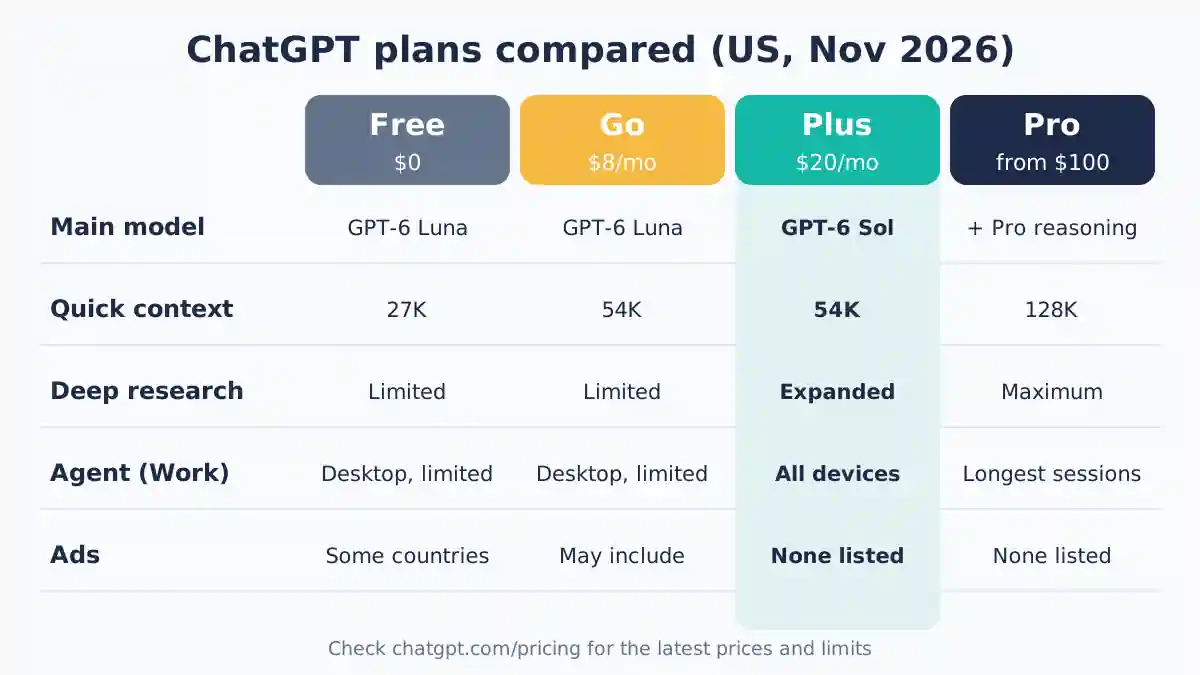
The biggest differences between the plans are the models you get, how much the AI can “hold in mind” at once, research and agent limits, and whether you see ads. The table below summarizes OpenAI’s official comparison as of November 6, 2026.
| Feature | Free | Go | Plus | Pro |
|---|---|---|---|---|
| US price | \$0 | \$8/mo | \$20/mo | From \$100/mo |
| Main chat model | GPT-6 Luna | GPT-6 Luna | GPT-6.1 Sol, GPT-6 Sol + others | Everything in Plus + Pro reasoning (GPT-6 Astra) |
| Everyday text chats | Unlimited* | Unlimited* | Unlimited* | Unlimited* |
| Quick-answer context window | 27K tokens | 54K | 54K | 128K |
| Reasoning context window | Varies | 256K | 256K | 400K |
| Deep research | Limited | Limited | Expanded | Maximum |
| Image creation | Limited | More | More complex and accurate | Unlimited, faster |
| Voice with video | No | Yes | Yes | Yes |
| ChatGPT Work (agent) | Limited, desktop | Limited, desktop | Expanded: desktop, web, mobile | Longer sessions + always-on agent |
| Ads | May appear in some countries | May include ads | Not listed | Not listed |
*”Unlimited” is subject to OpenAI’s abuse guardrails. Tools like file uploads, image creation and data analysis have separate limits.
A context window is the amount of text the AI can read and remember within one conversation, measured in tokens (roughly three-quarters of a word each). A bigger window means you can paste longer reports or keep longer chats without the model losing track. OpenAI estimates that the Plus quick-answer window fits about 40 pages of input, versus about 12 pages on Free.
What you actually get with ChatGPT Plus
ChatGPT Plus gives you four practical upgrades over Free: smarter models, more room for long documents, more research and agent time, and an ad-free experience. Here’s what each means in day-to-day use.
Stronger reasoning models
Plus adds OpenAI’s “Sol” family (GPT-6.1 Sol and GPT-6 Sol) and several GPT-5.6 models, while Free and Go run on the lighter GPT-6 Luna. Reasoning models take a little longer but plan their answer step by step, which shows up in math, code, contract reviews and multi-part questions.
Example: ask Free to compare three phone plans with different data caps and family discounts, and you’ll usually get a decent summary. Plus is more likely to build a correct month-by-month cost table and flag the cheapest option after the promo ends.
More context and memory
Plus has double Free’s quick-answer context (54K vs 27K tokens) and a 256K reasoning window. In practice, that’s the difference between pasting one chapter of your thesis and pasting most of it. Plus also gets “expanded” memory, so ChatGPT remembers more of your preferences across chats.
Deep research, ChatGPT Work and Codex
Deep research is a mode where ChatGPT spends several minutes browsing many sources and writes a cited report. Free and Go get a limited number; Plus gets “expanded” access.
ChatGPT Work is OpenAI’s agent: it can carry out multi-step tasks such as filling forms or gathering information across sites. Plus users get expanded access on desktop, web and mobile, while Free and Go are limited to the desktop app. Codex, OpenAI’s coding agent, also gets expanded usage on Plus.
[ADD PERSONAL EXPERIENCE: Describe one real task you ran on both Free and Plus (e.g., summarizing a 30-page PDF or planning a trip), and what was different about the results and the time it took.]
No ads
OpenAI says ads may appear on the Free tier in certain countries, and its Go plan page states the plan may include ads. Plus and Pro list no ads. If ads in your answers bother you, that alone may justify Plus.
Who is ChatGPT Plus worth it for?
ChatGPT Plus is worth it when it replaces paid time or another tool. If it saves you even one hour of work a month, \$20 is usually a good trade.
Plus is likely worth it if you:
- Write or edit for work every week and paste long documents.
- Study seriously, especially STEM, law or research-heavy subjects where reasoning models help.
- Code, even as a hobby, and want expanded Codex use.
- Run research on products, markets or travel and want cited reports.
- Hit limits on Free (images, uploads, voice or “Think” mode) more than once a week.
- Want an ad-free experience across web and mobile.
Plus is probably not worth it if you:
- Use ChatGPT a few times a week for quick questions.
- Mainly want simple writing help, like short emails or captions.
- Already pay for another AI assistant you’re happy with.
- Can get access through work or school (a Business or Edu seat covers you).
Three real-world scenarios
Seeing how different people actually use ChatGPT makes the decision easier. Here are three common profiles and the plan that fits each.
Maria, a nursing student. She uses ChatGPT almost daily to quiz herself, summarize lecture notes and check care-plan reasoning. She often pastes 30-page study guides, which overflow the free plan’s 27K-token window. Plus fits: the bigger context and reasoning models save her hours each week during exams.
Dan, a retired teacher. He asks ChatGPT for recipes, travel ideas and help with the odd email, maybe five times a week. He rarely hits a limit and doesn’t mind the occasional ad. Free is plenty, and paying \$240 a year would be wasted money.
Priya, a freelance marketer. She drafts client copy, makes social images and wants voice chats while driving between meetings. She doesn’t need heavy reasoning, but she runs out of image credits on Free. Go at \$8 covers her needs; if clients start asking for research reports, she can move up to Plus.
How to get more out of ChatGPT Free before you pay
You can stretch the free plan a long way with a few habits. Try these for two weeks before upgrading, because they often remove the reason to pay.
- Use “Think” when it matters. OpenAI’s free-tier FAQ says Free users can turn on Think from the + menu for harder questions. Save it for tasks that need careful reasoning.
- Split long documents. Paste one section at a time and ask for a summary of each, then a final summary of the summaries.
- Start fresh chats for new topics. Long, rambling threads use up the context window faster and lead to vaguer answers.
- Write clearer prompts. Say who the answer is for, the format you want and any limits (“a 5-bullet summary for a non-expert”).
- Use the Library. Free accounts get 500 MB of file storage, so you can reuse documents instead of re-uploading them.
If you still hit walls after this, that’s a strong signal that Plus (or Go) will pay for itself.
The cost-per-use test
The simplest way to decide is to divide the price by how often you’d use it. At \$20 a month, Plus costs about 66 cents a day.
| Your usage | Cost per use | Verdict |
|---|---|---|
| 2 sessions a week | ~\$2.30 | Probably not worth it |
| 1 session a day | ~\$0.66 | Worth it if Free limits annoy you |
| 3+ sessions a day | ~\$0.22 or less | Very likely worth it |
Run this for two weeks: each time you open ChatGPT, note whether Free did the job or whether you hit a limit or got a weak answer. If you hit a wall at least three or four times a week, upgrade. If not, save your money.
ChatGPT Go vs Plus: which should you pick?
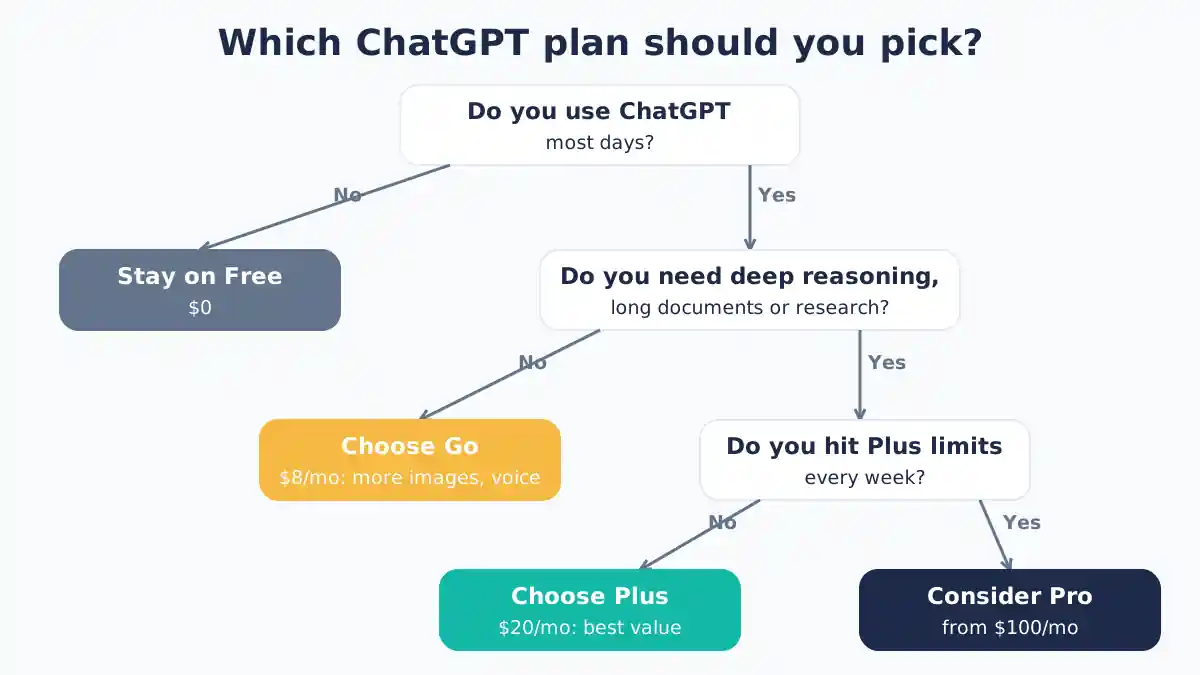
ChatGPT Go is the better buy if you want more than Free offers but don’t need advanced reasoning; Plus is better if your work depends on accuracy with complex tasks. Go costs \$8 a month, \$12 less than Plus.
Go gives you more image creation, longer memory, voice with video, scheduled tasks and the same 54K quick-answer window as Plus. What you give up is the Sol reasoning models, expanded deep research, wider agent access and an ad-free plan.
Pick Go if you’re a student or casual user who wants fewer limits on a budget. Pick Plus if you regularly ask ChatGPT to analyze, calculate or reason through something important.
ChatGPT Plus vs Pro: when is Pro worth it?
ChatGPT Pro is only worth it for professionals who use ChatGPT for hours a day and keep hitting Plus limits. At five to 25 times the price of Plus, it’s a work tool, not a consumer upgrade.
Pro adds Pro-level reasoning on GPT-6 Astra, a 128K quick-answer window, a 400K reasoning window, maximum deep research, unlimited image creation, and longer Codex and ChatGPT Work sessions. It also includes “Dot,” which OpenAI describes as an always-on agent.
If you can’t name a specific task where Plus runs out, you don’t need Pro. If your income depends on long coding or research sessions, the time saved can justify it.
How to try ChatGPT Plus before committing, and how to cancel
The safest approach is to upgrade for one month during a busy period, track how often you use the new features, and cancel before renewal if it didn’t pay off. You can cancel anytime from your account.
Steps to keep in mind:
- Upgrade from the ChatGPT app or website using the “Upgrade plan” option. OpenAI says your Free usage limits reset when you upgrade.
- Set a reminder a few days before renewal.
- Cancel in your account under the subscription settings. OpenAI’s help page says to cancel at least 24 hours before your billing date to avoid the next charge.
- Know the refund rules. OpenAI states subscription fees are non-refundable, with a 14-day refund window only for customers in the EU, UK and Turkey. If you subscribed through Apple or Google Play, cancel there instead.
FAQ
How much is ChatGPT Plus per month?
ChatGPT Plus costs \$20 per month in the US as of November 2026, billed monthly. OpenAI doesn’t offer an annual Plus plan on its own site. Prices can vary by country, taxes and app store, so check the final amount at checkout before you subscribe.
What’s the difference between ChatGPT Go and Plus?
Go costs \$8 a month and gives more images, longer memory and voice with video, but runs on the lighter GPT-6 Luna model and may show ads. Plus costs \$20 and adds the stronger Sol reasoning models, expanded deep research, wider ChatGPT Work access and no ads listed.
Is ChatGPT Plus worth it for students?
It depends on your subject. Students writing long papers, coding or studying math and science get real value from Plus’s reasoning models and bigger context window. For lighter use, Go or Free may be enough. Check whether your school offers ChatGPT Edu, which can make paying yourself unnecessary.
Does ChatGPT Plus have ads?
OpenAI’s official plan pages don’t list ads for Plus as of November 2026. Ads may appear on the Free plan in certain countries, and OpenAI says the Go plan may include ads. If you want an ad-free ChatGPT, Plus is the cheapest personal plan without an ads notice.
Can I get a refund for ChatGPT Plus?
Generally, no. OpenAI states subscription fees are non-refundable, except for customers in the EU, UK and Turkey, who can get a refund within 14 days of purchase. To avoid paying for another month, cancel at least 24 hours before your next billing date.
Is ChatGPT Pro worth it over Plus?
Only for heavy professional use. Pro starts at \$100 a month and adds Pro reasoning, much larger context windows, maximum deep research and longer agent and coding sessions. Most people never hit Plus limits often enough to need it, so try Plus first and upgrade only if it clearly runs out.
Conclusion: is ChatGPT Plus worth it for you?
ChatGPT Plus is worth it if you use ChatGPT daily for work, school or research and keep hitting the free plan’s limits. For occasional questions, Free is excellent, and Go covers the middle ground at \$8. Run the two-week cost-per-use test, upgrade for one month, and keep Plus only if it clearly saves you time.
