
If you use the mSecure password manager, change your master password and then change the passwords for your most important accounts, starting with email and banking. On November 3, 2026, mSecure’s developer emailed current and former customers about “suspicious activity” and told them to protect everything stored in the app. A follow-up said an unauthorized actor obtained an encrypted copy of a customer database.
The company hasn’t explained how it happened, and the advice it sent was vague. This guide turns the mSecure breach into a clear, ordered plan you can finish in an evening, and explains which steps matter most if you’re short on time.
Information in this article is current as of November 7, 2026. The company may release more details, and we’ll update this page if it does.
What happened in the mSecure breach?
The mSecure breach is a security incident in which an unknown party obtained an encrypted copy of a database belonging to mSecure’s current and former users. mSecure is a paid password manager made by mSeven Software, a company based in Lake Oswego, Oregon. A password manager is an app that stores your logins, notes and other secrets in an encrypted “vault” protected by one master password.
Here’s the mSecure breach timeline as reported by several security outlets:
- November 3, 2026: mSeven emailed customers saying it had “recently learned of suspicious activity.” It urged them to act immediately to protect their stored information, listing possible steps such as changing passwords, resetting two-factor authentication (2FA) and removing passkeys (The Hacker News; BleepingComputer).
- Follow-up notice: the company said an unauthorized actor acquired an encrypted copy of a database of current and former users, and that it had no evidence the actor accessed the confidential information inside it. It advised users to change their master password, change vital stored passwords, reset 2FA and replace passkeys (TechRadar).
- November 6, 2026: Malwarebytes noted that support replies shared on mSecure’s forum say only users syncing through mSecure Cloud are affected, but that it had not found a published company statement confirming that scope.
What we still don’t know: how the attacker got in, when it happened, how many people are affected and whether the problem is fully closed. BleepingComputer reported that the company had not publicly explained the cause.
Are you affected by the mSecure breach?
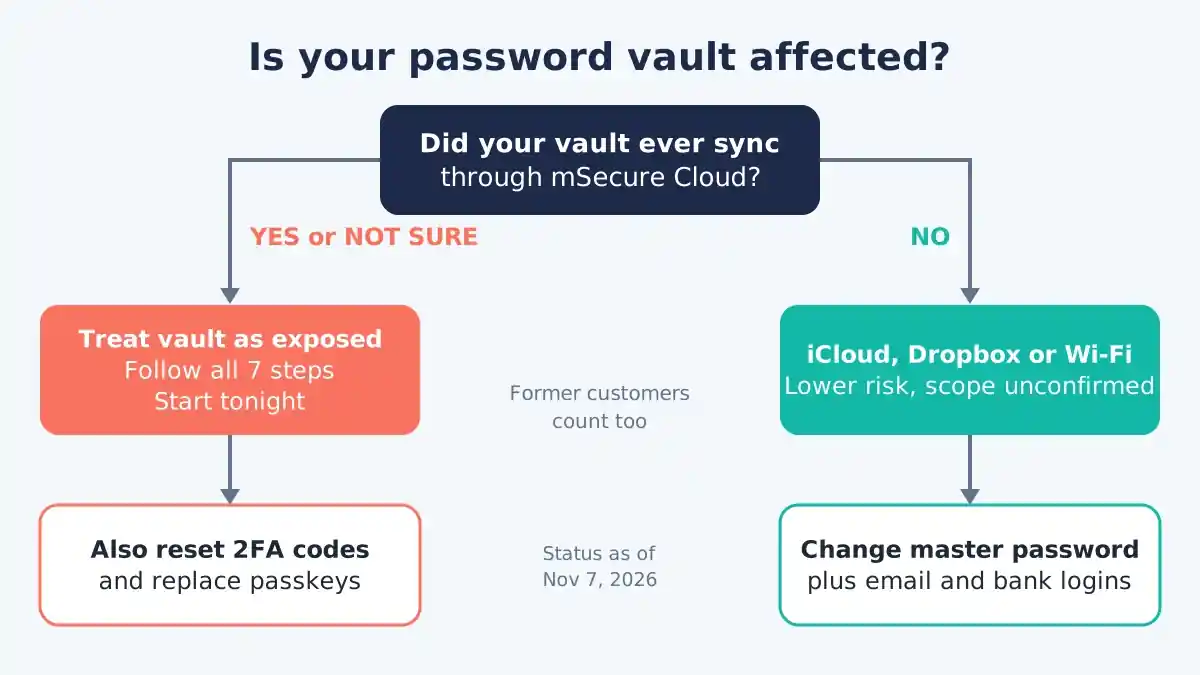
You’re most likely affected if your vault ever synced through mSecure Cloud, and that includes former customers. mSecure lets you sync in four ways: mSecure Cloud, Dropbox, iCloud or local Wi-Fi sync. According to support replies quoted by BleepingComputer and Malwarebytes, the incident concerns mSecure Cloud users only.
mSecure Cloud users
Treat your vault as exposed in the mSecure breach and follow every step below. The stolen copy sits on the attacker’s computer, where they can attack it offline with no lockouts or rate limits.
iCloud, Dropbox or Wi-Fi sync users
Your vault data shouldn’t have been in the stolen database, based on what support has said so far. Because that scope hasn’t been confirmed in a public statement, still change your master password and rotate your email and banking passwords as a precaution.
Former customers
The notice went to former customers too. If you ever used mSecure Cloud, the old vault data may be in the copy, and any password you never changed since then is still worth rotating.
How to check your sync method: open mSecure and look in its settings for the sync section. If you’re not sure which option you chose years ago, assume mSecure Cloud.
[ADD PERSONAL EXPERIENCE: If you or a reader used mSecure, describe what the email looked like, which sync option was set and how long the full password rotation took.]
Why the stolen encrypted vault in the mSecure breach still matters
Encryption protects a stolen vault only as well as the master password that unlocks it. mSecure’s documentation says it uses AES-256 encryption and a “zero-knowledge” design, meaning data is encrypted on your device before it syncs and the company can’t read it (BleepingComputer).
That’s good news, but it isn’t the end of the story. An attacker holding an encrypted copy can try billions of master-password guesses on their own hardware. A long, random master password makes that impractical. A short or reused one does not.
There’s also a catch many people miss: changing your master password today doesn’t change the copy the attacker already has. That copy is still locked with your old master password. This is why every source, including mSecure itself, tells you to change the passwords stored inside the vault, not just the one protecting it. Users of LastPass learned the same lesson after its 2022 breach, when stolen encrypted vaults became a long-term risk.
What to do after the mSecure breach: step by step
The fastest safe plan is: new master password, then email, then money, then everything else, then 2FA codes and passkeys. Work through these steps in order. If you only have 30 minutes tonight, finish steps 1–3.
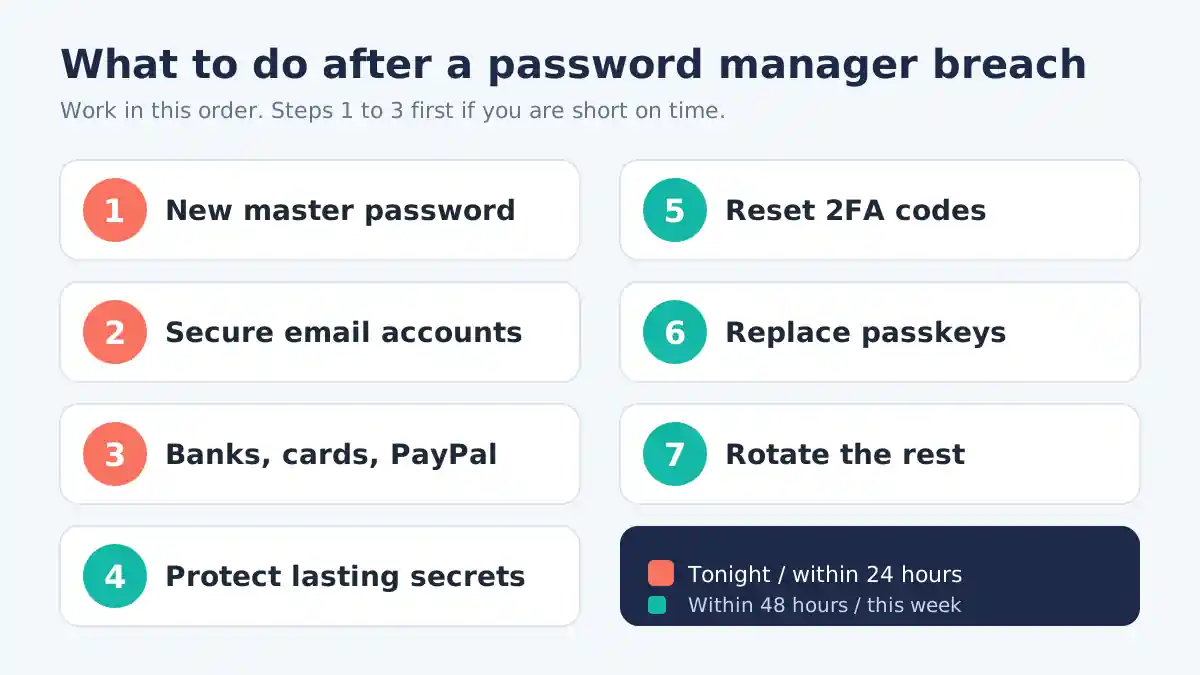
1. Change your mSecure master password
Pick a new master password of at least 16 characters, or a passphrase of five or more random words. Don’t reuse your old one with small changes. This protects your vault from now on, even though it can’t protect the stolen copy.
2. Secure your email accounts first
Your email is the “master key” to most other accounts because password resets go there. Change the password on every email account stored in mSecure, turn on 2FA if it’s off, and sign out of unknown sessions. In Google and Microsoft accounts you can review recent sign-ins from the security page.
3. Change financial and payment passwords
Next, change passwords for your bank, credit card, PayPal, brokerage, crypto exchange and any shopping sites that store a card. If you saved card numbers or bank details in mSecure, watch your statements closely and consider asking your card issuer for a new number.
4. Move anything that can’t be “changed”
Some secrets don’t have a reset button. If you kept a crypto wallet seed phrase in mSecure, move those funds to a new wallet with a new seed phrase. For things like Social Security numbers or passport details stored in secure notes, consider a free credit freeze with Equifax, Experian and TransUnion.
5. Reset 2FA codes stored in mSecure
mSecure 7 can store one-time passcode (OTP) secrets, the codes behind authenticator apps. If yours were in the vault, a cracked vault would hand over both your password and your second factor. For each of those accounts, turn 2FA off and on again, or use “change authenticator,” to generate a new secret. Save new backup codes somewhere separate.
6. Replace passkeys saved in mSecure
A passkey is a passwordless login stored as a cryptographic key. If mSecure held passkeys for you, sign in to each site, delete the old passkey from its security settings and create a new one, ideally stored in a different password manager or your phone’s built-in one.
7. Work through the rest and watch for phishing
Change the remaining passwords over the next week, starting with work accounts, social media, Apple or Google accounts and your mobile carrier. Breaches attract scam emails, so be wary of messages claiming to be from mSecure that ask you to “verify your vault” or click a link. Go to the app or website directly instead.
| Priority | Accounts | Why |
|---|---|---|
| Tonight | Master password, email | Email resets everything else |
| Within 24 hours | Banking, cards, PayPal, crypto | Direct financial loss |
| Within 48 hours | 2FA secrets, passkeys, Apple/Google, phone carrier | Stops account takeovers and SIM swaps |
| This week | Work, social, shopping, everything else | Closes remaining gaps |
Should you keep using mSecure after the breach?
mSecure says there’s no evidence the app is unsafe to use now, but whether you stay depends on how much you trust its response. TechRadar reported that the company also said deleting the app “won’t help,” since the issue is the stolen copy, not the app on your phone.
Malwarebytes suggested temporarily moving to a different password manager while questions remain. Reasonable options include your phone’s built-in manager (Google Password Manager or Apple Passwords) or another reputable paid service. If you switch, export your vault, import it into the new app, rotate your passwords there and then delete the export file.
If you stay, switch your sync to a method the company says wasn’t affected and keep an eye out for an official incident report. A full public explanation of what happened is a fair thing for paying customers to expect.
FAQ
Was mSecure hacked?
Yes. The mSecure breach was confirmed in the company’s own follow-up notice. mSeven Software said an unauthorized actor acquired an encrypted copy of a database of current and former users. It has not explained how this happened or how many people are affected, and says it has no evidence the attacker accessed the confidential vault contents as of November 7, 2026.
Is mSecure safe to use right now?
The company says it has no evidence the app is currently unsafe after the mSecure breach. Still, the cause hasn’t been disclosed. If you keep using it, change your master password, avoid mSecure Cloud sync until more is known, and rotate your important passwords. If trust is the issue, moving to another reputable password manager is a sensible, low-risk choice.
Do I need to change all my passwords?
If the mSecure breach affects you through mSecure Cloud sync, yes, eventually. Start with email, banking and anything that can reset other accounts, then work through the rest over a week. If you used iCloud, Dropbox or Wi-Fi sync, changing your master password and your most important logins is a sensible precaution while the scope remains unconfirmed.
Does changing my master password protect the stolen copy?
No. The stolen copy stays encrypted with whatever master password you had when it was taken. Changing it now protects your vault going forward, but an attacker can still try to crack the old copy offline. That’s why you also need to change the passwords stored inside the vault, especially for email and financial accounts.
What should I do about authenticator codes stored in mSecure?
Re-enroll them. For each account whose one-time-code secret lived in mSecure, disable and re-enable two-factor authentication, or use the site’s “change authenticator” option, so a new secret is created. Store the new code in a separate authenticator app and save fresh backup codes somewhere offline.
The bottom line
The mSecure breach is serious mainly because an encrypted copy of user data is now out of the company’s hands, and its safety depends on how strong your old master password was. Don’t wait for more details: change your master password tonight, secure your email and bank accounts next, then reset any 2FA codes and passkeys that lived in the vault. Keep an eye out for an official statement from mSeven, and treat any “mSecure” email asking you to click a link as a likely scam.
