Physical Address
304 North Cardinal St.
Dorchester Center, MA 02124
Physical Address
304 North Cardinal St.
Dorchester Center, MA 02124

Remove personal info from Google for free with Results about you, then opt out of people-search sites and data brokers. Simple 2026 steps.
To remove personal info from Google, use Google’s free Results about you tool. Open the Google app, tap your profile picture, then Results about you. It finds search results showing your phone number, home address or email and lets you request removal. Then go to the source: opt out of the people-search and data broker sites that publish your details, so they don’t come back.
Below are seven free, easy steps to remove personal info from Google and the sites behind it.
[ADD PERSONAL EXPERIENCE: one line about what you found the first time you searched your own name.]
Google doesn’t create this information. It finds it on other websites. The most common sources are:
Search your full name, your name plus your city, your phone number and your email address. Note every result that shows personal details you want removed.
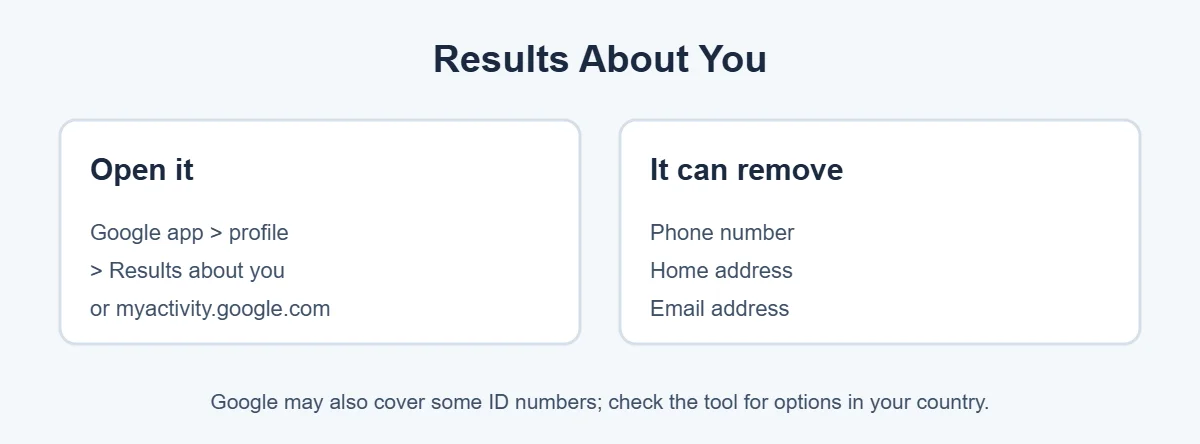
You can also request removal directly from a search result. Tap the three dots next to it, then Remove result.
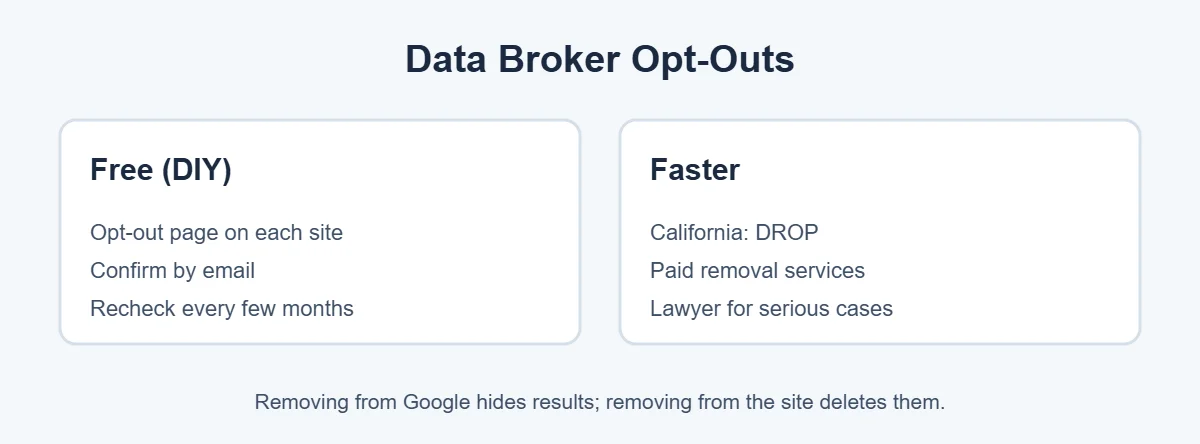
Sites like Whitepages, Spokeo, BeenVerified and many others have an opt-out page, often linked at the bottom of their homepage as “Do not sell my info” or “Opt out.” Search for your profile on the site, copy its link, and submit it on the opt-out page. Many ask you to confirm by email.
Delete or make private old social media accounts, remove your phone number and address from public profiles, and update business listings to use a PO box or business address if possible.
For blogs, forums or other sites, look for a contact or privacy email and politely ask them to remove your details. Once the page is removed or updated, use Google’s Refresh Outdated Content tool so Google updates its results.
Data brokers often add people back. Search yourself again every three to six months, keep Results about you alerts on, and repeat opt-outs when needed.
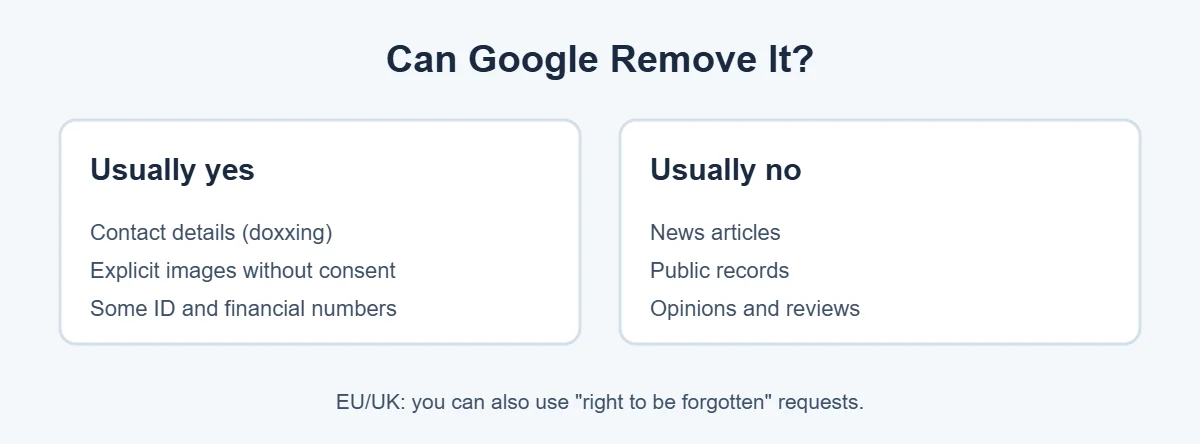
Google will usually remove results with personal contact information shared in a harmful way, explicit images shared without consent, and some sensitive ID or financial numbers. It usually won’t remove news articles, government records or opinions just because you don’t like them. Its full rules are in the Google Search removal policies.
For more simple guides, visit TrickieTech.
Why remove personal info at all? Having your address and phone number easy to find can lead to real problems:
You don’t need to disappear from the internet completely. Removing contact details and home address makes a big difference on its own.
| Do it yourself | Paid service | |
|---|---|---|
| Cost | Free | Usually a yearly subscription |
| Time | Several hours at first, plus regular rechecks | A few minutes to sign up |
| Number of sites | As many as you have time for | Often dozens to hundreds of brokers |
| Repeats removals | Only if you remember | Usually automatic |
| Best for | People with time and a few results | Busy people, many results, higher risk |
Well-known services include DeleteMe, Incogni, Optery and Kanary. Compare which sites they cover, what reports they give you, and the renewal price. Also note that many focus on US data brokers.
Google is the biggest, but not the only search engine. To remove personal info everywhere, check these too.
If intimate images or deepfakes of you are online without your consent, Google has a dedicated removal request for non-consensual explicit imagery, including AI-generated fakes. Use the form, include the links, and Google will review it. In the US, the TAKE IT DOWN Act passed in 2025 requires platforms to remove non-consensual intimate images, including deepfakes, after a valid request. Support organizations like StopNCII.org can help create hashes so participating platforms can block the images.
If you’re escaping domestic abuse or face threats, you may need to remove personal info more carefully. Take extra steps:
Using Results about you to remove personal info took the Google results down within days. Opting out on each site deleted the profiles, and alerts caught one that came back later.
Editing the blog post and using Google’s Refresh Outdated Content tool updated the search result within a week or two.
[ADD PERSONAL EXPERIENCE: add a short real example of a removal you did.]
When you contact a website owner directly, a clear, polite message gets the best results. Include:
Keep a copy of your message and the date you sent it. If there’s no reply after two weeks, send a short follow-up. In the EU and UK, you can mention that you’re making an erasure request under data protection law, which gives companies a legal deadline to respond.
Google requests through Results about you are often reviewed within a few days. Data broker opt-outs can take anywhere from a day to several weeks, depending on the site. Once a website removes your details, Google may take a few days to a few weeks to update its results, and the Refresh Outdated Content tool can speed this up. Plan for about a month to remove personal info from the main sources, then regular checkups to keep it that way.
When you contact a website owner directly, a clear, polite message gets the best results. Include:
Keep a copy of your message and the date you sent it. If there’s no reply after two weeks, send a short follow-up. In the EU and UK, you can mention that you’re making an erasure request under data protection law, which gives companies a legal deadline to respond.
Google requests through Results about you are often reviewed within a few days. Data broker opt-outs can take anywhere from a day to several weeks, depending on the site. Once a website removes your details, Google may take a few days to a few weeks to update its results, and the Refresh Outdated Content tool can speed this up. Plan for about a month to remove personal info from the main sources, then regular checkups to keep it that way.
If you’ve ever run a business from home, your address might appear on Google Maps or in a Business Profile. To change it, sign in to the Google account that manages the profile and edit the address, or choose to hide it if you serve customers at their location. If you don’t own the listing but your home is shown as a business by mistake, open the place on Maps, choose Suggest an edit, and report the problem. You can also request blurring of your house on Street View by opening the image and using Report a problem, which is permanent once done.
Yes. Google’s free Results about you tool lets you request removal of search results that show your phone number, home address or email address, and in some places other sensitive details. You can also contact websites directly and use free data broker opt-out pages.
No. Google only stops showing the result in its search. The page still exists on the original website and can appear in other search engines. To delete the information itself, ask the website or data broker to remove it.
Google usually reviews requests within a few days, and you can track the status in Results about you. Some requests are approved quickly, others need more review. If a request is denied, Google explains why, and you can sometimes resubmit with more details.
Data brokers are companies that collect and sell personal information, like names, addresses, phone numbers, relatives and age. People-search sites show this data publicly. They’re the main reason your details appear on Google, so opting out of them is an important step.
They can save time. Services like DeleteMe, Incogni and Optery send opt-out requests to many data brokers for you and repeat them over time. You can do the same yourself for free, but it takes hours and needs regular rechecks. Choose a well-reviewed service with clear pricing.
DROP (Delete Request and Opt-out Platform) is a free California state tool. California residents can send one deletion request to all registered data brokers. Brokers had to start processing requests from August 1, 2026, and then delete matching records within 90 days.
To remove personal info from Google, start with the free Results about you tool and turn on alerts. Then opt out of people-search sites and data brokers, which is where most of your details come from.
Clean up your own profiles, use privacy tools like California’s DROP if they apply to you, and recheck every few months.