
ChatGPT Wallet is a new OpenAI feature, launched on November 13, 2026, that stores your payment card so ChatGPT’s shopping agents, called “dots,” can complete a purchase for you after you review it and approve it with Face ID or a fingerprint. As of November 14, 2026, it is only open to a limited number of US ChatGPT Pro subscribers aged 18 and up.
That makes ChatGPT Wallet the first time most people will hand an AI chatbot the ability to actually check out. Below is what it does, who can get it, how the approval step protects you, and the gaps to keep in mind before you trust it with a card.
What is ChatGPT Wallet?
ChatGPT Wallet is a payment feature inside ChatGPT that holds an eligible credit or debit card and lets an AI agent pay a merchant on your behalf. You add a card once, ask your dot to find and buy something, then confirm the final order yourself, according to TechCrunch.
A few terms you will see in coverage:
- Dots are OpenAI’s agents in ChatGPT that research products and complete tasks. In shopping, a dot searches, compares and then goes to the merchant’s site to finish the order.
- Agentic checkout is any checkout where software, not you, fills in the order and payment steps.
- A payment token is a stand-in number that represents your card. The merchant and the dot see the token, not your real card number.
Who can use ChatGPT Wallet right now?
ChatGPT Wallet is in a limited US rollout. Both TechCrunch and The Decoder report the same requirements.
| Requirement | Status at launch (Nov 14, 2026) |
|---|---|
| ChatGPT plan | Pro only, and only a limited number of Pro users |
| Country | United States |
| Age | 18 or older |
| Card | US-issued Visa, Mastercard or American Express |
| Free and Plus plans | Not included yet; no date announced |
| Spending limits | Not available yet; OpenAI says they are planned |
If you are on Free or Plus, there is nothing to switch on yet. OpenAI has not published a wider rollout date, so treat any site claiming “how to get ChatGPT Wallet free” with suspicion. This information may change quickly; check OpenAI’s ChatGPT release notes for updates.
[ADD PERSONAL EXPERIENCE: If you have Pro access, describe where the Wallet option appeared in your ChatGPT settings, how long adding a card took, and what the approval screen looked like. If you don't have access, say so and note what you saw when you asked a dot to buy something.]
How ChatGPT Wallet works, step by step
ChatGPT Wallet works in four stages: add a card once, ask a dot to shop, review the order, then approve with biometrics. Here is the flow based on OpenAI’s launch details as reported by TechCrunch and The Decoder.
- Add an eligible card. You save a US-issued Visa, Mastercard or Amex card to ChatGPT Wallet. This is a one-time setup.
- Ask your dot to shop. For example: “Find a USB-C charger under $40 that supports 65W and order it to my home address.”
- The dot researches and builds the order. It searches and compares options, then completes the order on the merchant’s site.
- You review the order. Before anything is charged, you see the items, the total and the card that will be used.
- You approve with Face ID or a fingerprint. That security check authorizes the payment and creates a record of the transaction.
- The card network charges a token. Visa, Mastercard and American Express generate a payment token, so your real card number is not handed to the dot or the merchant.
- The merchant ships. The merchant receives the shipping address and contact details it needs to fulfil the order.
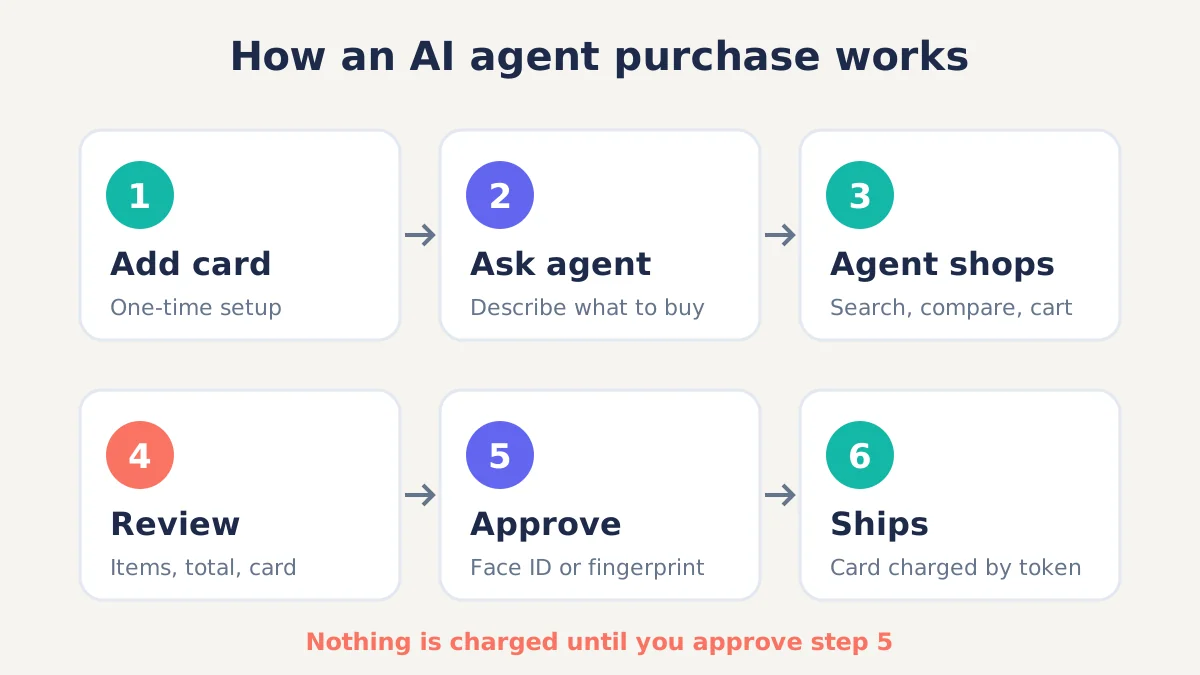
The key point: nothing is bought until you approve the final summary. That human checkpoint is the main safety feature at launch.
Is ChatGPT Wallet safe?
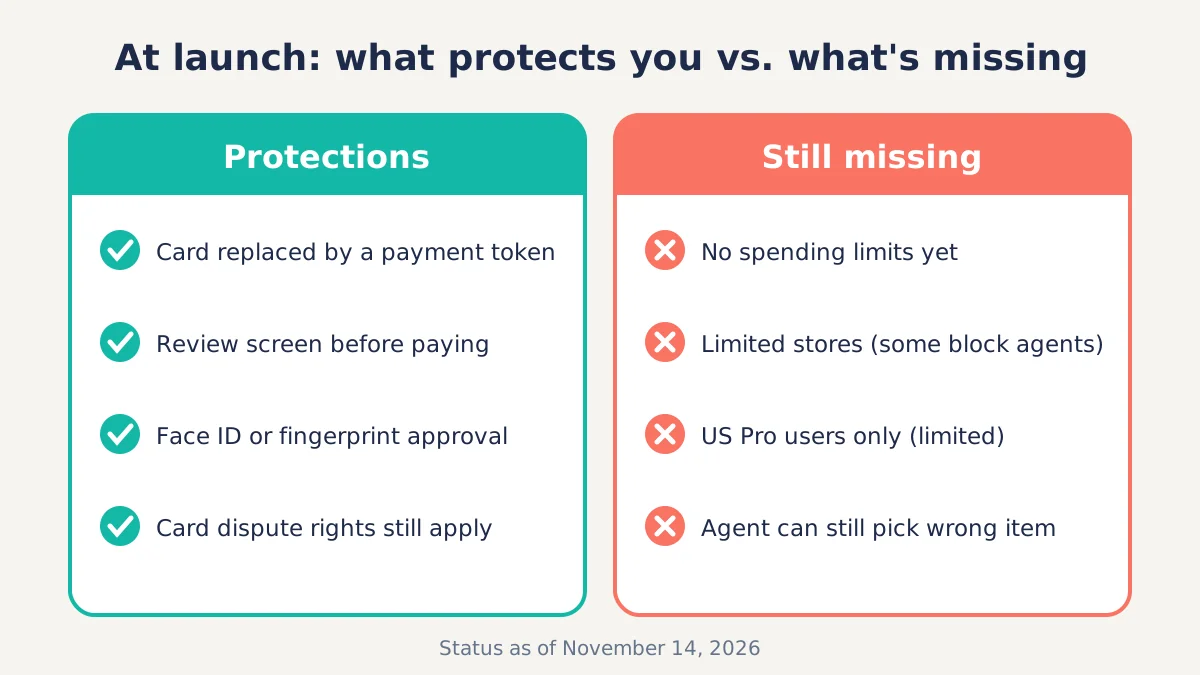
ChatGPT Wallet is built with two solid protections, card tokenization and a biometric approval step, but it is a brand-new product with limited controls, so use it carefully for now.
What protects you
- Tokenized payments. Your actual card number is replaced by a token from the card network. That is the same approach Apple Pay and Google Pay use, and it limits the damage if a merchant is breached.
- Approval before payment. Every purchase needs your review and a Face ID or fingerprint check, per OpenAI’s description reported by TechCrunch.
- Your card’s normal protections. OpenAI says card rewards still apply and you keep protections such as the right to dispute a transaction. US federal law also caps credit card liability for unauthorized charges at $50 under the Fair Credit Billing Act, as Cornell Law’s summary of the FCBA explains.
What is still missing
- No spending limits yet. OpenAI says limits are coming, but they are not part of the launch.
- Limited retailer coverage. Some retailers block AI agents. TechCrunch notes Amazon is the largest retailer that bans them, so a dot may not be able to buy there.
- Agent mistakes. An AI can pick the wrong size, color or seller. The approval screen is your chance to catch that, so read it every time.
- Phishing risk. Scammers love new features. OpenAI will not email you asking you to “verify your ChatGPT Wallet” with your card number. Only add cards inside the ChatGPT app or chatgpt.com.
What ChatGPT Wallet replaced: Instant Checkout
ChatGPT Wallet is OpenAI’s second try at in-chat shopping. The Decoder reports that OpenAI dropped its earlier approach, Instant Checkout, because it was not flexible enough, and rebuilt shopping around agents that can complete orders on a merchant’s own site.
For shoppers, the practical difference is reach. Instant Checkout depended on merchants that had integrated with OpenAI. The Wallet approach lets a dot attempt checkout on more stores, while merchants can follow OpenAI’s new Commerce Partner Playbook to make agent orders go through smoothly.
Smart ways to use an AI shopping agent
The safest way to use ChatGPT Wallet is for small, specific, low-risk purchases where you already know what you want. A few habits help:
- Be precise in your request. Include the model, size, color, budget and delivery deadline.
- Use a credit card, not a debit card. Credit cards keep disputed money off your bank balance while the issuer investigates.
- Check the seller name on the review screen. Make sure it is the retailer you expect, not a third-party marketplace seller you’ve never heard of.
- Turn on purchase alerts with your card issuer. You’ll get a push notification for every charge, including agent ones.
- Avoid big-ticket or final-sale items for now. Electronics with restocking fees and non-refundable tickets are poor first tests.
What to do if a ChatGPT Wallet purchase goes wrong
If an agent orders the wrong item, start with the merchant, then your card issuer. The steps are the same as any online order:
- Find the order record. Your approval creates a transaction record; also check your email for the merchant’s confirmation.
- Contact the merchant first. Cancel or start a return through the store’s normal process.
- Dispute with your card issuer if needed. If the merchant won’t fix it, file a dispute through your bank’s app. Under the Fair Credit Billing Act, you generally have 60 days from the statement date to dispute a credit card billing error in writing, as the California Attorney General outlines.
- Report anything suspicious. If a charge appears that you never approved, contact your issuer immediately, remove the card from ChatGPT Wallet, change your OpenAI password and turn on two-factor authentication.
FAQ
What is ChatGPT Wallet?
ChatGPT Wallet is an OpenAI feature launched November 13, 2026, that stores an eligible payment card so ChatGPT’s shopping agents (dots) can complete purchases for you. You review every order and approve it with Face ID or a fingerprint before any charge happens. Your real card number is replaced with a payment token.
Who can use ChatGPT Wallet?
As of November 14, 2026, only a limited number of ChatGPT Pro subscribers in the United States who are 18 or older can use it. You also need a US-issued Visa, Mastercard or American Express card. Free and Plus users don’t have access yet, and OpenAI hasn’t announced a wider rollout date.
Can ChatGPT buy things without my permission?
No, not under the launch design. Before payment, ChatGPT Wallet shows you the items, the total and the card, and you must approve with a biometric check such as Face ID or a fingerprint. If you don’t approve, nothing is charged. Always read the summary carefully, because the agent can still choose the wrong item.
Is ChatGPT Wallet safe to use?
It uses card tokenization and biometric approval, which are strong protections, and your card’s dispute rights still apply. However, spending limits aren’t available yet and the product is brand new. Start with small, specific purchases on a credit card and turn on charge alerts with your bank.
Does ChatGPT Wallet work on Amazon?
Probably not right now. Some retailers block AI shopping agents, and TechCrunch reported on November 13, 2026, that Amazon is the largest retailer to ban them. Retailer coverage is limited during the test rollout, so a dot may tell you it can’t complete an order on certain stores.
Can I set a spending limit in ChatGPT Wallet?
Not yet. OpenAI says it plans to add spending limits and more user controls in the future, but they were not part of the November 2026 launch. Until then, the per-purchase approval screen and your card issuer’s own alerts and limits are your main controls.
What are ChatGPT dots?
Dots are OpenAI’s AI agents inside ChatGPT that carry out tasks for you. For shopping, a dot searches for products, compares options and completes the order on the merchant’s website. ChatGPT Wallet gives dots a secure way to pay, but only after you approve each purchase.
Bottom line
ChatGPT Wallet is a careful first step toward AI agents that shop for you: tokenized cards, a mandatory review screen and biometric approval mean the agent can’t spend on its own. For now it’s limited to some US ChatGPT Pro users, has no spending limits and works with only some retailers. If you get access, test ChatGPT Wallet with a small purchase on a credit card, read every approval screen, and keep your bank’s charge alerts on.
Last updated: November 14, 2026. Details may change as OpenAI expands the rollout.
