
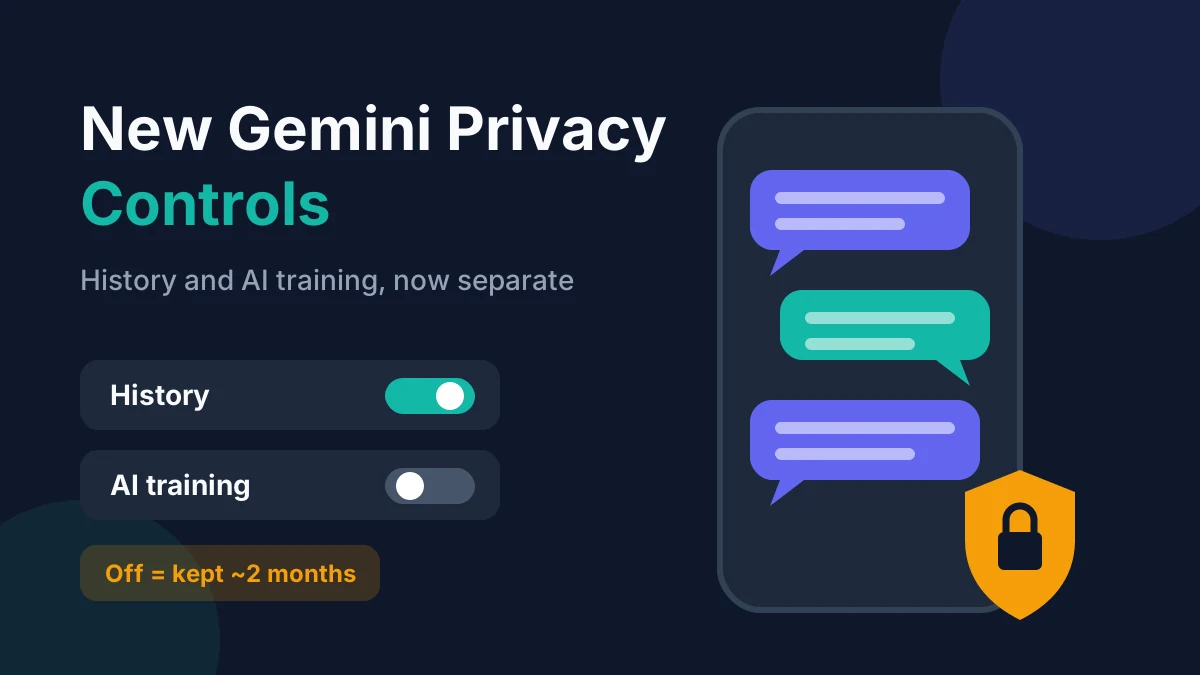
Gemini chat history now has its own settings, separate from AI training. Google announced on November 16, 2026 that you can keep your Gemini chat history while opting out of model training. The catch: if you turn History off, Google still saves future chats for around two months, up from 72 hours.
That trade-off matters for anyone whose Gemini chat history includes work notes, health questions or anything personal. This guide explains what changed, who it affects, and the exact steps to check, limit or delete your Gemini chat history today.
Table of contents
- What changed with Gemini chat history?
- How do the new History and training settings work?
- How to check your Gemini chat history settings
- How to delete Gemini chat history
- Gemini vs ChatGPT vs Claude: how long chats are kept
- Who is affected, and when?
- FAQ
What changed with Gemini chat history?
Google split one combined switch into two separate choices: whether Gemini saves your chats, and whether those chats help train Google’s AI models. Before this change, keeping your history meant your chats could also be used for training.
Google’s announcement, titled “We’re updating controls in the Gemini app,” says the new settings let you keep your history “while opting out of generative AI model training” (Google blog, Nov 16, 2026). Android Authority and Gizmodo both reported the change on November 17, 2026.
The second change got less attention. Google’s Gemini Apps Privacy Hub was updated to say that even with History off, “future chats will still be saved for around 2 months.” According to Gizmodo, an archived version from October 13, 2026 said 72 hours.
Here is the short version, as of November 19, 2026:
| Setting | Before (Oct 2026) | After the update |
|---|---|---|
| History on, training | Bundled together | Separate choices |
| History off: how long chats are kept | Up to 72 hours | Around 2 months |
| Default auto-delete for saved history | 18 months | 18 months |
| Auto-delete options | 3, 18, 36 months or never | 3, 18, 36 months or never |
| Human review of some chats | Yes, kept up to 3 years | Yes, kept up to 3 years |
How do the new History and training settings work?
History controls whether your chats stay in your Gemini sidebar so you can reopen them. Training controls whether Google may use your chat content to improve its generative AI models. You can now have History on and training off.
Gemini chat history is the saved list of your past conversations with Google’s Gemini app, stored in your Google Account. It is different from a temporary chat, which does not appear in your history.
According to Google’s help page, the training choice appears as checkboxes when you turn History on:
- Chat content including text & uploads: lets Google use your typed chats and files for training.
- Audio and Gemini Live videos & screenshares: a separate opt-in for voice and Live sessions, off by default.
Reports differ on the default for the chat-content box. Android Authority says Google describes training as off by default in the new setup, while Google’s help page lists chat-content training as on by default for adults. Don’t assume. Open the setting and look at the box yourself.
What “around two months” actually means
When History is off, Google still keeps new chats for about two months. Google says it uses them to respond to you, process feedback and “protect Google, its users, and the public,” with help from human reviewers (Gemini Apps Privacy Hub, updated November 17, 2026).
In plain terms, turning off Gemini chat history hides chats from you, but it does not make them disappear from Google’s systems right away.
Human review still applies
Google states that a subset of chats is read by human reviewers, including trained service providers. Reviewed chats are disconnected from your account and kept for up to three years, and deleting your history does not delete those reviewed copies.
That’s the main reason to avoid typing passwords, card numbers, medical record details or anything you would not want a stranger to read into any AI chatbot.
How to check your Gemini chat history settings
You can check your Gemini chat history settings in under a minute from the Gemini website or app. The menu names differ slightly by device: the web shows “History,” while some phone views still show “Gemini Apps Activity.”
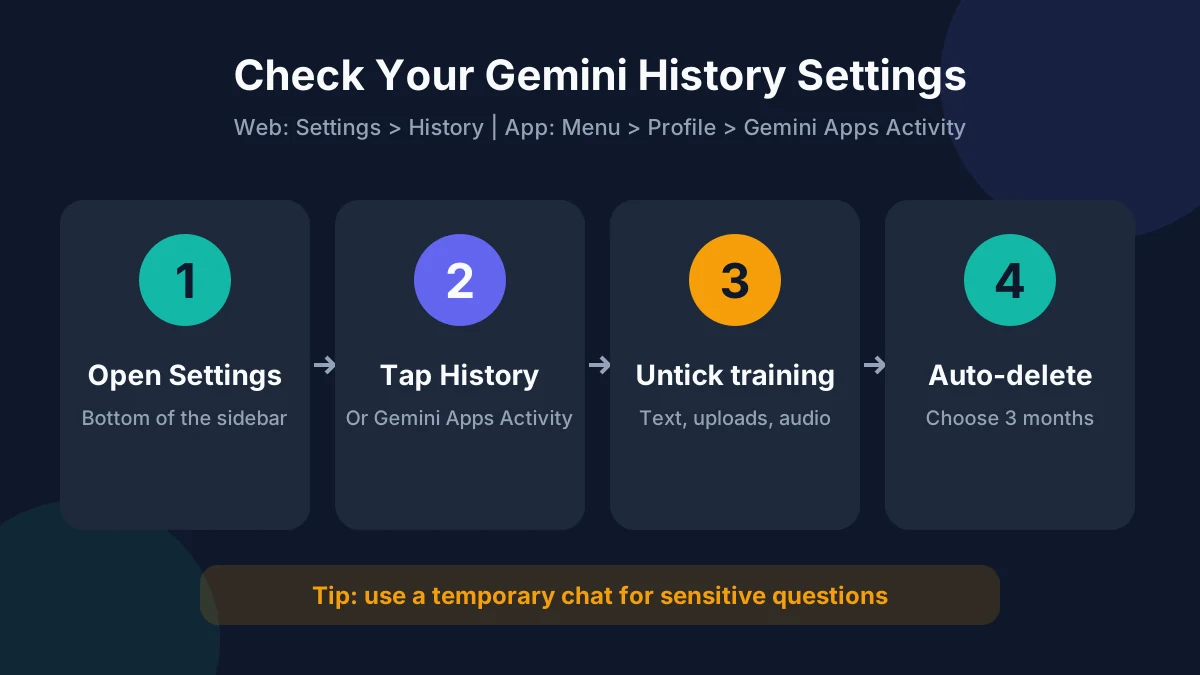
On the web (gemini.google.com):
- Sign in and open Settings at the bottom of the left sidebar.
- Click History (older layouts: Activity).
- Check whether History is On or Off.
- If it’s on, look at the two training checkboxes and untick any you don’t want.
- Click Turn on or Save to confirm.
On Android or iPhone (Gemini app):
- Open the Gemini app and tap the Menu icon at the top left.
- Tap your profile picture or initial.
- Tap Gemini Apps Activity (or History once the update reaches your phone).
- Review the on/off state, the auto-delete period and any training checkboxes.
Google says the new controls are “rolling out globally in the coming weeks,” so your screen may not show the separate training checkbox yet. If you only see one switch, you’re still on the old layout. Check back next week.
[ADD PERSONAL EXPERIENCE: Screenshot or describe what your own Gemini History screen showed on the date you tested it (web and phone), including whether the separate training checkbox had arrived yet.]
How to delete Gemini chat history
To delete Gemini chat history, open Settings > History (or Gemini Apps Activity), tap Delete, and choose a time range such as Last hour, Last day, All time or a custom range. You can also delete single chats from the sidebar.
Steps on the web, based on Google’s support article:
- Go to Settings > History.
- Click Delete above the list.
- Pick Last hour, Last day, All time or Custom range.
- Confirm. To remove one day only, click Delete all history from [day] next to that date.
To stop saving new chats, click On at the top and choose Turn off or Turn off and delete history. Remember that chats you start afterwards are still held for about two months.
Set auto-delete so you never have to remember
Auto-delete wipes older Gemini chat history on a schedule. The default is 18 months, but you can switch to 3 months:
- In Settings > History, click Deleting history older than 18 months (or Choose an auto-delete option).
- Select 3 months.
- Click Next, then confirm.
For most people, Gemini chat history on + training off + 3-month auto-delete is a sensible middle ground. You keep recent chats for reference without building a years-long archive.
Use temporary chats for sensitive questions
Gemini’s temporary chats don’t appear in your Gemini chat history, and Google says they aren’t used to train its models. Use one for one-off questions you’d rather not keep, such as a tax or health query. Start one from the new-chat menu in the app or on the web.
Gemini vs ChatGPT vs Claude: how long chats are kept
Gemini now keeps history-off chats longer than its two biggest rivals keep similar “off the record” chats. Gizmodo noted that OpenAI holds temporary chats for up to 30 days and Anthropic keeps conversations for 30 days by default, with exceptions for safety or legal holds.
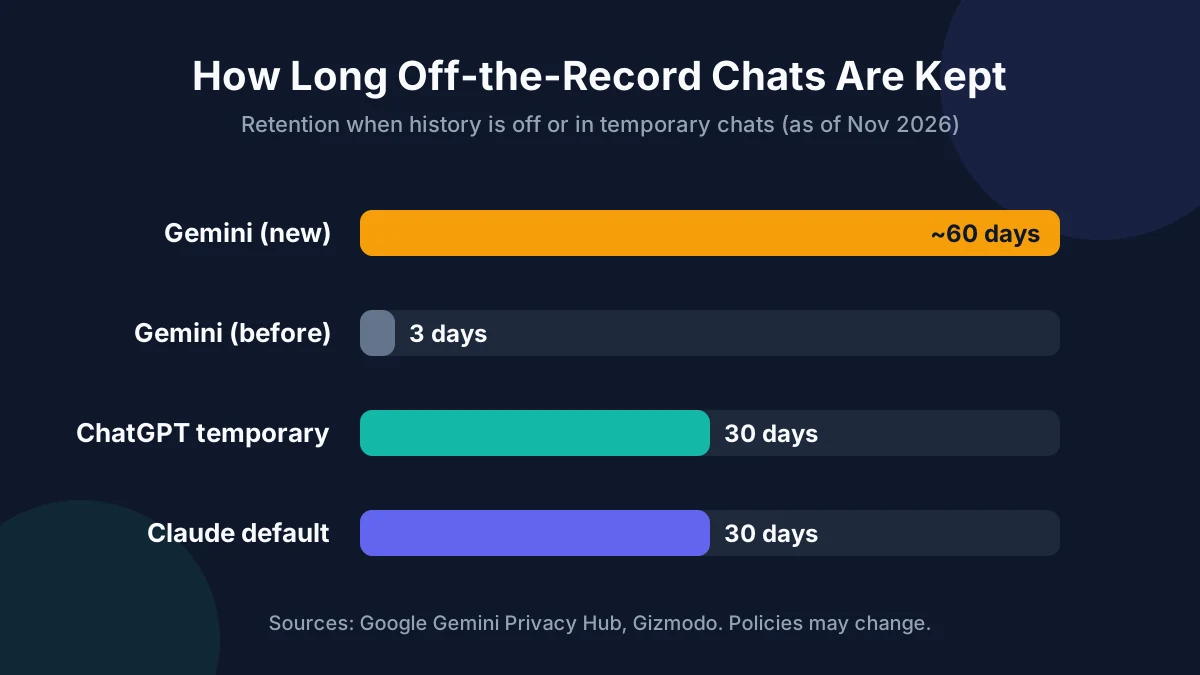
| Assistant (as of Nov 2026) | “Off” or temporary chat retention | Separate training opt-out? |
|---|---|---|
| Google Gemini | About 2 months (history off) | Yes, rolling out now |
| ChatGPT | Up to 30 days (temporary chats) | Yes |
| Claude | 30 days by default | Yes |
Gemini chat history rules and rivals’ policies change often, so check each company’s privacy page before you rely on these numbers. If you also want to limit AI features elsewhere on Google, see our guide on how to turn off AI Overviews. Meta users can follow our steps to turn off Meta AI on WhatsApp.
Who is affected, and when?
The change applies to personal Google Accounts using the Gemini app worldwide, rolling out over the coming weeks from November 16, 2026. Work and school accounts follow their administrator’s Workspace settings instead.
- Personal accounts (free and paid): get the new History and training controls as the rollout reaches them.
- Google Workspace accounts: your admin controls retention, and you may not be able to change it yourself.
- Under-18 users: Google’s help pages describe the 18+ defaults only, so parents should check settings directly on a teen’s account.
The topic peaked in searches on November 17–18, 2026, right after the coverage. Google may still adjust the wording or the two-month figure, so we’ll update this page if it changes.
FAQ
Does Google read my Gemini chats?
Some of them. Google says a subset of chats is reviewed by human reviewers, including trained contractors, to improve quality and safety. Reviewed chats are detached from your account and kept for up to three years, even if you later delete your Gemini chat history. Avoid sharing sensitive personal data in any chat.
If I turn off Gemini History, are my chats deleted right away?
No. Turning History off stops chats from appearing in your list, but Google says future chats are still saved for around two months. Existing saved history stays until you delete it or auto-delete removes it. Choose “Turn off and delete history” to clear what’s already saved.
Can I keep Gemini chat history without helping train Google’s AI?
Yes, once the new controls reach your account. Turn History on, then untick “Chat content including text & uploads” and the audio and Live checkbox before confirming. If you only see one combined switch, the rollout hasn’t reached you yet. Google says it’s arriving globally in the coming weeks.
How long does Gemini keep my history by default?
By default, Gemini auto-deletes saved history older than 18 months. You can change this to 3 or 36 months, or turn auto-delete off entirely. Three months is the most private option that still lets you reopen recent conversations, and you can delete any chat manually at any time.
Are Gemini temporary chats private?
Temporary chats don’t show up in your history, and Google says they aren’t used to train its models. They’re still processed and briefly stored to answer you and for safety checks, so they aren’t fully private. Treat them as “not saved to your list,” not “invisible to Google.”
Does this change apply to Google Workspace accounts?
Not in the same way. Work and school accounts use Google Workspace data terms, and an administrator sets retention and history options. You may not see the new toggles at all. Ask your IT team what’s enabled before you put company information into Gemini.
Is ChatGPT more private than Gemini now?
On retention for “off the record” chats, yes: OpenAI holds temporary chats for up to 30 days versus Gemini’s roughly two months. Both let you opt out of training, and both may keep data longer for legal or safety reasons. The safest habit is the same everywhere: don’t share secrets.
The bottom line
Google’s update gives you more control over Gemini chat history, but turning History off is no longer a quick way to make chats vanish. Today, open Settings > History, untick the training boxes, set auto-delete to 3 months and use temporary chats for anything sensitive. Then re-check in a week or two, once the full rollout reaches your account.
