
How much does a laptop weigh? Most laptops weigh between 2.5 and 6 pounds (about 1.1 to 2.7 kg). Thin 13-inch laptops sit near 2.7 pounds, everyday 15-inch models are usually 3.5 to 4.5 pounds, and big gaming laptops can go past 6 pounds.
Below you’ll find the average laptop weight for each type, real weights for popular 2026 models taken from official spec sheets, and three easy ways to check how much your own laptop weighs.
[ADD PERSONAL EXPERIENCE: one line about the laptop you carry every day and how its weight feels in a backpack.]
Table of Contents
How Much Does a Laptop Weigh? The Quick Answer
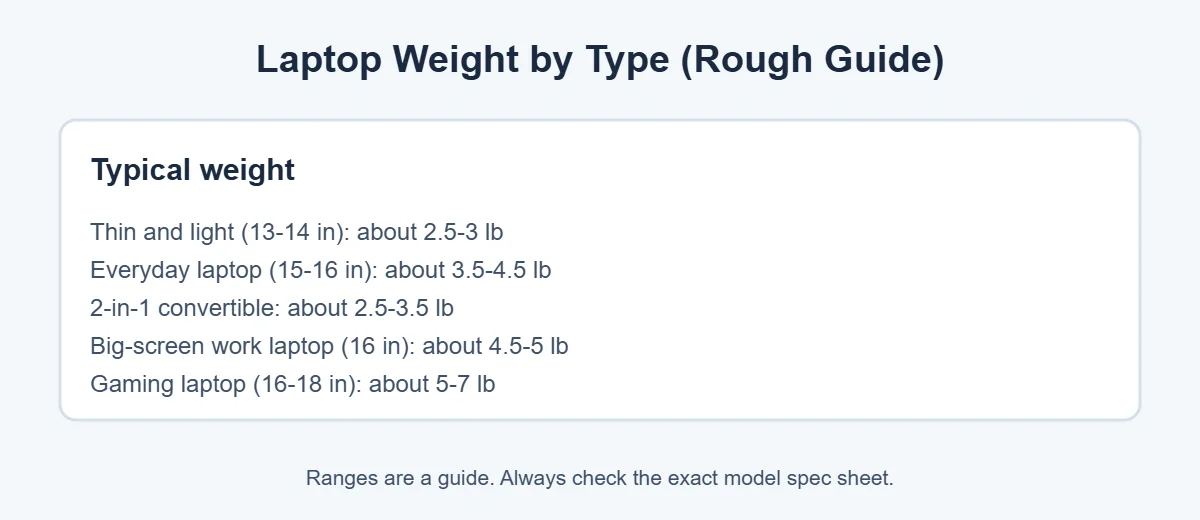
The quick answer depends on screen size and what the laptop is built for. Bigger screens, bigger batteries and stronger graphics chips all add weight. Here’s a rough guide by type.
| Laptop type | Screen size | Typical weight | Best for |
|---|---|---|---|
| Thin and light (ultrabook) | 13-14 inches | About 2.5-3 lb (1.1-1.4 kg) | Students, travel, daily carrying |
| Everyday laptop | 15-16 inches | About 3.5-4.5 lb (1.6-2 kg) | Home and office use |
| 2-in-1 convertible | 13-14 inches | About 2.5-3.5 lb (1.1-1.6 kg) | Note-taking, tablet mode |
| Big-screen work laptop | 16 inches | About 4.5-5 lb (2-2.3 kg) | Video editing, design |
| Gaming laptop | 16-18 inches | About 5-7 lb (2.3-3.2 kg) | Gaming, heavy software |
These ranges are a guide, not a rule. Two laptops with the same screen size can differ by a full pound, so always check the exact model.
Real Laptop Weights: 2026 Examples
To show how much a laptop weighs in real life, here are four popular models with weights straight from the makers’ own spec pages.
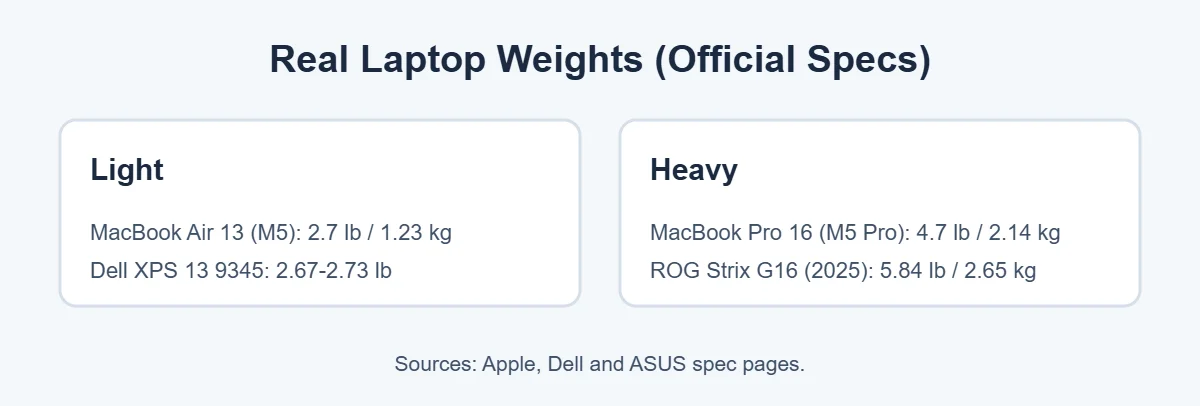
- MacBook Air 13-inch (M5): 2.7 lb (1.23 kg), according to Apple’s tech specs.
- Dell XPS 13 (9345): 1.23 to 1.24 kg (2.67 to 2.73 lb), depending on the screen, per Dell’s owner’s manual.
- MacBook Pro 16-inch (M5 Pro): 4.7 lb (2.14 kg), per Apple.
- ASUS ROG Strix G16 (2025): 2.65 kg (5.84 lb), per the ASUS spec page.
Notice the gap: the heaviest model here weighs more than twice as much as the lightest. That’s why screen size and purpose matter so much.
What Makes a Laptop Heavy?
A few parts decide most of a laptop’s weight:
- Screen size: A 16-inch screen needs a bigger body, hinge and frame than a 13-inch one.
- Battery: Bigger batteries last longer but weigh more.
- Graphics chip and cooling: Gaming laptops need fans, heat pipes and thick bodies to stay cool.
- Materials: Aluminum and magnesium bodies are often lighter than thick plastic ones of the same size.
- Extras: A number pad, more ports or a touchscreen can add a little too.
Gaming laptops combine all of these, which is why they’re the heaviest group. If you’re torn, this guide on whether gaming laptops are good for everyday use can help.
Don’t Forget the Charger
When people ask how much a laptop weighs, they usually mean the laptop alone, and that’s what spec sheets list. The charger is extra. Small USB-C chargers are light, but the big power bricks that come with gaming laptops can add a lot to your bag. If you commute every day, weigh the laptop and charger together.
How Much Should Your Laptop Weigh?
The right laptop weight depends on how you use it:
- You carry it all day (students, travelers): aim for 3 pounds or less.
- You carry it a few times a week: 3.5 to 4.5 pounds is fine.
- It mostly stays on a desk: weight matters less, so choose screen size and power first.
Students, in particular, should think about weight before buying. This list of the best laptops for accounting students is a good place to compare options.
How to Check How Much Your Laptop Weighs
Want the exact laptop weight for your own model? It takes two minutes.

- Find the model number on the sticker under your laptop, or in Settings under System and About.
- Search the maker’s website for that model plus “specs” or “tech specs”.
- Look for the “Weight” line. Most makers list both pounds and kilograms.
- No spec sheet? Put the laptop on a kitchen scale, or hang your bag on a luggage scale.
Keep in mind that makers note weight can change slightly depending on the configuration you bought.
Frequently Asked Questions
What is the average laptop weight?
Most laptops weigh between about 2.5 and 6 pounds (1.1 to 2.7 kg). Thin 13-inch models sit at the low end, around 2.7 pounds, while 16-inch gaming laptops sit at the high end. A typical everyday 15-inch laptop lands somewhere in the middle, often around 3.5 to 4.5 pounds.
How much does a MacBook weigh?
According to Apple, the 13-inch MacBook Air with M5 weighs 2.7 pounds (1.23 kg), and the 16-inch MacBook Pro with M5 Pro weighs 4.7 pounds (2.14 kg). Weight can change slightly by configuration, so check Apple’s tech specs page for your exact model.
How much does a gaming laptop weigh?
Gaming laptops are the heaviest type. For example, ASUS lists the ROG Strix G16 (2025) at 5.84 pounds (2.65 kg), and many 17- and 18-inch gaming models weigh even more. Their big chargers can add noticeable weight to your bag as well.
Is 2 kg heavy for a laptop?
Two kilograms (about 4.4 pounds) is middle-of-the-road. It’s fine for carrying between rooms or to the office a few times a week. If you carry your laptop all day, every day, a model closer to 1.2 to 1.4 kg (2.6 to 3 pounds) will feel much easier.
Does the charger count in laptop weight?
No. The weight on a spec sheet is usually for the laptop alone. The charger and cable are extra, and big gaming chargers can be heavy. If you travel a lot, weigh the laptop and charger together to know your real carrying weight.
How can I find out how much my laptop weighs?
Look for the model number on the sticker under your laptop, then search the maker’s spec sheet and look for “weight”. You can also place it on a kitchen scale or hang the bag on a luggage scale for a quick, real-world number.
The Bottom Line
So, how much does a laptop weigh? Most weigh 2.5 to 6 pounds. Thin 13-inch laptops are the lightest at around 2.7 pounds, everyday 15-inch laptops sit in the middle, and gaming laptops are the heaviest.
If you’ll carry it every day, aim for 3 pounds or less and don’t forget the charger. If it lives on your desk, pick the screen size and power you need and don’t worry much about weight.
{“@context”:”https://schema.org”,”@type”:”FAQPage”,”mainEntity”:[{“@type”:”Question”,”name”:”What is the average laptop weight?”,”acceptedAnswer”:{“@type”:”Answer”,”text”:”Most laptops weigh between about 2.5 and 6 pounds (1.1 to 2.7 kg). Thin 13-inch models sit at the low end, around 2.7 pounds, while 16-inch gaming laptops sit at the high end. A typical everyday 15-inch laptop lands somewhere in the middle, often around 3.5 to 4.5 pounds.”}},{“@type”:”Question”,”name”:”How much does a MacBook weigh?”,”acceptedAnswer”:{“@type”:”Answer”,”text”:”According to Apple, the 13-inch MacBook Air with M5 weighs 2.7 pounds (1.23 kg), and the 16-inch MacBook Pro with M5 Pro weighs 4.7 pounds (2.14 kg). Weight can change slightly by configuration, so check Apple’s tech specs page for your exact model.”}},{“@type”:”Question”,”name”:”How much does a gaming laptop weigh?”,”acceptedAnswer”:{“@type”:”Answer”,”text”:”Gaming laptops are the heaviest type. For example, ASUS lists the ROG Strix G16 (2025) at 5.84 pounds (2.65 kg), and many 17- and 18-inch gaming models weigh even more. Their big chargers can add noticeable weight to your bag as well.”}},{“@type”:”Question”,”name”:”Is 2 kg heavy for a laptop?”,”acceptedAnswer”:{“@type”:”Answer”,”text”:”Two kilograms (about 4.4 pounds) is middle-of-the-road. It’s fine for carrying between rooms or to the office a few times a week. If you carry your laptop all day, every day, a model closer to 1.2 to 1.4 kg (2.6 to 3 pounds) will feel much easier.”}},{“@type”:”Question”,”name”:”Does the charger count in laptop weight?”,”acceptedAnswer”:{“@type”:”Answer”,”text”:”No. The weight on a spec sheet is usually for the laptop alone. The charger and cable are extra, and big gaming chargers can be heavy. If you travel a lot, weigh the laptop and charger together to know your real carrying weight.”}},{“@type”:”Question”,”name”:”How can I find out how much my laptop weighs?”,”acceptedAnswer”:{“@type”:”Answer”,”text”:”Look for the model number on the sticker under your laptop, then search the maker’s spec sheet and look for \”weight\”. You can also place it on a kitchen scale or hang the bag on a luggage scale for a quick, real-world number.”}}]}