
Most Windows 11 26H2 problems are now fixed. As of Microsoft’s release health update on November 5, 2026, four of the five known issues it tracks for version 26H2 are marked “Resolved,” and the last one, a USB audio bug, is “Mitigated” with a full fix still in progress. If you install the latest cumulative update along with 26H2, most people can upgrade safely.
That’s a big change from late September, when early reports told readers to hold off. Below you’ll find what broke, what Microsoft fixed and with which update, how to deal with the remaining USB audio bug, and what to do if the update itself fails or you want to go back.
Is Windows 11 26H2 safe to install now?
Yes, for most home and work PCs, Windows 11 26H2 is safe to install as of November 2026. Microsoft has resolved four of the five tracked issues, and Windows Latest reported on November 4 that Microsoft now recommends updating to 26H2. The one exception: if you depend on an older USB audio device, such as a USB headset, DAC or microphone, test first or wait.
Windows 11 version 26H2 is the 2026 annual feature update for Windows 11. It became generally available on September 29, 2026, according to Windows Latest and HelpDeskGeek.
Microsoft says 26H2 is delivered “using servicing technology,” so on PCs already running 24H2 or 25H2 it installs much like a monthly update, with one restart. Those versions share the same core system, and the new features are switched on by the update rather than installed from scratch. That’s why the download is small and the install is quick on most PCs.
Microsoft also claims that, in its own lab testing, PCs with 8GB of RAM are up to 20% more responsive and multitask up to 40% faster on 26H2. There are no independent benchmarks for this yet, so treat it as a vendor claim.
Windows 11 26H2 problems: full known issues list
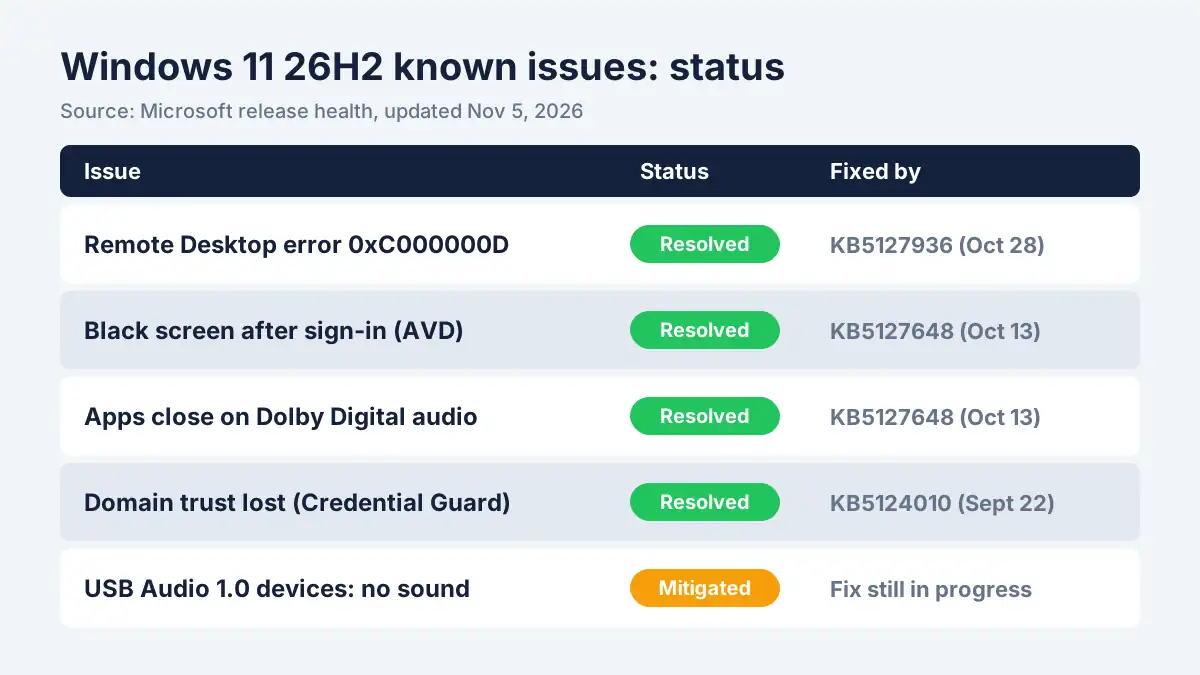
Microsoft lists five known issues for Windows 11 26H2; four are resolved and one is mitigated. The table below reflects Microsoft’s Windows release health page for 26H2, last updated November 5, 2026. Statuses can change, so check that page before you troubleshoot.
| Known issue | Who it affects | Status (Nov 5, 2026) | Fixed by |
|---|---|---|---|
| Remote Desktop fails for standard users with error 0xC000000D | Business PCs with Administrator protection turned on | Resolved | KB5127936 (Oct 28, 2026) and later |
| Black screen or desktop won’t load after sign-in | Mainly Azure Virtual Desktop hosts using FSLogix | Resolved | KB5127648 (Oct 13, 2026) and later |
| Apps close when decoding AC-3 (Dolby Digital) audio | Mostly older apps that play Dolby Digital audio | Resolved | KB5127648 (Oct 13, 2026) and later |
| Domain-joined PCs lose trust with the domain | Business PCs using Credential Guard machine identity isolation | Resolved | KB5124010 (Sept 22, 2026) and later |
| USB Audio Class 1.0 devices fail to start or play no sound | USB headsets, DACs and mics that use the older USB Audio 1.0 driver | Mitigated | Fix still in progress |
Remote Desktop error 0xC000000D
This bug stopped non-administrator users from connecting through Remote Desktop when a security feature called Administrator protection was turned on. It mostly affected company-managed PCs. Microsoft fixed it in the October 28, 2026 update (KB5127936), so installing the latest update solves it.
Black screen after sign-in
Some users saw a black screen or a desktop that never finished loading after signing in. Microsoft says this mainly hit Azure Virtual Desktop setups that use FSLogix profiles, not typical home PCs. Before the fix, pressing Ctrl+Shift+Esc to open Task Manager and running explorer.exe (File > Run new task) brought the desktop back. The October 13 update (KB5127648) resolved it.
Apps closing during Dolby Digital audio
Certain apps, mainly older ones, closed unexpectedly while decoding AC-3 (Dolby Digital) audio, such as some video players. This was fixed in the October 13 update, KB5127648.
Domain trust lost on business PCs
On some domain-joined PCs that used Credential Guard’s machine identity isolation, the PC lost its secure connection to the company domain. The September 22 preview update (KB5124010) fixed it. Home users were not affected.
How to fix USB audio problems after the 26H2 update
The USB audio bug is the only one of the Windows 11 26H2 problems Microsoft hasn’t fully fixed. Devices that use the USB Audio Class 1.0 driver may fail to start, show error Code 10 in Device Manager, produce no sound, or ignore volume changes. Microsoft marks it “Mitigated” and says it is working on a full fix in a future update.
Try these steps in order:
- Install every pending update. Go to Settings > Windows Update > Check for updates and install everything offered, including optional updates. Microsoft says an out-of-band update already addressed some symptoms.
- Check Device Manager. Right-click Start > Device Manager, expand “Sound, video and game controllers,” and look for a yellow warning icon. If you see Code 10, right-click the device, choose Uninstall device, unplug it, restart, and plug it back in.
- Use another audio path for now. A Bluetooth headset, the 3.5mm jack, or your monitor’s HDMI audio uses different drivers and should keep working while you wait.
- Pause updates if you haven’t upgraded yet. If a USB audio device is essential for work calls, go to Settings > Windows Update > Pause updates until the fix lands.
- Businesses: Microsoft says IT admins can contact Microsoft Support for Business for help with this issue.
[ADD PERSONAL EXPERIENCE: Did you test 26H2 with a USB headset or USB DAC? Note the device model, whether you saw Code 10, and which step fixed it.]
Windows 11 26H2 won’t install or gets stuck: what to do
If the 26H2 update fails, stalls or keeps rolling back, the cause is usually low disk space, a corrupted update cache or a conflicting device or driver. These general Windows fixes work for most install failures:
- Free up space. Open Settings > System > Storage and run Cleanup recommendations. Clearing temporary files helps the update finish.
- Unplug extras. Disconnect external drives, docks and USB devices you don’t need, then retry.
- Run the Windows Update troubleshooter. Search “troubleshoot” in Settings and run the Windows Update troubleshooter.
- Repair system files. Open Terminal (Admin) and run
DISM /Online /Cleanup-Image /RestoreHealth, thensfc /scannow. Restart and check for updates again. - Update drivers and antivirus. Out-of-date graphics, audio or third-party security software can block feature updates. Check your PC maker’s support site.
- Wait and retry. Microsoft rolls feature updates out in stages, so if 26H2 isn’t offered yet, it may simply not be your PC’s turn.
To confirm the install worked, press Windows + R, type winver, and press Enter. The window should show “Version 26H2.”
How to roll back Windows 11 26H2
You may be able to undo 26H2, but there’s no guarantee. Microsoft’s general instructions for going back to a previous version of Windows are under Settings > System > Recovery > Go back, and that option is usually available only for a limited time after an upgrade. HelpDeskGeek reported it found no Microsoft-documented rollback path specific to 26H2.
Because 26H2 installs like a small update on 24H2 or 25H2 PCs, the “Go back” option may not appear. In that case:
- Open Settings > Windows Update > Update history > Uninstall updates and look for the most recent update.
- If you uninstall a monthly update instead, be aware you may also remove security fixes.
- If neither option works, restore from a backup or system image.
The safest approach is to back up your files to an external drive or cloud storage before upgrading. See Microsoft’s guide: Go back to the previous version of Windows.
Should you install Windows 11 26H2 now or wait?
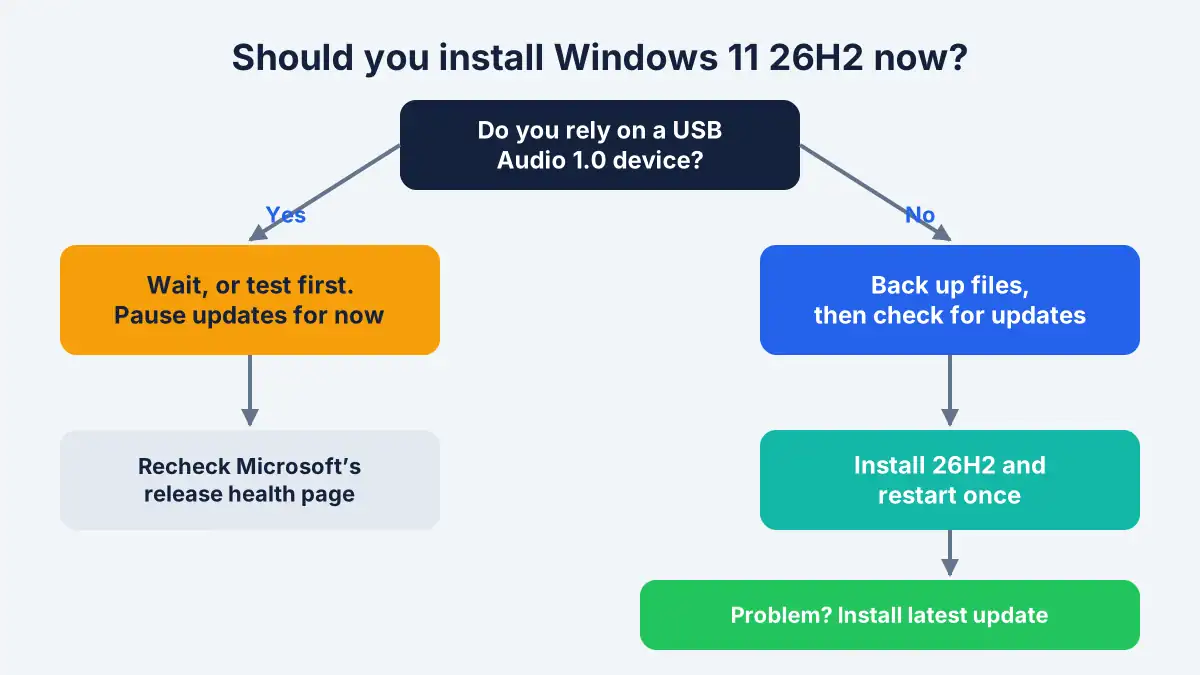
Install now if you don’t rely on a USB Audio 1.0 device; wait or test first if you do. Here’s a simple way to decide:
- Home user with Bluetooth or built-in audio: back up, then install 26H2 along with the latest cumulative update.
- Work-from-home user with a USB headset: check whether calls still work on a spare PC, or pause updates for a few weeks.
- Business IT: make sure October 13 or later updates are deployed, test on a pilot group, and keep an eye on the release health page.
Microsoft lets you pause updates from Settings > Windows Update, so waiting is easy.
Frequently asked questions
Is Windows 11 26H2 safe to install?
For most people, yes. As of November 5, 2026, Microsoft has resolved four of the five known issues for Windows 11 26H2. The remaining USB Audio Class 1.0 bug is mitigated but not fully fixed, so anyone who depends on an older USB headset, microphone or DAC should test first or pause updates.
What are the known issues in Windows 11 26H2?
Microsoft tracks five: a Remote Desktop error (0xC000000D), black screens after sign-in on virtual desktops, apps closing during Dolby Digital audio, domain trust loss on some business PCs, and USB Audio 1.0 devices failing. The first four are resolved through updates released between September 22 and October 28, 2026.
How do I fix no sound from my USB headset after 26H2?
Install all pending updates first, since Microsoft says an out-of-band update addressed some symptoms. Then check Device Manager for error Code 10, uninstall the device, restart and reconnect it. If sound still fails, use Bluetooth, the 3.5mm jack or HDMI audio until Microsoft ships the full fix.
Can I uninstall Windows 11 26H2?
Sometimes. Try Settings > System > Recovery > Go back, which Microsoft offers only for a limited time after an upgrade. Because 26H2 installs like a small update, that option may be missing. If so, check Update history > Uninstall updates, or restore from a backup made before the upgrade.
How do I check if I have Windows 11 26H2?
Press Windows + R, type winver and press Enter. The “About Windows” window shows your version and OS build number. If it says Version 26H2, you have the 2026 update. You can also find it under Settings > System > About, in the Windows specifications section.
Is Windows 11 26H2 a big download?
Usually not. On PCs already running Windows 11 24H2 or 25H2, Microsoft delivers 26H2 using servicing technology, so it installs much like a monthly update and needs one restart. PCs on older versions, such as 23H2, may need a larger and slower full upgrade.
Bottom line
Windows 11 26H2 problems have mostly been fixed: four of five known issues are resolved as of November 5, 2026, and the USB audio bug is the one to watch. Back up your files, install 26H2 with the latest update, and keep a USB headset fallback ready if you rely on one. Because Microsoft updates its known-issues list often, check the release health page before troubleshooting, and we’ll update this guide as fixes arrive.
Last updated: November 8, 2026. Information may change as Microsoft releases new updates.
