
The Android November 2026 security update fixes 216 vulnerabilities, 23 of them rated critical, including a zero-click bug and the “SMS of Death” flaw that can crash your phone with one invisible text. To be protected, your phone needs a security patch level of 2026-11-05 or later (2026-11-01 covers the two headline bugs). Check it in Settings > About phone > Android version, then install any waiting update.
That’s the short version. Below, you’ll find what each bug actually does, how to update a Pixel, Samsung or other Android phone, and what to do if your phone is too old to get the fix.
Facts in this article are current as of November 6, 2026. Rollout dates change by brand and carrier, so check back if your phone hasn’t updated yet.
What’s in the Android November 2026 security update?
The Android November 2026 security update is Google’s monthly batch of security fixes, published in the Android Security Bulletin on November 2, 2026. It covers phones running Android 14, 15, 16 and 17.
A security patch level is the date stamp that tells you which monthly fixes your phone has. This month there are two:
- 2026-11-01 fixes problems in Android’s core software (Framework, System and Runtime).
- 2026-11-05 adds fixes for the kernel and chip-maker components (Arm, Imagination, MediaTek, Qualcomm and Unisoc).
According to The Hacker News and eSecurity Planet, the bulletin lists 216 vulnerabilities in total, with 23 rated critical. Google’s own advice is simple: update to the latest version of Android where you can.
The two bugs that matter most
Most of the 216 fixes are low-profile, but two got attention because they need nothing from you to work. You don’t have to tap a link or install an app.
CVE-2026-58868: a zero-click remote code execution bug
CVE-2026-58868 is a critical flaw in Android’s Framework that could let an attacker run code on a phone remotely. The bulletin states that user interaction isn’t needed for exploitation, which is what “zero-click” means.
It affects Android 14, 15, 16 and 17. As of November 4, The Hacker News reported that Google’s bulletin did not mention any attacks using these flaws, and none were in CISA’s Known Exploited Vulnerabilities catalog. That’s reassuring, but details now being public is exactly why you shouldn’t wait.
CVE-2026-58882: the “SMS of Death”
The SMS of Death is a bug in how Android reads a special kind of text called a WAP Push message. A malformed message only eight bytes long can crash the phone’s calling service, drop active calls (including emergency calls) and knock out cell service for a while. BleepingComputer reports the message never appears in your inbox, so you’d see no obvious cause.
An attacker only needs your phone number. A researcher published the details and a proof-of-concept on October 29, 2026, after reporting it to Google months earlier. In BleepingComputer’s testing, a burst of these messages could trap a phone in a reboot loop.
Google lists the fix as CVE-2026-58882 in the November bulletin at the 2026-11-01 level. (BleepingComputer reported that some code fixes reached devices in October, but the November patch level is the safe benchmark.)
[ADD PERSONAL EXPERIENCE: Note which phone you checked (e.g., Pixel 9 or Galaxy S25), what patch date it showed before updating, and how long the download and restart took.]
Which patch level do you need?
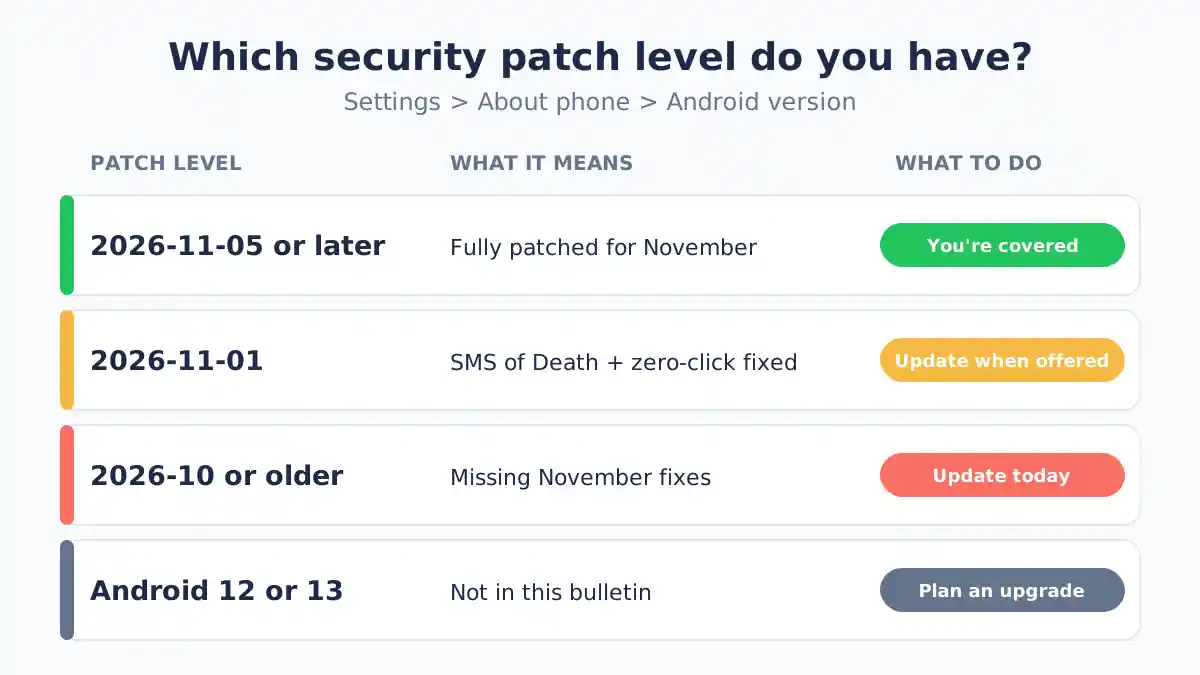
You need 2026-11-05 or later to be covered for every fix in the November bulletin. A phone on 2026-11-01 is protected against both headline bugs, because both sit in that first batch.
| Your patch level | What it means | What to do |
|---|---|---|
| 2026-11-05 or later | Fully patched for November | Nothing; you’re covered |
| 2026-11-01 | SMS of Death and zero-click RCE fixed; some chip fixes still pending | Install the next update when offered |
| 2026-10-xx or older | Missing November fixes | Check for an update today |
| Android 12 or 13 | Not listed in this bulletin | See the “no longer gets updates” section below |
There’s a second date on the same screen: the Google Play system update. Google pushes some fixes this way (for media codecs, Wi-Fi and telephony parts), but The Hacker News notes the zero-click bug is not one of them. Your security patch level is the number that counts here.
How to check and install the Android November update
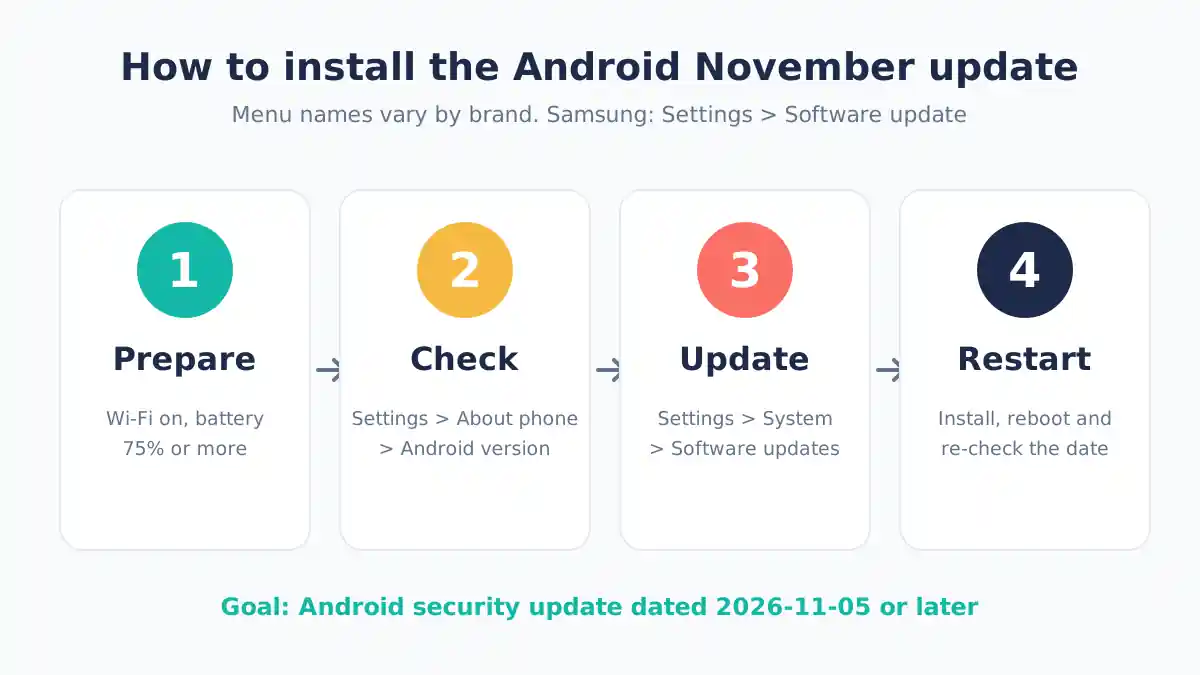
To check, open Settings > About phone > Android version and look at “Android security update.” To install, open Settings > System > Software updates (names vary slightly by brand). These steps come from Google’s Android Help page.
Before you start, Google recommends two things: connect to Wi-Fi and charge your phone to at least 75%.
Pixel phones
- Open Settings > System > Software updates > System update.
- Tap Check for update, then download and install.
- Restart when prompted. Pixels install in the background and switch to the new version on reboot.
Google says Pixel updates start arriving the day its monthly Pixel bulletin goes live and take about a week and a half to reach every device. As of November 6, the November 2026 Pixel bulletin had not yet appeared on Google’s Pixel bulletin index, so tap “Check for update” again over the next few days.
Samsung Galaxy phones
- Open Settings > Software update.
- Tap Download and install.
- Follow the prompts; the phone restarts during installation.
Samsung’s November package covers 206 issues, including Samsung-specific fixes, according to eSecurity Planet. Samsung rolls out by model, carrier and region and has not shared a firm schedule, so flagships usually get it first and budget A-series models later.
Motorola, OnePlus and other brands
Look for Settings > System > System updates or Settings > Software update. If nothing appears, your maker or carrier may not have released it yet. Google’s help page says update timing varies by device, manufacturer and carrier.
What if your phone no longer gets updates?
If your phone runs Android 12 or 13, or is past its update window, it won’t get this fix. The November bulletin doesn’t list Android 12 or 13, and the SMS of Death researcher says those versions run the same vulnerable code.
Here’s what you can do:
- Check your support end date. Search your model plus “update policy” on the maker’s site. Recent Pixel and Galaxy flagships get several years of updates; older budget phones often get far fewer.
- Keep Google Play system updates current. Open Settings > Security & privacy > System & updates > Google Play system update. It won’t fix the zero-click bug, but it covers other parts.
- Plan an upgrade. A phone that no longer gets monthly patches will keep collecting unfixed flaws. If you rely on it for banking or work, it’s time to budget for a replacement.
- Watch for the warning signs. Sudden call drops, “No service” with full bars, or a phone that keeps restarting are worth noting.
Stuck in a crash loop after a strange text?
If your phone keeps crashing or rebooting, try this order:
- Install any pending update first, if the phone stays on long enough. BleepingComputer reports the fix also deletes the malicious messages.
- Restart in Safe Mode (on most phones, hold the power-off option) to get a stable window to update.
- Ask your carrier whether it can block the sender or filter the message on its network.
- Factory reset as a last resort. In one test, an older Android 12 phone needed a reset. Back up first if you can.
There is also a computer-based method using Android’s developer tools (ADB) to delete the stored message, but it’s technical. Most people should go to their carrier or a repair shop instead.
FAQ
What is the SMS of Death on Android?
The SMS of Death is a bug (CVE-2026-58882) where a tiny, malformed text message crashes Android’s phone service. It can drop calls, including emergency calls, and cut cell service without anything showing in your inbox. Google fixed it at the 2026-11-01 security patch level for Android 14 through 17.
How do I check my Android security patch level?
Open Settings, tap About phone (or About tablet), then tap Android version. You’ll see “Android security update” with a date such as 2026-11-05. That date is your patch level. On Samsung, the same details are under Settings > About phone > Software information.
Is my phone safe on Android 12 or 13?
Not fully. Google’s November 2026 bulletin covers Android 14 through 17 only, and the researcher behind the SMS of Death says Android 12 and 13 contain the same flaw. Keep Google Play system updates current, avoid unknown senders, and consider upgrading to a phone that still gets monthly patches.
When will Samsung get the November 2026 update?
Samsung is rolling it out in stages by model, carrier and region, and hasn’t published a firm schedule as of November 6, 2026. Galaxy flagships typically get monthly patches first. Check Settings > Software update > Download and install every few days until it appears.
Do Pixel owners need to do anything?
Yes, but it’s quick. Pixels download updates automatically, yet the fix only takes effect after a restart. Go to Settings > System > Software updates, tap Check for update, and restart when asked. Google says Pixel rollouts can take about 1.5 weeks to reach all devices.
Can a text message really hack my phone?
Rarely, but yes, bugs like these show it’s possible. The SMS of Death crashes services rather than stealing data, and no attacks had been reported as of November 4, 2026. The best defense is boring but effective: install security updates as soon as your phone offers them.
Conclusion: update your Android phone today
The Android November 2026 security update is worth installing as soon as it reaches you. It closes a zero-click bug and the SMS of Death, two flaws that need no tap or download from you. Check your patch level now, aim for 2026-11-05 or later, and if your phone is too old to get it, start planning your next one.
