
Is iCloud down for you? First check Apple’s System Status page: a yellow or red dot next to iCloud means the problem is on Apple’s side and you only need to wait. On November 17, 2026, a faulty internal update knocked out iCloud sign-in, the App Store, Apple Music and Apple Pay for hours. If the status page is all green, the fixes below usually solve it in minutes.
That outage hit at midday on a Tuesday, and many people assumed their phone, password or account was the problem. Most of the time it isn’t. This guide shows you how to tell a real iCloud down event from a device glitch fast, what to try, what not to touch, and how to avoid the phishing texts that often follow a big outage.
In this guide:
- Is iCloud down right now? How to check
- What happened in the November 17 Apple outage?
- Why did iCloud go down?
- iCloud down or just your device? 7 quick fixes
- iCloud down? What not to do
- Watch out for fake “Apple Account locked” messages
- How to prepare for the next iCloud down day
- FAQ
Is iCloud Down Right Now? How to Check in 30 Seconds
The fastest way to answer “is iCloud down?” is Apple’s official System Status page, which lists every Apple service with a colored dot. Green means available. Yellow or red means Apple has confirmed an issue, and a note tells you when it started and who is affected.
Apple updates that page within minutes of confirming a problem, but there is often a short lag at the start. During that gap, crowd reports fill in the picture:
- Downdetector: a sudden spike of user reports for “iCloud” or “Apple” is a strong early sign of a real outage.
- Social media: search “iCloud down” on X, Threads or Reddit and sort by latest. Dozens of fresh posts within a few minutes point to a wide problem.
- A second device: if iCloud fails on your iPhone but works on your Mac on the same account, the issue is probably local.
A service outage is a period when a cloud service stops working for many users at once because of a fault on the provider’s side. You can’t fix an outage from your phone. You can only confirm it and wait.
What Happened in the November 17 Apple Outage?
On Tuesday, November 17, 2026, several Apple services failed at the same time for users in the US and other regions. User reports started climbing around 11:30 a.m. to 12:45 p.m. ET, depending on the outlet tracking it, according to MacRumors and Tom’s Guide.
Apple’s status page listed iCloud Account & Sign In issues affecting all users, TechCrunch reported. Downdetector logged thousands of reports, with Apple Pay complaints passing 2,000 within minutes.
Here is what users and Apple’s status page reported as affected (as of November 17, 2026):
| Service | What users saw |
|---|---|
| iCloud Account & Sign In | “Verification failed” errors, endless sign-in loops |
| iCloud Mail and iCloud.com web apps | Mail not loading, web apps timing out |
| App Store | Downloads and purchases failing |
| Apple Music | Streaming and library sync errors |
| Apple Pay and Apple Card | Card payments declined or stuck |
| AppleCare on Device, Apple Business, Apple School Manager | Support and management tools unavailable |
| Apple retail stores | Some stores could not complete purchases |
By mid-afternoon, Apple told Tom’s Guide the issue was resolved, though a few status entries stayed yellow for longer as systems caught up. If something still misbehaves on your device today, it’s more likely a leftover sync glitch than a live outage. The fixes further down handle that.
[ADD PERSONAL EXPERIENCE: Describe what you saw on your own iPhone or Mac during the November 17 outage, such as the exact error message, which apps failed, and how long it took to return to normal.]
Why Did iCloud Go Down on November 17?
Apple said the outage was caused by an internal update, not a cyberattack. In a statement reported by MacRumors and 9to5Mac, the company said it was working to bring the remaining systems back online. Apple has not shared which system the update changed.
An internal update is a change Apple pushes to its own servers, such as new code or a configuration change. When that change breaks the account sign-in system, every service that depends on your Apple Account can fail at once. That’s why iCloud, the App Store, Apple Music and Apple Pay went down together, and why so many people searched “iCloud down” at once.
The good news: an outage caused by a bad server update doesn’t mean your data was stolen. Even with iCloud down, your photos, notes and passwords stay stored on Apple’s servers and on your devices. They simply can’t sync until sign-in works again. Apple hasn’t reported any data loss from this event (as of November 18, 2026).
iCloud Down or Just Your Device? 7 Quick Fixes
If Apple’s status page shows everything green but iCloud still fails, work through these fixes in order. Most people are back in sync by step 4.
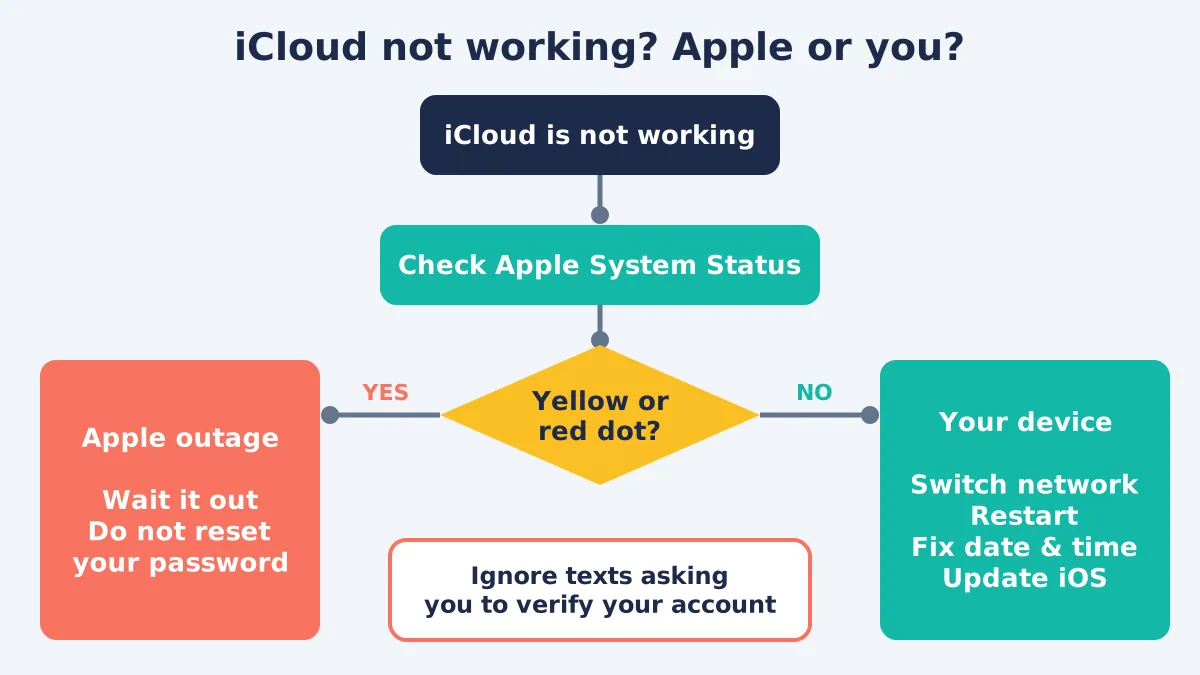
- Check the status page again. Refresh Apple System Status. If any iCloud line is yellow or red, stop here and wait.
- Switch networks. Turn Wi-Fi off and try cellular data, or the other way round. A slow or filtered network can block iCloud even when Apple is fine.
- Restart your device. A restart clears stuck background processes that keep retrying a failed sign-in. On iPhone, hold the side button and a volume button, then slide to power off.
- Check date and time. Go to Settings > General > Date & Time and turn on Set Automatically. A wrong clock breaks the secure connection to iCloud.
- Update your software. Go to Settings > General > Software Update. Apple often ships small fixes for sync bugs, and an old version can trip over server changes.
- Check your iCloud storage. Go to Settings > [your name] > iCloud. If storage is full, backups and Photos sync stop, which can look like iCloud down errors. Our guide to getting more storage on iPhone can help.
- Toggle the problem app. In Settings > [your name] > iCloud, turn off sync for the app that fails (for example Notes), wait 30 seconds, and turn it back on. Choose Keep on My iPhone if asked, so nothing is deleted.
If the problem started after a recent iOS update rather than an outage, our list of iOS 27.2 problems and fixes covers known bugs.
iCloud Down? What Not to Do During an Outage
If Apple confirms an iCloud down event, changing your account settings won’t help and can make things worse. Several outlets covering the November 17 outage, including TechTimes, noted that password resets were unlikely to fix anything.
Avoid these common mistakes during an outage:
- Don’t reset your Apple Account password. The reset may fail halfway or lock you out for longer once services return.
- Don’t sign out of iCloud. Signing out during an outage can leave you unable to sign back in until it ends, and you may lose access to Find My for a while.
- Don’t erase or restore your iPhone. A restore needs iCloud to work. Doing it during an outage can leave you with an empty phone.
- Don’t delete and redownload apps. If the App Store is affected, you may not get them back until it recovers.
The safe move is boring but effective: confirm the outage, wait, and check the status page every 30 minutes.
Watch Out for Fake “Apple Account Locked” Messages
Scammers use big outages to send fake alerts that look like they come from Apple. Expect texts and emails saying your Apple Account is “locked” or “suspended” with a link to “verify” it. Apple doesn’t ask you to fix outages through links in texts.
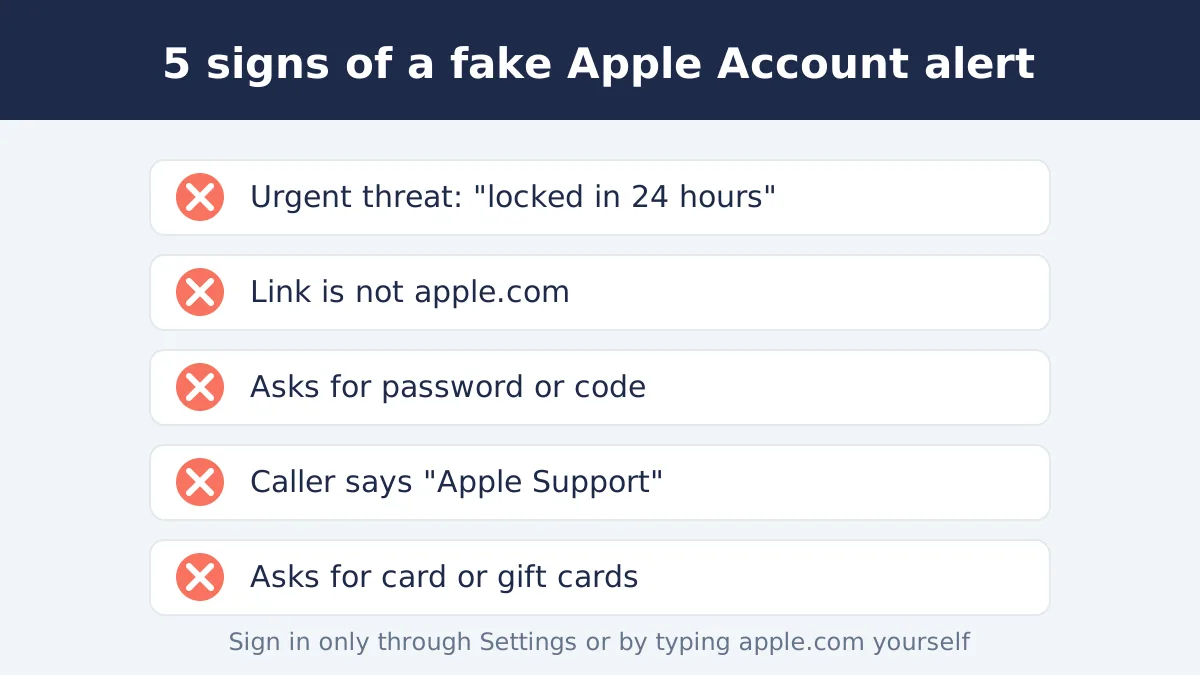
Phishing is a scam where criminals pretend to be a trusted company to trick you into handing over passwords, codes or card details. Apple’s own guide to recognizing phishing and fake support calls lists the warning signs. Here are the ones that matter most after an outage:
- The message creates urgency: “Your account will be deleted in 24 hours.”
- The link goes to a look-alike address, not apple.com.
- It asks for your password, a verification code or card number.
- Someone calls claiming to be Apple Support and asks you to read a code aloud.
If you get one, don’t tap the link. Sign in only through Settings on your device or by typing apple.com yourself. If you already tapped a link, follow our steps on what to do after clicking a phishing link.
How to Prepare for the Next iCloud Down Day
You can’t stop the next outage, but you can make sure it doesn’t lock you out of anything important. A little setup now keeps your photos, passwords and payments usable on an iCloud down day.
- Keep a local backup. Back up your iPhone to a Mac or Windows PC every month, so you aren’t relying on iCloud alone.
- Carry a backup payment method. The November 17 outage disrupted Apple Pay at checkout. A physical card in your wallet avoids that.
- Set up passkeys and a recovery contact. Passkeys and an account recovery contact make it easier to get back in if sign-in breaks later.
- Save key info offline. Keep boarding passes, tickets and important files downloaded on the device, not just in iCloud Drive.
- Bookmark the status page. One tap answers “is it me or Apple?”
FAQ
Is iCloud down right now?
Check Apple’s System Status page at apple.com/support/systemstatus. A green dot next to iCloud means it’s working; yellow or red means Apple has confirmed a problem. As of November 18, 2026, Apple said the November 17 outage was resolved. If the page is green and iCloud still fails, the problem is probably your device or network.
Why did iCloud go down on November 17, 2026?
Apple said a faulty internal update to its own systems caused the outage, and that it was not a cyberattack. The update broke Apple Account sign-in, which many services rely on. That’s why iCloud, the App Store, Apple Music and Apple Pay failed at the same time. Apple hasn’t said which system the update changed.
Was my data lost or hacked in the Apple outage?
No data loss or breach has been reported (as of November 18, 2026). Apple said the outage came from an internal update, not hackers. Your photos, notes and passwords stay stored and simply couldn’t sync while sign-in was broken. Once services returned, sync should resume without you doing anything.
Should I reset my Apple Account password with iCloud down?
No. During an iCloud down event on Apple’s side, a password reset won’t fix it and may fail or lock you out longer. Wait for the System Status page to show green. Reset your password only if you think someone else knows it or you get a real security alert inside Settings.
Why does iCloud say “verification failed” or keep asking me to sign in?
That message usually appears when Apple’s sign-in servers can’t respond, as happened on November 17. If the status page is green, check that your date and time are set automatically, switch between Wi-Fi and cellular, and restart your device. Updating iOS fixes many lingering sign-in loops.
How long do iCloud outages usually last?
Most iCloud down events last from under an hour to a few hours. The November 17, 2026 outage began around midday Eastern time, and Apple said it was resolved by mid-afternoon, with a few services recovering later. Apple’s status page shows the start time of each issue and updates when it’s fixed.
Can I still use my iPhone with iCloud down?
Yes. Calls, texts over your carrier, the camera and apps that don’t need sign-in keep working. Features that depend on your Apple Account, such as iCloud Photos sync, App Store downloads, Apple Music streaming and sometimes Apple Pay, may fail until Apple restores service.
The Bottom Line
Whenever you wonder “is iCloud down?”, the first and best move is to check Apple’s System Status page. If Apple confirms the problem, wait it out and don’t touch your password or sign out. If the page is green, the 7 quick fixes above solve most sync and sign-in problems in minutes. And whatever happens, ignore any text or email asking you to “verify” your Apple Account through a link.
Information in this article is current as of November 18, 2026. Outage details may be updated as Apple shares more.
